Вовед
This manual provides detailed instructions for the ORICO AP42F Magnetic Card Reader and M.2 SSD Enclosure. Please read this manual thoroughly before using the product to ensure proper operation and to maximize its features. This device combines a TF/SD 3.0 card reader with an M.2 NVMe SSD enclosure, offering high-speed data transfer and PD 100W charging capabilities, designed for compatibility with various Type-C devices including iPhone 15/16/17 Pro series, iPads, MacBooks, and Android devices.
Производот завршиview
Клучни карактеристики
- Функционалност 5-во-1: Combines TF/SD 3.0 card reader and M.2 NVMe SSD enclosure.
- Пренос на податоци со голема брзина: USB 3.2 Gen2 interface supporting up to 10Gbps for SSDs and 104MB/s for SD/TF cards.
- Испорака на моќност од 100W (PD): Supports up to 100W power input and 85W output for simultaneous charging and data transfer.
- Магнетен додаток: Features 17 built-in magnets for secure and stable attachment to compatible devices, especially iPhone Pro models.
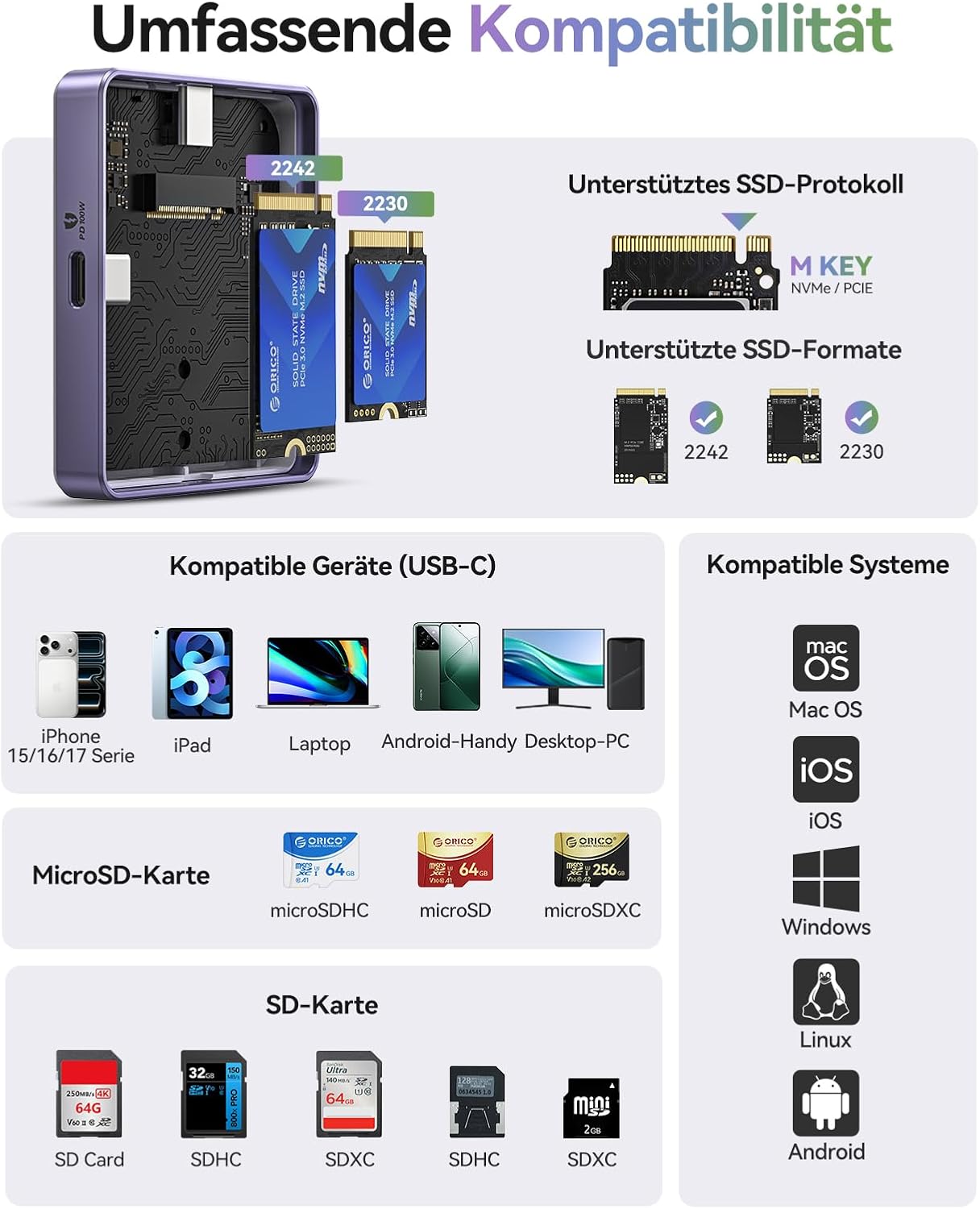
- Компатибилност со SSD: Supports M.2 NVMe (M-key) SSDs in 2230 and 2242 form factors.
- Компатибилност со широк уред: Compatible with iPhone 15/16/17 Pro/Pro Max, iPad Pro, MacBook, Android phones, laptops, and tablets with Type-C ports.
Содржина на пакетот
- ORICO Magnetic M.2 NVMe SSD Enclosure
- 0.3 м USB-C до USB-C кабел
- Magnetic Ring (for non-magnetic devices)
- Термичка подлога
- Завртки
- Шрафцигер
- Упатство за употреба
Дијаграм на производот
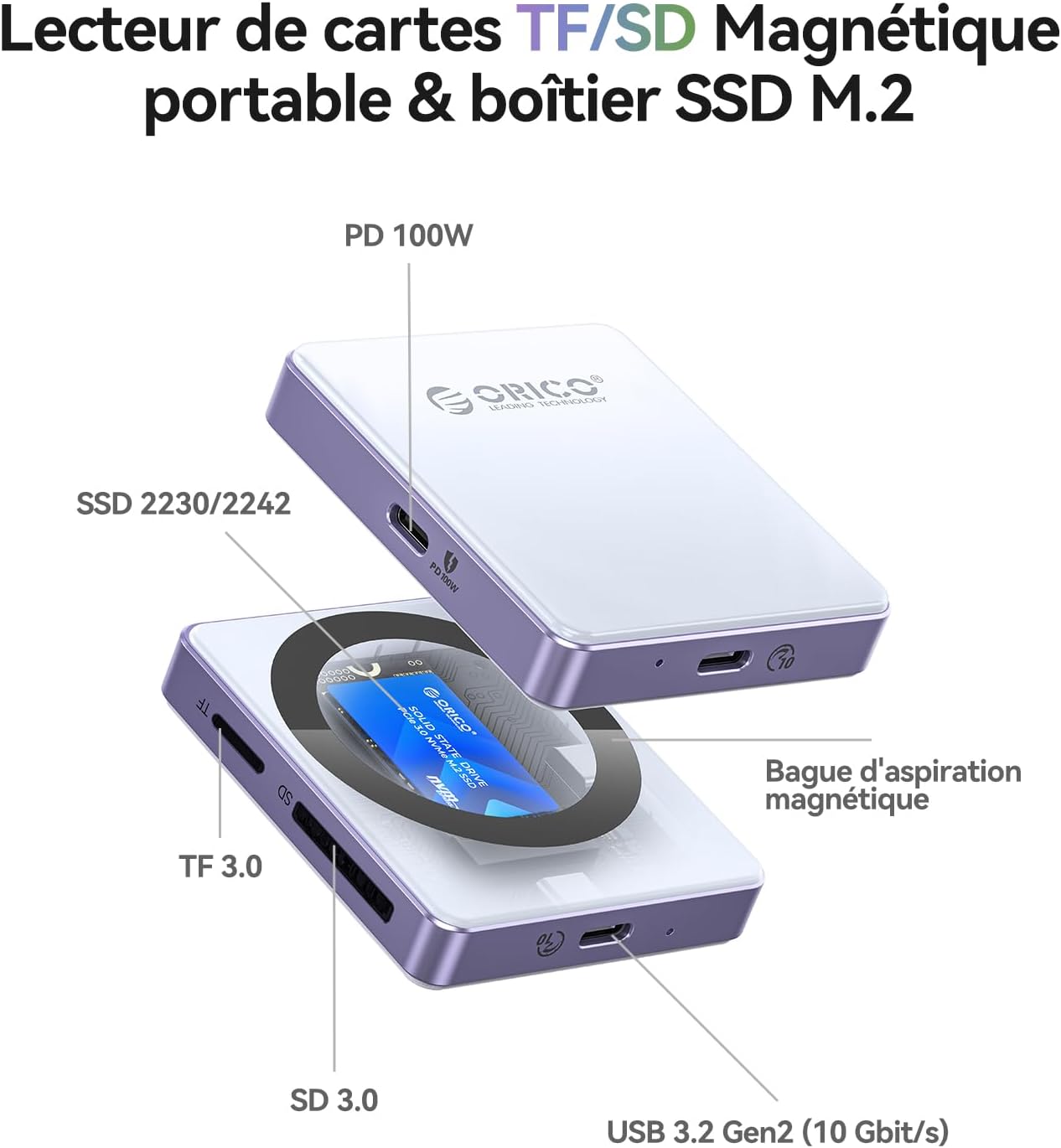
Поставување
Инсталирање на M.2 NVMe SSD
- Carefully open the SSD enclosure.
- Insert your M.2 NVMe (M-key) SSD (2230 or 2242 form factor) into the slot. Ensure it is fully seated.
- Прицврстете го SSD-то со дадената завртка.
- Apply the thermal pad to the SSD for optimal heat dissipation.
- Добро затворете го куќиштето.
Забелешка: The SSD is not included and must be purchased separately. For optimal performance and to prevent disconnections, especially with phone USB ports, use SSDs with power consumption of 4.5W or less. For higher power SSDs, external power via the PD port is required.
Прикачување на уред
- For iPhones 15/16/17 Pro/Pro Max, the enclosure can magnetically attach directly to the back of the phone.
- For other devices or non-magnetic phone cases, use the included magnetic ring. Peel off the adhesive backing and attach the ring to the back of your device or case where you intend to mount the enclosure.

Упатства за работа
Поврзување со вашиот уред
- Connect the ORICO AP42F to your host device (iPhone, iPad, MacBook, PC, etc.) using the provided USB-C cable.
- Ensure the connection is secure. The device should be recognized automatically by your operating system.
Using the M.2 SSD Enclosure
- Once connected, the installed M.2 SSD will appear as an external storage device.
- Сега можете да префрлите files to and from the SSD at speeds up to 10Gbps.
- For iPhone 15 Pro series and later, the enclosure supports direct ProRes 4K 60/120fps video recording to the SSD.


Using the TF/SD Card Reader
- Insert your TF (MicroSD) or SD card into the corresponding slot on the enclosure.
- The card will appear as a separate external drive.
- Трансфер files со брзина до 104MB/s.

Using the PD 100W Charging Port
- Connect a USB-C power adapter (up to 100W) to the PD port on the enclosure.
- This will provide power to both the enclosure and the connected host device (up to 85W output), allowing for simultaneous data transfer and charging.

Одржување
- Одржувајте го куќиштето чисто и без прашина. Користете мека, сува крпа за чистење.
- Избегнувајте изложување на уредот на екстремни температури, влажност или директна сончева светлина.
- Ensure proper ventilation, especially during extended use, to prevent overheating of the SSD. The thermal pad helps with this.
- Ракувајте внимателно за да избегнете физичко оштетување.
Решавање проблеми
| Проблем | Можна причина | Решение |
|---|---|---|
| Уредот не е препознаен | Loose connection, incompatible SSD, driver issue, SSD not properly installed. |
|
| Frequent disconnections during use (especially with phones) | SSD power consumption exceeds phone's USB port limit. |
|
| Бавни брзини на пренос на податоци | USB port limitation, cable quality, SSD performance, host device limitations. |
|
| Магнетното прицврстување е слабо | Device not magnetic, thick case, incorrect placement of magnetic ring. |
|
Спецификации
| Карактеристика | Детал |
|---|---|
| Бренд | ОРИКО |
| Модел | AP42F |
| Материјал | Алуминиум |
| Компатибилност со SSD | M.2 NVMe (M-key) 2230/2242 |
| Читач на картички | TF 3.0, SD 3.0 |
| Data Transfer Rate (SSD) | До 10 Gbps (USB 3.2 Gen2) |
| Data Transfer Rate (Card Reader) | До 104 MB/s |
| Испорака на енергија (ПД) | Input: 100W, Output: 85W |
| Компатибилни уреди | iPhone 15/16/17 Pro/Pro Max, iPad Pro, MacBook, Android phones, Laptops, Tablets (Type-C) |
| Поддржани оперативни системи | macOS, iOS, Windows, Linux, Android |
| Специјална карактеристика | Compact, Magnetic Attachment (17 magnets) |
Гаранција и поддршка
Производите на ORICO обично доаѓаат со стандардна гаранција од производителот. Ве молиме погледнете ја гарантната картичка вклучена во вашиот пакет или посетете ја официјалната страница на ORICO. webстраница за специфични услови за гаранција.
For technical support, troubleshooting assistance, or inquiries about your product, please contact ORICO customer service through their official website or the retailer where you purchased the product. Keep your purchase receipt and product model number (AP42F) handy when contacting support.
Онлајн ресурси:
- Официјална продавница на ORICO на Amazon
- (Refer to official ORICO website for direct support contact information)


