1. Вовед
Thank you for choosing the JOMAA VM604 Wireless Ergonomic Vertical Mouse. This advanced mouse is designed to provide superior comfort and efficiency, reducing wrist strain during prolonged use. Featuring multi-device connectivity, adjustable DPI, and a unique multi-function dial, the VM604 is an ideal tool for various computing environments.
Ве молиме внимателно прочитајте го ова упатство пред да го користите производот за да обезбедите правилно функционирање и да го максимизирате неговиот век на траење.
2. Производот завршиview
2.1 Содржина на пакетот
- JOMAA VM604 Ergonomic Vertical Mouse
- USB приемник (2.4G)
- USB-C кабел за полнење
- Упатство за употреба
2.2 Компоненти на глувчето
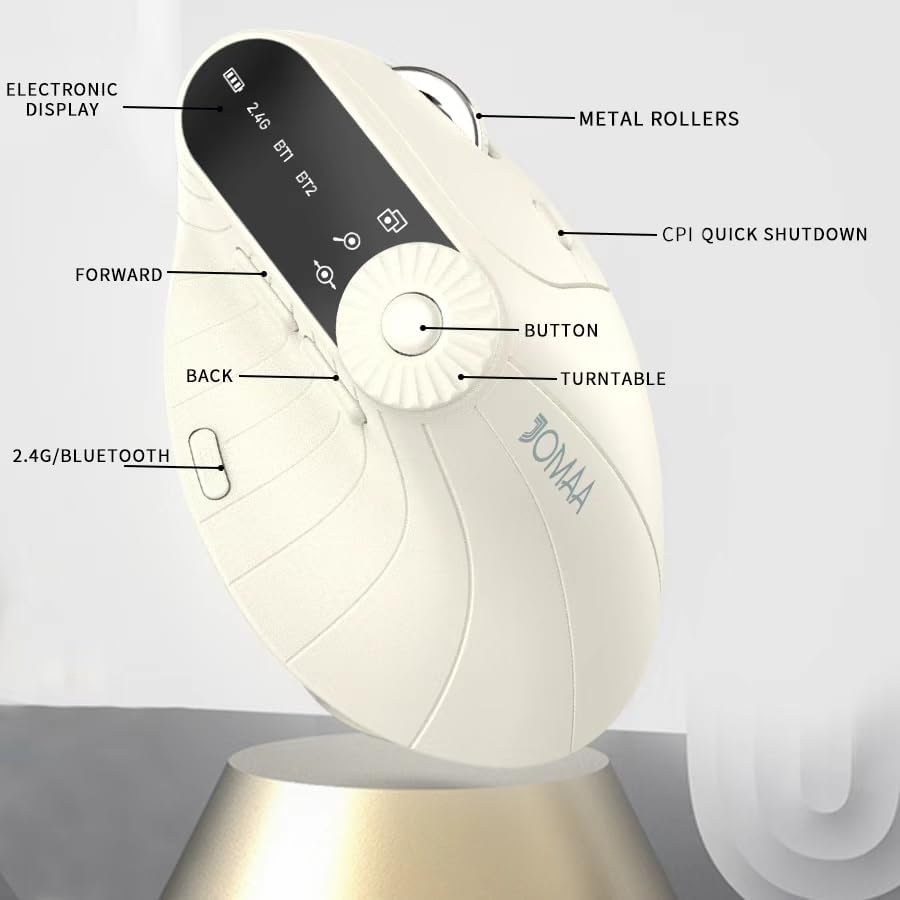
Слика 1: Labeled components of the JOMAA VM604 mouse, highlighting the electronic display, metal rollers, CPI quick shutdown, forward/back buttons, turntable, and 2.4G/Bluetooth switch.
- Лево копче за кликнување: Standard left mouse function.
- Десен клик на копче: Standard right mouse function.
- Тркало за лизгање: За вертикално скролување.
- Копче за напред: Навигира напред во web прелистувачи или file истражувачи.
- Копче за назад: Навигира назад во web прелистувачи или file истражувачи.
- Multi-function Turntable/Dial: Offers three functions: 1. Window switching, 2. Zoom in/out (for pages and images), 3. Page moves left/right (for Excel).
- DPI/CPI Adjustment Button: Циклично ги менува поставките за DPI (1000/1200/1600/2400).
- Електронски дисплеј: Shows battery level, connection mode (2.4G, BT1, BT2), and DPI setting.
- Connection Mode Switch (Bottom): Toggles between 2.4G, Bluetooth 1 (BT1), and Bluetooth 2 (BT2) modes.
- Power ON/OFF Switch (Bottom): Го вклучува или исклучува глувчето.
- Приклучок за полнење USB-C: Located at the front of the mouse.
- USB Receiver Storage Slot: Located at the bottom of the mouse.
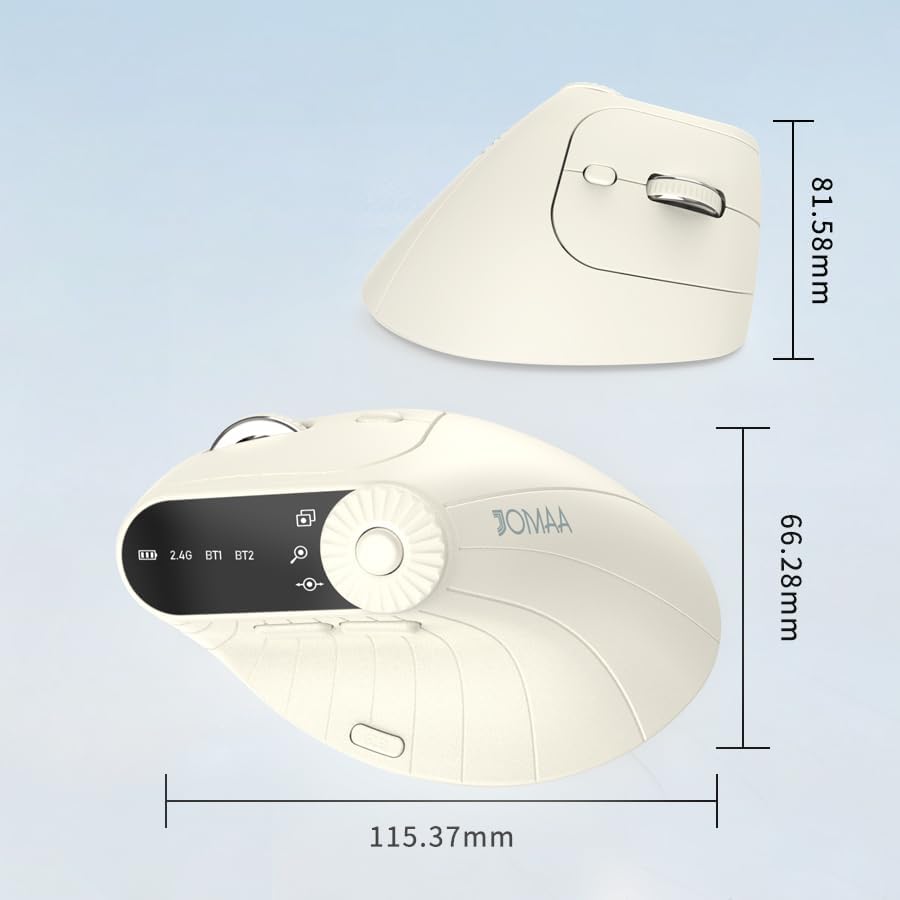
Слика 2: Dimensions of the JOMAA VM604 mouse, showing its ergonomic vertical design.

Слика 3: Illustration of the JOMAA VM604's 57-degree ergonomic design, promoting a natural handshake posture to reduce wrist pressure.
3. Поставување
3.1 Полнење на глувчето
The JOMAA VM604 mouse features a built-in rechargeable battery. To charge:
- Connect the provided USB-C charging cable to the charging port at the front of the mouse.
- Поврзете го другиот крај од USB кабелот со USB извор на напојување (на пр., USB порт на компјутер, USB адаптер за ѕид).
- The electronic display will indicate charging status.

Слика 4: The JOMAA VM604 mouse connected via USB-C for charging, with a visible charging indicator on the electronic display.
3.2 2.4G безжична конекција
За стабилна и брза безжична конекција:
- Locate the USB receiver stored in the slot at the bottom of the mouse.
- Приклучете го USB-приемникот во достапна USB порта на вашиот компјутер.
- Turn on the mouse using the ON/OFF switch at the bottom.
- Slide the connection mode switch to the '2.4G' position. The mouse should automatically connect to your computer.
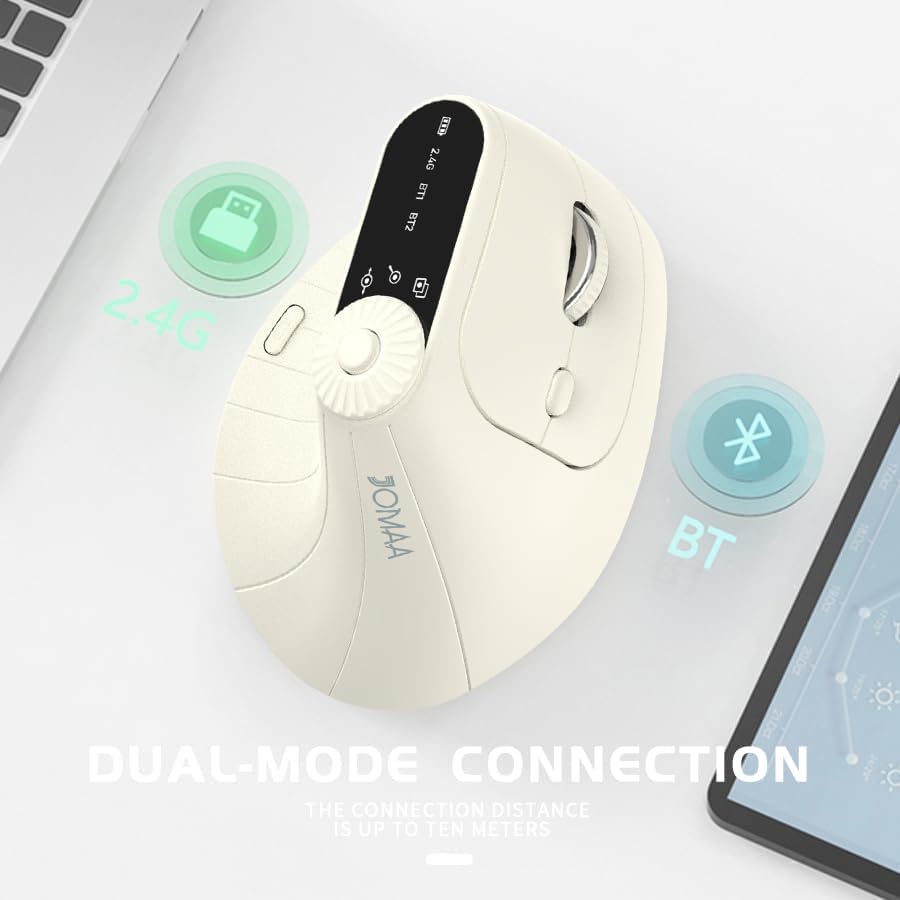
Слика 5: The JOMAA VM604 mouse illustrating its dual-mode connection capabilities, including the 2.4G USB receiver and Bluetooth options.
3.3 Bluetooth конекција (BT1/BT2)
The mouse can connect to two different Bluetooth devices:
- Turn on the mouse using the ON/OFF switch at the bottom.
- Slide the connection mode switch to either 'BT1' or 'BT2' position.
- For the first Bluetooth connection or to reset a connection, press and hold the connection mode switch for 3-5 seconds until the Bluetooth indicator on the electronic display starts blinking.
- On your device (PC, Laptop, MacBook), go to Bluetooth settings and search for 'JOMAA VM604' (or similar name).
- Select the mouse to pair. The indicator light will stop blinking once connected.
- To switch between connected devices, simply double-click the connection mode switch to cycle through 2.4G, BT1, and BT2.
4. Упатства за работа
4.1 Прилагодување на DPI
Adjust the mouse sensitivity (DPI/CPI) to suit your preference:
- Press the DPI Adjustment Button (Component 7) located near the multi-function dial.
- Each press will cycle through the available DPI settings: 1000, 1200, 1600, and 2400.
- The electronic display will show the current DPI setting.
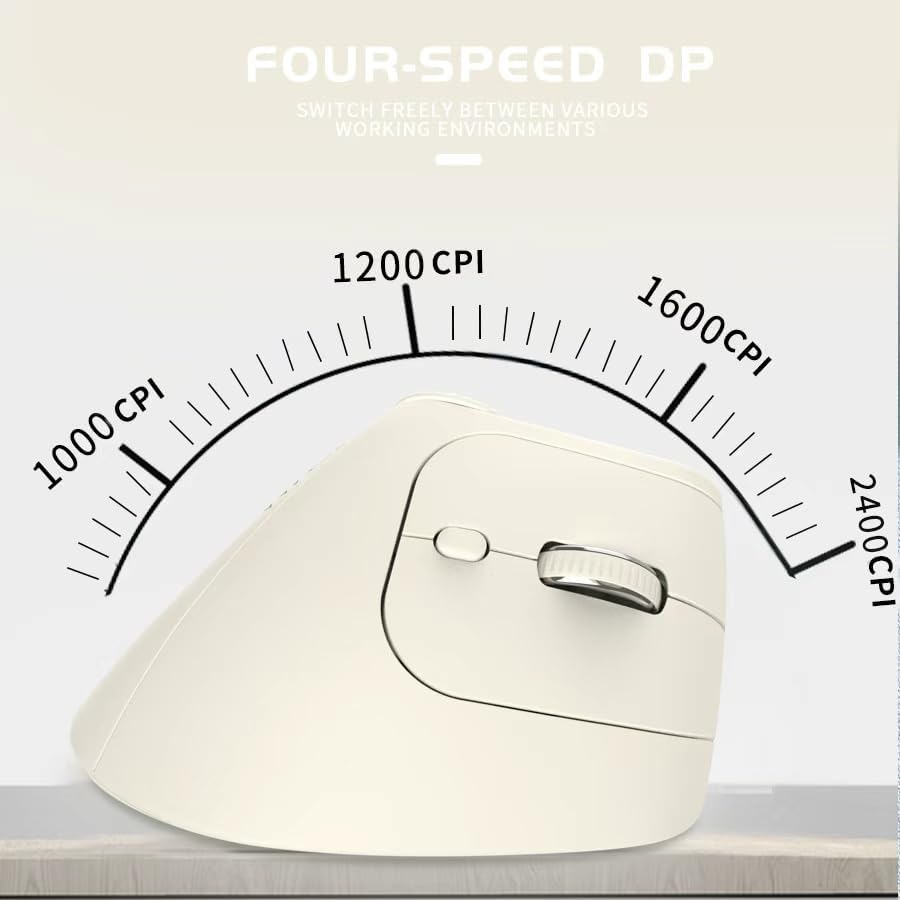
Слика 6: The JOMAA VM604 mouse highlighting its four-speed CPI settings (1000, 1200, 1600, 2400) for precise optical tracking.
4.2 Multi-Function Turntable
The unique turntable (Component 6) provides enhanced control:
- Window Switching: Rotate the dial to quickly switch between open application windows.
- Зумирајте/одзумирате: Rotate the dial to zoom in or out on pages and images.
- Page Left/Right: Useful for navigating large spreadsheets in applications like Excel.

Слика 7: The multi-function knob on the JOMAA VM604 mouse, demonstrating its uses for window switching, zooming in/out on pages and images, and moving pages left/right in applications like Excel.
4.3 Копчиња за напред/назад
Use the Forward (Component 4) and Back (Component 5) buttons for quick navigation in web прелистувачи и file истражувачи.
5. Одржување
5.1 Чистење
За да се одржат оптимални перформанси и хигиена:
- Исклучете го глувчето пред чистење.
- Користете мека, гamp cloth to wipe the surface of the mouse.
- Избегнувајте употреба на груби хемикалии или абразивни материјали.
- Periodically clean the optical sensor at the bottom with a cotton swab.
5.2 Грижа за батерии
За да го продолжите животниот век на батеријата:
- Избегнувајте често целосно празнење на батеријата.
- Полнете го глувчето редовно, дури и ако не е целосно испразнето.
- If the mouse will not be used for an extended period, turn it off.

Слика 8: The JOMAA VM604 mouse demonstrating its intelligent hibernate mode, which activates after 60 seconds of inactivity to save power.
6 Смена на проблеми
- Глувчето не реагира: Ensure the mouse is turned on and fully charged. Check the connection mode (2.4G or Bluetooth) and ensure it's correctly paired/connected to your device. For 2.4G, try plugging the USB receiver into a different port. For Bluetooth, try re-pairing the device.
- Движењето на курсорот е неправилно: Clean the optical sensor at the bottom of the mouse. Ensure the surface you are using is clean and suitable for mouse operation. Adjust the DPI setting to a lower value if the cursor is too fast.
- Проблеми со Bluetooth конекција: Ensure your device's Bluetooth is enabled. Try forgetting the device in your Bluetooth settings and re-pairing. Ensure the mouse is in the correct BT1 or BT2 mode and in pairing mode (blinking indicator).
- Multi-function dial not working: Ensure the mouse is properly connected. Some functions may require specific application support.
7. Спецификации
| Карактеристика | Детал |
|---|---|
| Димензии на производот | 6 x 4 x 0.04 инчи |
| Тежина на ставката | 7.4 унци |
| Број на модел на ставка | VM604 |
| Батерии | 1 9V batteries required (included) - Note: Product features built-in rechargeable battery, 9V battery information may be a listing error. |
| Технологија за поврзување | Bluetooth, USB (2.4G Wireless) |
| Специјална карактеристика | Ergonomic Design, Multi-function Turntable, Adjustable DPI, Rechargeable |
| Технологија за откривање на движење | Оптички |
| Поставки за ДПИ | 1000/1200/1600/2400 |
| Боја | Beiga |
8. Гаранција и поддршка
JOMAA products are designed and manufactured to the highest quality standards. This product is covered by a limited warranty from the date of purchase. For detailed warranty information, technical support, or customer service inquiries, please refer to the contact information provided on the product packaging or visit the official JOMAA webсајт.
Ве молиме чувајте го вашиот доказ за купување за барањата за гаранција.
9. Официјално видео за производот
Видео 1: Надview of the JOMAA VM604 Ergonomic Mouse, showcasing its unique vertical design and comfortable grip. This video highlights the physical appearance and ergonomic benefits of the mouse.


