Вовед
This manual provides detailed instructions for the setup, operation, and maintenance of your GUSTARD R30 Fully-Discrete R2R Network Streamer DAC. Please read this manual thoroughly before using the device to ensure optimal performance and longevity.
Список за пакување
По отварањето на пакувањето, проверете дали се вклучени сите од следниве ставки:
- GUSTARD R30 Mainframe
- Кабел за напојување
- USB кабел
- Далечински управувач
- Гарантна картичка

Преден панел завршиview
The front panel of the GUSTARD R30 features essential controls and a display for real-time status and operations.
- Копче за вклучување: Toggles between standby and active states. The R30 can remain in standby mode when the rear power switch is ON.
- Област на прикажување: Shows the current input channel, encoding format, and sampling rate. Displays menu items when in the setup menu.
- Приказ на јачина на звук: Indicates the current volume level, ranging from -63.5dB to 0dB. 'FIXED' indicates bypass mode. Displays menu options during configuration.
- Копче '-': Normally decreases volume. Cycles through options in the menu.
- Копче за менувачот: Short press switches inputs. Long press enters/exits the menu. Short press navigates items in the menu.
- Копче „+“: Normally increases volume. Cycles through options in the menu.

Заден панел завршиview
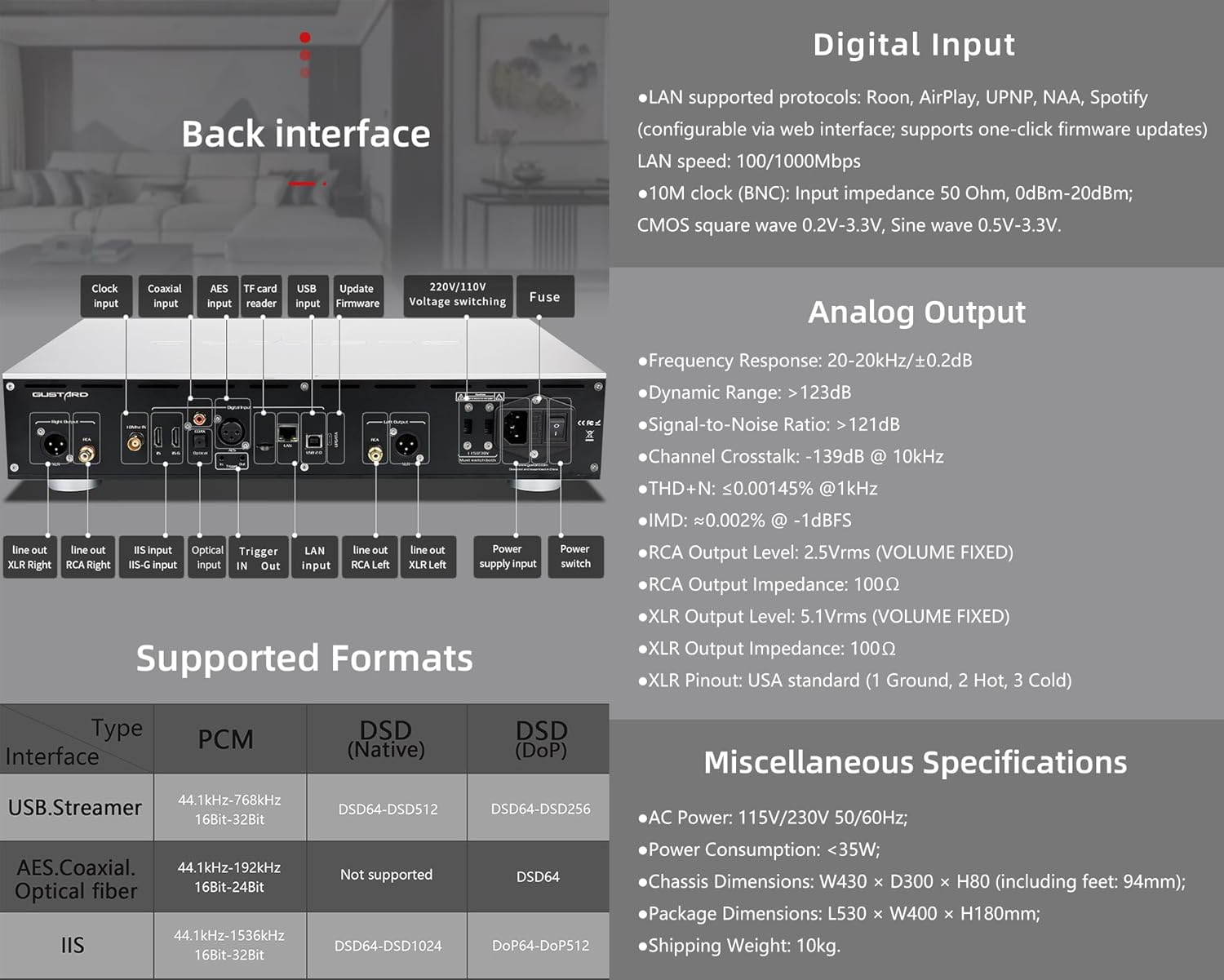
The rear panel provides various input and output connections for the GUSTARD R30.
- Влез со часовник: For external 10MHz clock synchronization.
- Коаксијален влез: Дигитален аудио влез.
- Влез AES: Дигитален аудио влез.
- USB влез: За поврзување со компјутер или друг USB аудио извор.
- LAN Input: For network streaming functionality.
- Читач на картички TF: За ажурирања на фирмверот.
- Ажурирајте го фирмверот: USB порта за ажурирања на фирмверот.
- 220V/110V Voltage Префрлување: Selector for power voltage.
- Осигурувач: Осигурувач за напојување.
- Line Out XLR Right/Left: Balanced analog audio outputs.
- Line Out RCA Right/Left: Unbalanced analog audio outputs.
- IIS Input (IIS-G): Digital audio input with Gustard pinout.
- Оптички влез: Дигитален аудио влез.
- Активирање Влез/Излез: For 12V trigger control.
- Влез за напојување: Приклучок за наизменична струја.
- Прекинувач: Главен прекинувач за напојување.
Important: Ensure both voltagпрекинувачите се поставени на иста јачина на звукtage кога работи на 220V/110V voltage switch, otherwise, it may damage the internal transformer upon powering on.
Контроли на екранот и панелот
The R30 utilizes a large OLED display for real-time status monitoring and functional operations. The diagram below illustrates the main interface display states.
1. OLED дисплеј
The display shows the input channel, external clock indication, encoding format, sampling rate, and volume.
2. Input Channel Selection
R30 има 7 влезни канали. На главниот интерфејс, со секое притискање на копчето за менувачот се менуваат достапните канали по следниов редослед: COAX → AES → OPT → USB → STREAMER → IIS(G) → IIS(M*).
***Note: IIS(G) is for fixed Gustard pinout configuration and cannot be adjusted. IIS(M*) supports adjustable pinout configuration.
3. Прилагодување на јачината на звукот
- When the main interface is displayed, pressing the "+" or "-" buttons directly adjusts the analog volume attenuation function of the passive preampОлеснувач. Слабеењето се движи од 0dB до -63.5dB (вкупно 63.5dB слабеење).
- Pressing "+" at 0dB activates Fixed Output mode (bypassing attenuation circuit), displaying 'FIXED' indicator.
- When 'FIXED' is displayed, pressing "-" first exits bypass mode before controlling the attenuation level.

Мени за поставување
On the main screen, long press the Gear Button to enter the settings menu (hereinafter referred to as the menu button). In this state, the menu button can sequentially switch the menu items to be modified. "+" and "-" buttons are used to adjust the currently selected menu options. When the screen is in the settings menu, long press the menu button again to return to the main screen.
Структура на менито:
- PCM ФИЛТЕР
- DSD ФИЛТЕР
- РЕЖИМ НА НОС
- REF CLOCK
- IIS MODE
- ФАЗА
- TRIGGER CH.
- TRIGGER VOL.
- ПРИКАЖИ

Функции на менито
Пристапете до менито со притискање на копчето за мени на главниот интерфејс. Секоја опција од менито е детално опишана подолу.
1. PCM FILTER (PCM Digital Filter Adjustment)
R30 користи саморазвиен високо-перформансен PCM overs.ampLing дигитален филтерски модул со три типа филтри:
- VIVID (Default): Similar to the FAST roll-off type of traditional digital filter, but with better ringing characteristics, very small pre-ringing, and fast convergence post-ringing. It aims for a broad soundstage and sound restoration. Recommended for most music styles.
- НЕЖНО: Similar to the SLOW roll-off type of traditional digital filter, offering a soft listening experience.
- СОСТАВ: A hybrid digital filter, balancing characteristics between Vivid and Gentle for a good listening experience.
2. DSD FILTER (DSD Digital Filter Adjustment)
DSD филтерот има 4 вградени опции за пропусен опсег: 47K (Default), 50K, 60K, 70K.
3. РЕЖИМ НА НЕ (Без овери)ampling Filter Mode)
When enabled, the PCM signal bypasses the oversampling filter entirely, decoded straight through the R-2R decoder module. This preserves micro-details and timing integrity. When enabled, there may be a slight clicking sound when the playback data format switches between PCM and DSD.
- DISABLE (Default)
- Овозможи
4. REF CLOCK (Reference Clock Selection)
The GUSTARD-K2, low-noise clock synthesizer, achieves ultra-low jitter performance. The R30 offers two clock options:
- INTERNAL (Default): Uses the built-in OCXO internal reference.
- EXT. 10MHz: Selects an external 10MHz reference source. It is recommended to connect to GUSTARD C16 or C18 reference 10M master clocks.
If the external clock is lost, powered off, or its frequency deviation is greater than +/-150ppm, "EXT ERR" will be displayed and flash.
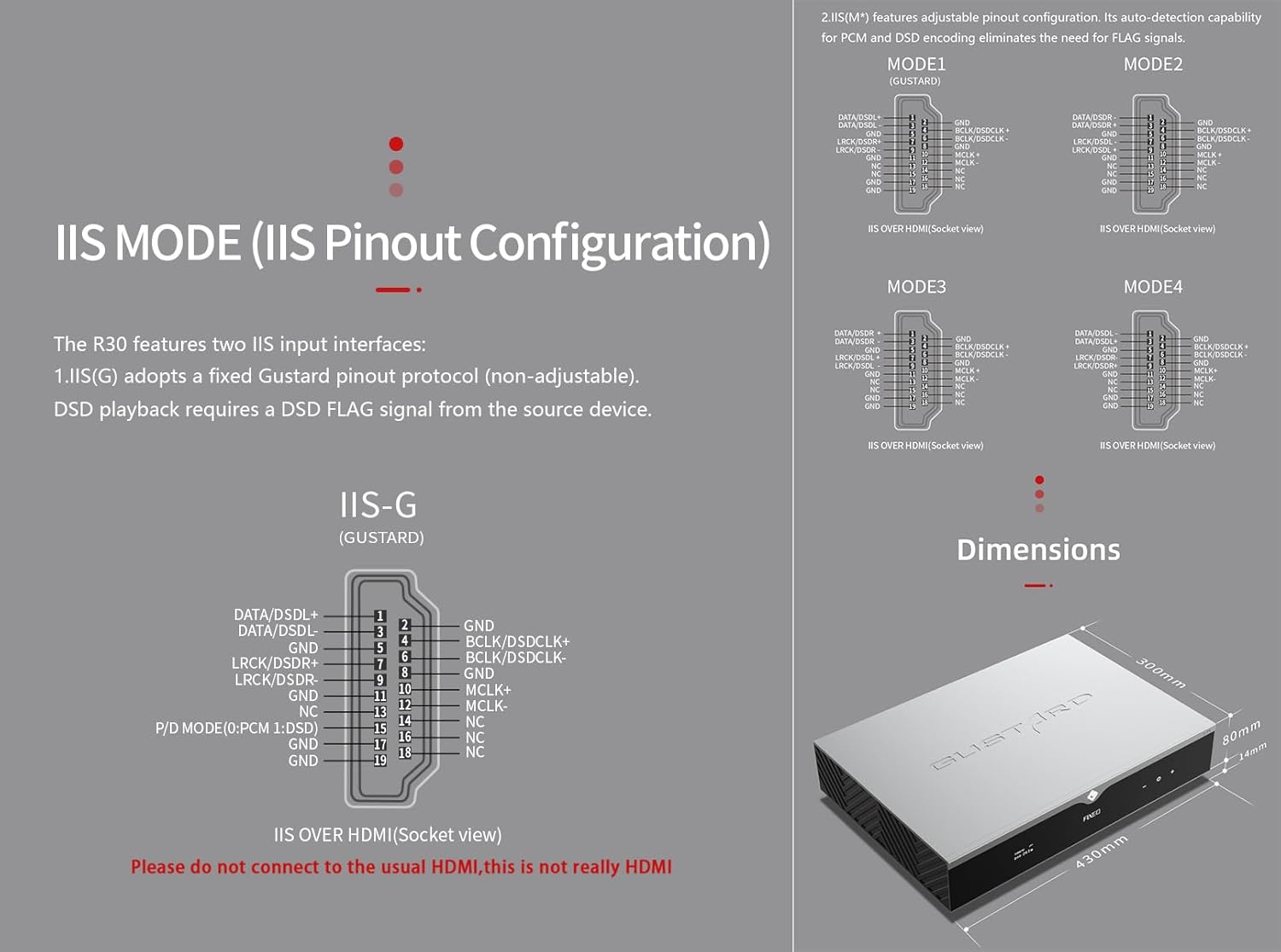
5. IIS MODE (IIS Pinout Mode Selection)
R30 има два IIS влезни интерфејси:
- IIS(G): Fixed Gustard pinout protocol (non-adjustable). DSD playback requires a DSD FLAG signal from the source device.
- IIS(M*): Features adjustable pinout configuration. Its auto-detection capability for PCM and DSD encoding eliminates the need for FLAG signals.
IIS(M*) adjustable Pinout mode IIS input has four Pinouts: MODE1 (Default), MODE2, MODE3, MODE4. MODE1 is compatible with the GUSTARD mode. If you are connecting to a GUSTARD front end such as U12, U16, U18, S16, S26, etc., you can match them with MODE1, which is the former works in the Gustard output mode.
Please do not connect to the usual HDMI, this is not really HDMI.
6. PHASE (Phase Setting)
Оваа функција нуди две опции:
- NON-inverted (Default): When non-inverted, the RCA output of R30 is normal phase, and the XLR balanced output is American standard polarity output (1 ground, 2 hot, 3 cold).
- Превртено: When inverted, only the RCA output is reverse phase, and the XLR balanced output is Japanese/European standard polarity output (1 ground, 2 cold, 3 hot).
7. TRIGGER CH. (Linkage Trigger Start Channel Selection)
The R30 can be triggered by an external 12V linkage signal and automatically turn on from standby mode. When the 12V trigger signal ceases or drops to 0V, automatic standby activation occurs. When the R30 is working, it is switched to the input channel of this setting by the 12V trigger linkage signal.
- LAST (Default): The input channel that was in use before entering standby last time.
- Other options include COAX, AES, OPT, USB, STREAMER, IIS(G), IIS. Selecting any channel activates it upon receiving a 12V trigger signal.
8. TRIGGER VOL. (Link Trigger Boot Volume Selection)
R30 може да се вклучи од режим на подготвеност преку надворешен сигнал за активирање од 12V и автоматски да се постави на избраното ниво на јачина на звук. Алтернативно, за време на работата, сигнал за активирање од 12V го префрла излезот на претходно поставената јачина на звук. Оваа опција ја конфигурира излезната јачина на звук по активирањето на активирањето.
- LAST (Default): The volume used before entering standby.
- ПОПРАВЕНО: Fixed full-scale output bypassing attenuation.
- -20 dB: Output at a volume attenuated to -20dB.
- -30 dB: Output at a volume attenuated to -30dB.
- -40 dB: Output at a volume attenuated to -40dB.
9. DISPLAY (Screen Brightness Settings)
Long-term high-brightness use of OLED screens can cause screen burn-in or ghosting. Therefore, the R30 is designed to always select automatic screen off, or manually select automatic screen off, which can also reduce interference.
- AUTO (Default): Automatically reduce brightness.
- АВТОМАТСКО ИСКЛУЧЕНО: Automatically turn off the screen.
Инфрацрвено далечинско управување
Кога работите со DAC производи, притиснете го и држете го копчето DAC повеќе од 3 секунди за да влезете во режим на контрола на DAC. AMPРежимите /STREAM ги контролираат другите производи на Gustard.
- Во мирување: Press once to activate R30 from standby. Press once during operation to enter standby.
- Мени: Press to access R30's setup menu.
- Подлога со 4 копчиња за насока: Up/Down navigates menu items. Left/Right adjusts selected options. Center press activates/deactivates mute.
- Назад: Returns to main interface.
- Вол-: Decreases output volume on main interface.
- Том+: Increases output volume on main interface.
Забелешки:
- Operational range varies with angle.
- Obstructions between remote and sensor may cause malfunction.
- Remove batteries if unused for more than 1 month.
- Thoroughly clean battery compartment if leakage occurs.
- May accidentally trigger other IR-controlled devices.

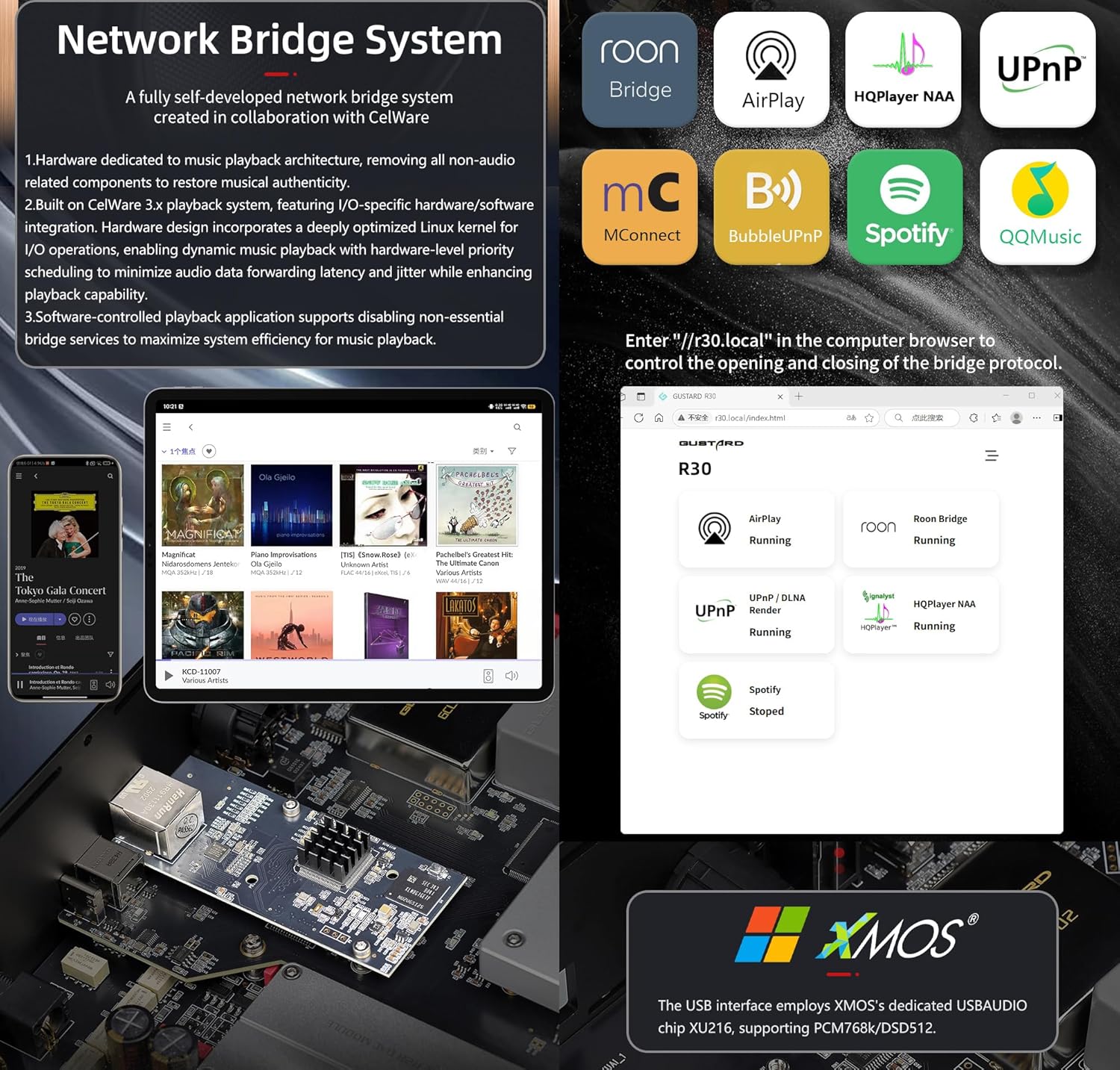
Брз почеток на мрежен мост стример
After connecting R30's RJ45 port to your local network:
- Select the STREAMER channel and await system boot (approximately 1 minute, until "DSD 24.5MHz" appears).
- Access R30's configuration page via: http://R30.local (as shown below). Disable unused streaming protocols on the web интерфејс за максимизирање на ефикасноста на системот. Ажурирањата на фирмверот се извршуваат и тука.
(Управувањето со мобилен/таблет е во исчекување до објавување на наменската апликација)
You can turn off streaming protocols that are not frequently used through the web page to maximize system music playback performance. At the same time, the online upgrade of the Streamer is also operated on the web страница.
(Откако ќе се стартува наменската апликација Streamer, горенаведените операции може да се извршат во апликацијата)
Official Product Video: GUSTARD R30 - User Manual
Спецификации на производот
Digital Input Support Formats:
| Тип | PCM | DSD (мајчин) | DSD (DoP) |
|---|---|---|---|
| USB.Streamer | 44.1kHz-768kHz 16Bit-32Bit | DSD64-DSD512 | DSD64-DSD256 |
| AES.Coaxial.Optical fiber | 44.1kHz-192kHz 16Bit-24Bit | Не е поддржано | DSD64 |
| IIS | 44.1kHz-1536kHz 16Bit-32Bit | DSD64-DSD1024 | DoP64-DoP512 |
Аналоген излез:
- Фреквентен одзив: 20-20kHz/±0.2dB
- Динамички опсег:> 123dB
- Сооднос на сигнал до бучава:> 121dB
- Преслушување на канали: -139dB @ 10kHz
- THD+N: ≤ 0.00145% @1kHz
- IMD: ≈0.002% @ -1dBFS
- RCA излезно ниво: 2.5Vrms (ЈАЧИНА ВОЛУМЕН ФИКСИРАНА)
- RCA излезна импеданса: 100Ω
- XLR ниво на излез: 5.1Vrms (ЈАЧИНА НА ЈАЧИНАТА СО ФИКСИРАНА)
- XLR излезна импеданса: 100Ω
- XLR излез: стандард за САД (1 заземјување, 2 жешки, 3 ладни)
Други спецификации:
- AC Power: 115V/230V 50/60Hz
- Потрошувачка на енергија: <35W
- Chassis Dimensions: W430 × D300 × H80 (including feet: 92mm)
- Package Dimensions: L530 × W400 × H180mm
- Shipping Weight: 10kg (with package)
- 10MHz BNC Input: Input impedance 50 Ohm, 0dBm-20dBm; CMOS square wave 0.2V-3.3V, Sine wave 0.5V-3.3V.
- Trigger: IN- 12V Typ. OUT- 12V Typ.
Услови за гаранција
Thank you for choosing GUSTARD HIFI products. To safeguard your rights and interests, please read the following warranty terms carefully. You can promptly obtain comprehensive after-sales service provided by GUSTARD.
Гаранција на производот
You will enjoy a 2-year free warranty and lifetime maintenance after the date of purchasing GUSTARD's HIFI product.
* Производителот ги носи само товарите од кинеското копно. Дел од товарот и данокот генерирани од странство ќе ги реши корисникот со преговори со дилерот.
Бесплатен сервис за гаранција
GUSTARD R30 from the purchasing датум во бесплатниот гарантен период, корисникот го користи производот нормално и производот не работи поради квалитет на компонентите или проблеми со производството.
Надвор од услугата за гаранција
Belonging to one of the following circumstances, products are no longer provided warranty service:
- Производите од датумот на купување го надминале однапред определениот гарантен период.
- Моделот, бар-кодовите и датумот на купување не се совпаѓаат со вистинскиот производ и гарантната картичка.
- Without GUSTARD technician permission, unauthorized modifications to the circuit, components or self-repaired product.
- Оштетување предизвикано од неодоливи природни сили.
- Надвор од дозволената употреба на еколошка штета.
- Оштетување поради неправилна употреба или неправилно складирање. Вклучувајќи, но не ограничувајќи се на: кнtage е превисоко за да ги запали колата или компонентите; Удар и што резултира со оштетување на школка или внатрешна; оштетување поради вода, масло, течност и прекумерна прашина; оксидација или корозија на производот итн.
- Надвор од гарантниот период, како што е оштетување на поединечна компонента, изглед поради човечко оштетување, модификациите на фирмверот доведуваат до неможност за работа од страна на неовластени корисници. GUSTARD се обврзува да преземе разумни надоместоци за одржување (освен компонентите со голема површина или плочката што се изгорени без поправка). Трошоците за транспорт и одржување, трошоците за материјали се бара да ги сноси корисникот.
Информации за контакт
Производител: Shenzhen Goshide Technology Co., LTD
Адреса: Room 302, Building 1, No. 28, Huimin 1st Road, Guanlan Sub-district, Longhua District, Shenzhen City, Guangdong Province
тел: +86-18682080102
Webсајт: http://www.gustard.com
Е-пошта: service@gustard.com