1. Вовед
The SMSL D200 is a high-performance Digital-to-Analog Converter (DAC) designed to deliver exceptional audio fidelity. Featuring the ROHM BD34352EKV DAC chip, a new generation XMOS XU316 USB solution, and SMSL's self-developed CK-03 clock processing circuit, the D200 supports high-resolution audio formats including PCM up to 32bit/768kHz, DSD512, and full MQA decoding. This manual provides detailed instructions for setting up, operating, and maintaining your D200 DAC.
2. Содржина на пакетот
Ве молиме проверете го пакувањето за следните ставки:
- SMSL D200 DAC Unit
- Далечински управувач
- Кабел за напојување
- USB Cable (may vary by region)
- Bluetooth антена
3. Клучни карактеристики
- Напреден DAC чип: Utilizes the ROHM BD34352EKV DAC chip for high-quality audio conversion.
- Поддршка за аудио со висока резолуција: Supports PCM up to 32bit/768kHz and DSD up to DSD512 via USB.
- MQA декодирање: Full MQA and MQA-CD decoder support via USB, Optical, and Coaxial inputs.
- XMOS XU316: Features the new third-generation XMOS XU316 for robust USB audio processing.
- CK-03 Clock Circuit: SMSL's self-developed CK-03 clock processing circuitry significantly reduces clock jitter and supports external clock input (standard 10MHz or atomic clock).
- Bluetooth поврзување: Integrated Qualcomm Bluetooth chip with external antenna supports SBC, AAC, aptX, aptX HD, and LDAC codecs for high-quality wireless audio streaming.
- Balanced and Unbalanced Outputs: Provides XLR balanced and RCA unbalanced analog outputs.
- Integrated Pre-ampпоживо: Features an integrated pre-amplifier circuit with volume control.
- Linear Power Supply: Built-in linear power supply for stable and clean power delivery.
- Кориснички интерфејс: 1.9-inch fully laminated tempered glass display panel for clear information and easy navigation.
4. Производот завршиview
4.1 Преден панел
The front panel features the display screen, a multi-function knob, and an indicator LED.
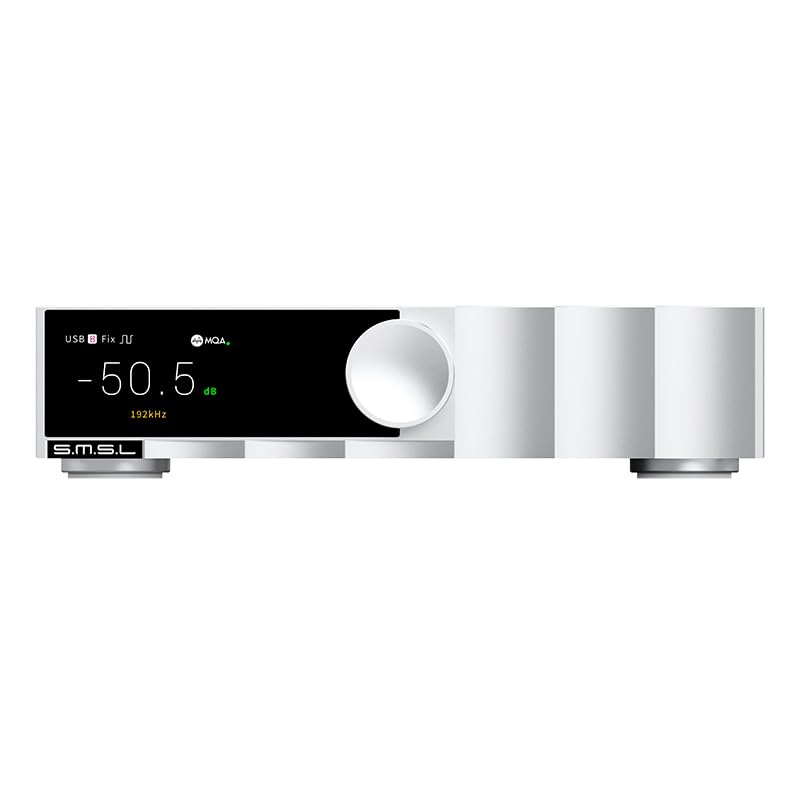
Слика: напред view of the SMSL D200 DAC, showing the display with volume and sample rate, and the control knob.

Image: Detailed functional description of the front panel, labeling the display screen, function knob, and indicator LED.
4.2 Заден панел
The rear panel provides all input and output connections, including balanced XLR, unbalanced RCA, digital inputs (Optical, Coaxial, USB), an external clock input, and the AC power inlet.
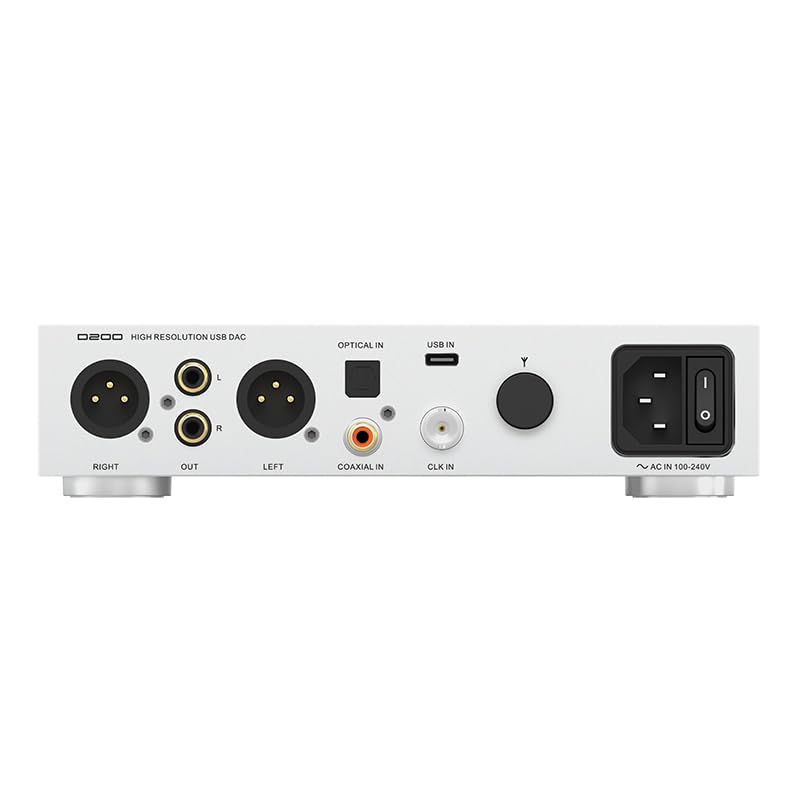
Слика: Заден дел view of the SMSL D200 DAC, showing XLR, RCA, Optical, Coaxial, USB, Clock In, and AC In ports.
Врски на задниот панел:
- RIGHT/LEFT OUT (XLR): Balanced analog audio outputs.
- ИЗЛЕЗ (RCA): Unbalanced analog audio outputs.
- ОПТИЧКИ ВО: Оптички дигитален аудио влез.
- КОАКСИЈАЛНО ВО: Coaxial digital audio input.
- USB ВО: USB Type-B input for connecting to a computer or other USB audio source.
- CLK IN: External clock input (BNC connector) for 10MHz clock or atomic clock.
- AC IN 100-240V: Влез за наизменична струја.
- Порт за Bluetooth антена: For connecting the included Bluetooth antenna.
5. Поставување и врски
5.1 Поврзување за напојување
- Ensure the D200 is placed on a stable, level surface.
- Connect the provided power cord to the AC IN port on the rear panel of the D200.
- Plug the other end of the power cord into a suitable AC power outlet (100-240V).
5.2 Приклучоци за аудио излез
Connect the D200 to your amplifier or active speakers using either the XLR or RCA outputs.
- XLR излези: For balanced connections, use XLR cables to connect the D200's XLR outputs to the XLR inputs of your ampживописен.
- RCA излези: For unbalanced connections, use RCA cables to connect the D200's RCA outputs to the RCA inputs of your ampживописен.
5.3 Аудио влезни приклучоци
Изберете еден од следниве методи на внесување:
- USB влез: Connect a USB cable from your computer (Windows, Mac, Linux) or other compatible USB audio source to the USB IN port on the D200. For Windows, a driver may be required (refer to SMSL website for downloads). Mac, Android, iOS, and Linux typically operate driverless.
- Оптички влез: Connect an optical cable from your digital audio source (e.g., CD player, TV) to the OPTICAL IN port.
- Коаксијален влез: Connect a coaxial cable from your digital audio source to the COAXIAL IN port.
- Влез со Bluetooth: Attach the provided Bluetooth antenna to the antenna port on the rear panel.
- Влез за надворешен часовник: If using an external 10MHz clock or atomic clock, connect it to the CLK IN port.
6. Упатства за работа
6.1 Основни контроли
The D200 can be controlled using the front panel knob or the included remote control.
- Front Panel Knob:
Ротирај: Adjusts volume (in playback mode) or navigates menu options.
Кратко притиснете: Enters the menu or confirms a selection.
Долг печат: Exits the menu or switches the unit on/off. - Далечински управувач: Provides full control over input selection, volume, menu navigation, and playback functions (for Bluetooth).
6.2 Навигација на мени
To access the settings menu, short press the front panel knob or press the 'Menu' button on the remote. Rotate the knob or use the up/down arrows on the remote to navigate. Short press the knob or 'OK' button to select an option.

Image: Screenshot of the D200's settings menu, showing options like Inputs, Clock In, Outputs, PCM Filter, DSD Filter, Sound Color, Pre Mode, FN Key For, Language, Audio Phase, Dimmer, Brightness, Reset.
Key menu options include:
- Внесување: Select the active audio input (USB, Optical, Coaxial, Bluetooth, Clock In).
- CLOCK IN: Configure external clock settings.
- ИСТАНИИ: Изберете излезен режим.
- PCM FILTER: Choose between Slow Roll-off, Sharp Roll-off, or Filter Off for PCM playback.
- DSD FILTER: Select Narrow, Normal, or Wide filter for DSD playback.
- SOUND COLOR: Adjust sound characteristics (e.g., Sound 1, Sound 2, Sound 3, Sound 4).
- PRE MODE:
ПРЕД AMP: Output volume is controlled by the D200.
FIXED CHOOSE: Output volume is fixed to the currently set DAC mode volume.
ПОПРАВЕНО: Output volume is fixed to the maximum volume of DAC mode. - FN KEY FOR: Customize the function of the FN key on the remote.
- ЈАЗИК: Изберете јазик за прикажување.
- AUDIO PHASE: Adjust audio phase.
- Димер: Прилагодете ја осветленоста на екранот.
- Осветленост: Прилагодете ја осветленоста на екранот.
- РЕСЕТ: Вратете ги фабричките поставки.

Image: Explanations for PCM Filter, DSD Filter, Sound Color, and Pre Mode settings.
6.3 Bluetooth Operation Guide
За да го поврзете вашиот уред преку Bluetooth:
- Ensure the Bluetooth antenna is connected to the D200.
- Select 'Bluetooth' as the input source on the D200.
- On your mobile device, search for Bluetooth devices and select 'SMSL D200'.
- Once paired, audio from your device will stream to the D200. The D200 supports Bluetooth song information and lyrics display.
6.4 MQA репродукција
The D200 is a full MQA decoder. When playing MQA audio files via USB, Optical, or Coaxial inputs, the D200 will automatically detect and unfold the MQA stream, delivering the original studio master quality. The display will indicate MQA playback status.
7. Спецификации
| Параметар | Вредност |
|---|---|
| Влезови | USB / Оптички / Коаксијален / Bluetooth |
| Излези | RCA / XLR |
| Излез на линија Amplitude (XLR) | 5 Врмс |
| Излез на линија Amplitude (RCA) | 2.5 Врмс |
| THD+N | 0.00019% (-114dB) (UN-WTD) |
| Dynamic Range (XLR) | 123 dB |
| Dynamic Range (RCA) | 121 dB |
| SNR (XLR) | 123 dB |
| SNR (RCA) | 121 dB |
| Режим за пренос на USB | USB 2.0 Asynchronous |
| USB компатибилност | Windows 7/8/8.1/10/11 (Driver Required), Mac OSX 10.6 above, Android, iOS, Linux (Driverless) |
| MQA декодер | USB / Оптички / Коаксијален |
| USB PCM Sampling Rates & Bit Depth | 44.1~768kHz (32bit) |
| USB DSD Sampling Rates & Bit Depth | 2.8224-22.5792MHz (1bit) |
| USB DoP Sampling Rates & Bit Depth | 2.8224~11.2896MHz (1bit) |
| Optical/Coaxial PCM Sampling Rates & Bit Depth | 44.1~192kHz (24bit) |
| Optical/Coaxial DoP Sampling Rates & Bit Depth | 2.8224MHz (1bit) |
| Bluetooth кодеци | SBC, AAC, aptX, aptX HD, LDAC |
| Потрошувачка на енергија | <10 W |
| Потрошувачка на енергија во мирување | <0.5 W |
| Димензии (ШxВxД) | 200 x 47.9 x 197.9 mm |
| Тежина | 1.214 кг / 2.68 bs |
Note: Measurements may have slight errors; refer to the actual product.
8 Смена на проблеми
If you encounter issues with your D200, please refer to the following common solutions:
- Без моќност: Ensure the power cord is securely connected to both the D200 and a working power outlet. Check the power switch on the rear panel.
- Нема звук:
Verify the correct input source is selected on the D200.
Check all audio cable connections between the D200 and your ampлафикатор/звучници.
Ensure the volume level on the D200 and your ampОлабавувачот не е поставен на минимум или исклучен.
If using USB, ensure the correct driver is installed (for Windows) and the D200 is selected as the output device in your computer's sound settings. - Искривен звук:
Проверете ги кабелските приклучоци за лабавост или оштетување.
Обезбедете сampling rate of your audio source matches the D200's capabilities for the selected input.
Try resetting the D200 to factory settings via the menu. - Проблеми со поврзувањето со Bluetooth:
Ensure the Bluetooth antenna is properly attached.
Make sure the D200 is in Bluetooth input mode.
Unpair and re-pair the D200 from your mobile device's Bluetooth settings.
If problems persist, please contact SMSL customer support.
9. Одржување
To ensure the longevity and optimal performance of your SMSL D200:
- Чистење: Користете мека, сува крпа за чистење на надворешноста на уредот. Избегнувајте употреба на абразивни средства за чистење, растворувачи или хемиски спрејови.
- Поставување: Place the unit in a well-ventilated area, away from direct sunlight, heat sources, and excessive moisture. Ensure adequate space around the unit for airflow.
- Ракување: Ракувајте со уредот внимателно. Избегнувајте испуштање или изложување на силни удари.
- Исклучено: When not in use for extended periods, it is recommended to power off the unit and unplug it from the mains.
10. Гаранција и поддршка
The SMSL D200 comes with a standard manufacturer's warranty. Please refer to the warranty card included in your package or visit the official SMSL webстраница за детални услови за гаранција.
For technical support, troubleshooting assistance, or service inquiries, please contact your authorized SMSL dealer or SMSL customer service directly. Contact information can typically be found on the SMSL official webсајт.


