1. Вовед
This manual provides detailed instructions for the setup, operation, and maintenance of your Bikevee GPS Wireless Cycling Computer, model BKV300B. Please read this manual thoroughly before using the device to ensure proper function and to maximize your cycling experience.
The Bikevee BKV300B is a 2.4-inch LCD display cycling computer designed to accurately track various cycling data, including speed, distance, and trip time. It features automatic start/stop functionality, an auto-backlight for visibility in varying light conditions, and an IPX7 waterproof rating for reliable performance in diverse weather.
2. Содржина на пакетот
Проверете дали сите артикли наведени подолу се вклучени во вашиот пакет:
- Bike Computer (Main Unit)
- USB-C кабел за полнење
- Out Front Extended Mount
- Шестоаголна завртка со приклучок
- Шестоаголен клуч
- Sponge Pads

Image: Contents of the Bikevee GPS Cycling Computer package, including the main unit, charging cable, mount, screw, wrench, and sponge pads.
3. Производот завршиview
The Bikevee BKV300B is designed for ease of use and comprehensive data tracking. Key features include:
- 2.4-инчен LCD дисплеј: Provides clear visibility of cycling data.
- Овозможено GPS: Accurate speed and distance measurement without external sensors.
- Автоматско стартување/стопирање: Automatically records ride data when in motion and pauses when stopped.
- Автоматско позадинско осветлување: Adjusts display brightness automatically for optimal viewдење или ноќе.
- Водоотпорен IPX7: Заштитено од привремено потопување во вода.
- Долг век на батеријата: До 28 часа континуирана употреба со едно полнење.

Image: The Bikevee GPS Cycling Computer main unit shown alongside its out-front extended mount.

Image: The Bikevee cycling computer display illustrating various data types such as ride time, distance, speed, ascent, gradient, altitude, and clock.

Image: A visual representation of the Bikevee cycling computer's compact dimensions (70mm x 45mm) and lightweight design (50g).
4. Поставување
4.1 Монтирање на уредот
The Bikevee BKV300B uses a wireless GPS system, eliminating the need for magnets or wires. Installation is straightforward:
- Attach the Out Front Extended Mount to your bicycle's handlebar using the provided hexagon socket screw and wrench. Ensure it is securely fastened.
- Insert the Bikevee computer into the mount. It should click into place.
- Power on the device. The computer will automatically search for GPS signals to calibrate time and begin tracking.

Image: A comparison showing the complex installation of a wired bike computer versus the simple, wireless installation of the Bikevee GPS computer on a handlebar mount.
4.2 Почетни поставки
При првата употреба или по ресетирање, можеби ќе треба да ги конфигурирате основните поставки:
- Unit Selection (MPH/KM/H): Use the device buttons to navigate to the settings menu and select your preferred speed and distance units.
- Временска зона: Set your local time zone. The device will automatically synchronize time via GPS.
5. Упатства за работа
5.1 Вклучување/исклучување
Press and hold the power button (usually located at the bottom left) to turn the device on or off.
5.2 Автоматско стартување/стоп
The computer automatically detects movement. When you start cycling, it begins recording data. When you stop for a period, it automatically pauses the recording. This feature conserves battery and simplifies operation.
5.3 Автоматско позадинско осветлување
The device features an automatic backlight that adjusts based on ambient light conditions. This ensures readability in both bright daylight and low-light environments. To manually control the backlight:
- Press two specific buttons simultaneously (refer to device interface for exact buttons, often power and mode) to toggle the backlight on or off.
- Turning off the backlight during the day can help extend battery life.
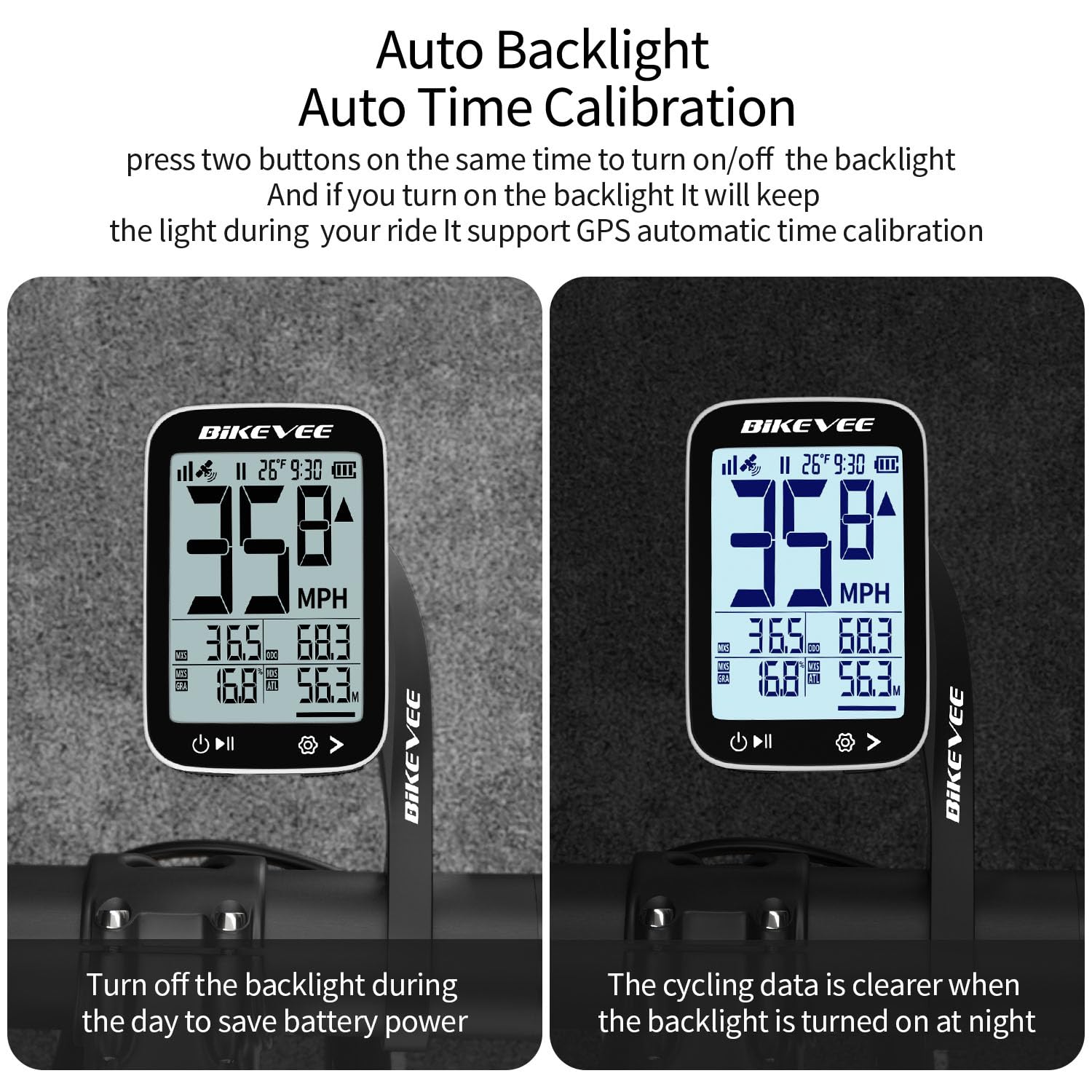
Image: The Bikevee cycling computer display showing the difference in visibility with the auto backlight off (left) and on (right), demonstrating improved clarity in low light.
5.4 Приказ на податоци
The 2.4-inch LCD displays various cycling metrics. Use the mode button (usually bottom right) to cycle through different data screens or views. Data points typically include:
- Current Speed (MPH/KM/H)
- Просечна брзина
- Максимална брзина
- Време на возење
- Ride Distance
- Вкупно растојание (километража)
- Висина
- Градиент
- Температура
- Часовник
6. Одржување
6.1 Полнење на батеријата
The Bikevee BKV300B is equipped with a 650mAh rechargeable Lithium-Ion battery, providing up to 28 hours of use. When the battery indicator is low:
- Connect the device to a USB power source using the provided USB-C charging cable.
- A charging indicator on the screen will confirm the device is charging.
- Ensure the charging port cover is securely closed after charging to maintain water resistance.
6.2 Хидроизолација
The device has an IPX7 international protection rating, meaning it is protected against temporary immersion in water (up to 1 meter for 30 minutes). While it is suitable for use in rain, avoid prolonged immersion or high-pressure water jets.

Image: The Bikevee cycling computer shown with water droplets, illustrating its IPX7 waterproof capability. A note advises against prolonged immersion.
6.3 Чистење
Избришете го уредот со мека, гamp крпа. Не користете абразивни средства за чистење или растворувачи.
7 Смена на проблеми
- Уредот не се вклучува:
Проверете дали батеријата е наполнета. Поврзете ја со извор на енергија и обидете се повторно.
- Нема GPS сигнал:
Осигурајте се дека сте на отворено место со чист простор view of the sky. Initial GPS lock may take a few minutes. Avoid using indoors or under heavy tree cover.
- Inaccurate speed/distance:
Verify that the device has a stable GPS signal. Ensure unit settings (MPH/KM/H) are correct.
- Задното осветлување не работи:
Check if the auto-backlight feature is enabled or if it has been manually turned off. Try toggling it using the designated button combination.
- Проблеми со екранот:
If the display is frozen or unresponsive, try performing a soft reset by pressing and holding the power button for an extended period (e.g., 10-15 seconds) until the device restarts.
8. Спецификации
| Бренд | Bikevee |
| Број на модел | BKV300B |
| Боја | Црно-бело |
| Димензии на производот | 70L x 45W x 16H Millimeters |
| Тежина на ставката | 100 Grams (50g for main unit) |
| Големина на екранот | 2.4 инчи |
| Тип на дисплеј | LCD екран |
| Траење на батеријата | До 28 часа |
| Тип на батерија | Литиум јон од 650 mAh |
| Водоотпорен рејтинг | IPX7 |
| Тип на монтирање | Handlebar Mount (Out Front Extended Mount) |
| Влез со човечки интерфејс | Копчиња |
9. Гаранција и поддршка
For warranty information and technical support, please refer to the documentation provided with your purchase or visit the official Bikevee webстраница. Зачувајте го доказот за купување за гаранциски побарувања.
For further assistance, you may contact Bikevee customer service through their official channels.


