Вовед
This manual provides comprehensive instructions for the safe and efficient operation of your NIIMBOT D110 Bluetooth Label Maker Machine. Please read this manual thoroughly before using the device to ensure proper setup, usage, and maintenance.
Содржина на пакетот
По отворањето на пакувањето, проверете дали се вклучени сите од следниве елементи:
- 1 x NIIMBOT D110 Label Maker Machine
- 1 x 12x40mm Thermal Label Roll (pre-installed in printer)
- 1 x USB-кабел тип-C
- Упатство за употреба (овој документ)
- Additional 3 rolls of clear labels (packaged separately)
Поставување
1. Полнење на уредот
Before initial use, fully charge the NIIMBOT D110 label maker.
- Connect the provided Type-C USB cable to the charging port on the label maker.
- Поврзете го другиот крај од USB кабелот со стандарден USB адаптер за напојување (не е вклучен) или USB порт на компјутерот.
- Индикаторската ламбичка ќе го покаже статусот на полнење (на пр., црвена за полнење, зелена за целосно наполнето).
2. Поставување на лента за етикети
The device comes with one roll of label tape pre-installed. To replace or install new tape:
- Open the label compartment cover by gently lifting it.
- Remove any empty label roll.
- Insert the new label roll with the printing surface facing upwards, ensuring the label edge extends slightly out of the slot.
- Цврсто затворете го капакот на преградата додека не кликне на своето место.

Image: NIIMBOT D110 Label Maker with a label roll being inserted and a smartphone displaying the NIIMBOT app interface for label creation.
3. Преземање на апликација и Bluetooth поврзување
The NIIMBOT D110 operates via a dedicated mobile application.
- Download the "NIIMBOT" app from the App Store (for iOS) or Google Play Store (for Android). You can search for "NIIMBOT" or scan the QR code provided in the quick start guide.
- Проверете дали Bluetooth е овозможен на вашиот мобилен уред.
- Open the NIIMBOT app.
- Turn on the D110 label maker by pressing and holding the power button.
- Within the app, search for available devices and select "D110" to connect. The indicator light on the printer will confirm a successful connection.
Image: The NIIMBOT D110 Bluetooth Label Maker, highlighting its wireless connectivity and showing icons for downloading the companion app from the App Store and Google Play.
4. PC Connection (Optional)
For more versatile content editing, the D110 can also be connected to a computer.
- Download and install the necessary drivers from the official NIIMBOT webсајт.
- Connect the D110 to your computer using the provided Type-C USB cable.
- Follow the on-screen instructions in the NIIMBOT PC software to begin creating and printing labels.
Упатства за работа
1. Creating Labels with the NIIMBOT App
The NIIMBOT app offers various features for designing your labels.
- Внесување текст: Enter your desired text.
- Symbols & Icons: Access over 1500 symbols to enhance your labels.
- Јазици: Supports over 10 languages for text input.
- Рамки: Choose from over 100 frames to customize label borders.
- QR Code & Barcode: Generate and print QR codes or barcodes directly from the app.
- Шаблони: Utilize various built-in templates for quick label creation.
- Сериско печатење: Print multiple identical or different labels efficiently.

Image: The NIIMBOT app interface showcasing its powerful functions, including a wide selection of symbols, support for multiple languages, various frames, and the ability to generate QR codes and barcodes.
2. Печатење на етикети
Откако ќе ја дизајнирате вашата етикета во апликацијата:
- Review your label design on the app screen.
- Ensure the D110 is connected via Bluetooth and has sufficient battery.
- Tap the "Print" button in the app.
- The label maker will automatically feed and print the label.
- Tear off the printed label along the serrated edge.
3. Supported Label Sizes
The D110 supports various label widths from 0.47 inches (12mm) to 0.59 inches (15mm). Ensure you use genuine NIIMBOT thermal labels for optimal performance.

Image: The NIIMBOT D110 Label Maker demonstrating its compatibility with various label sizes, including 12x22mm, 12x40mm, 14x40mm, 14x60mm, 15x30mm, and 15x50mm, with examples of printed labels.
4. Апликација прampлес
The NIIMBOT D110 is suitable for a wide range of labeling needs, including:
- School supplies (notebooks, binders, pencil cases)
- Food storage and organization
- Reminder labels for medication or tasks
- Gift labeling
- Travel item identification
- Cosmetic organization
- Office filing and organization
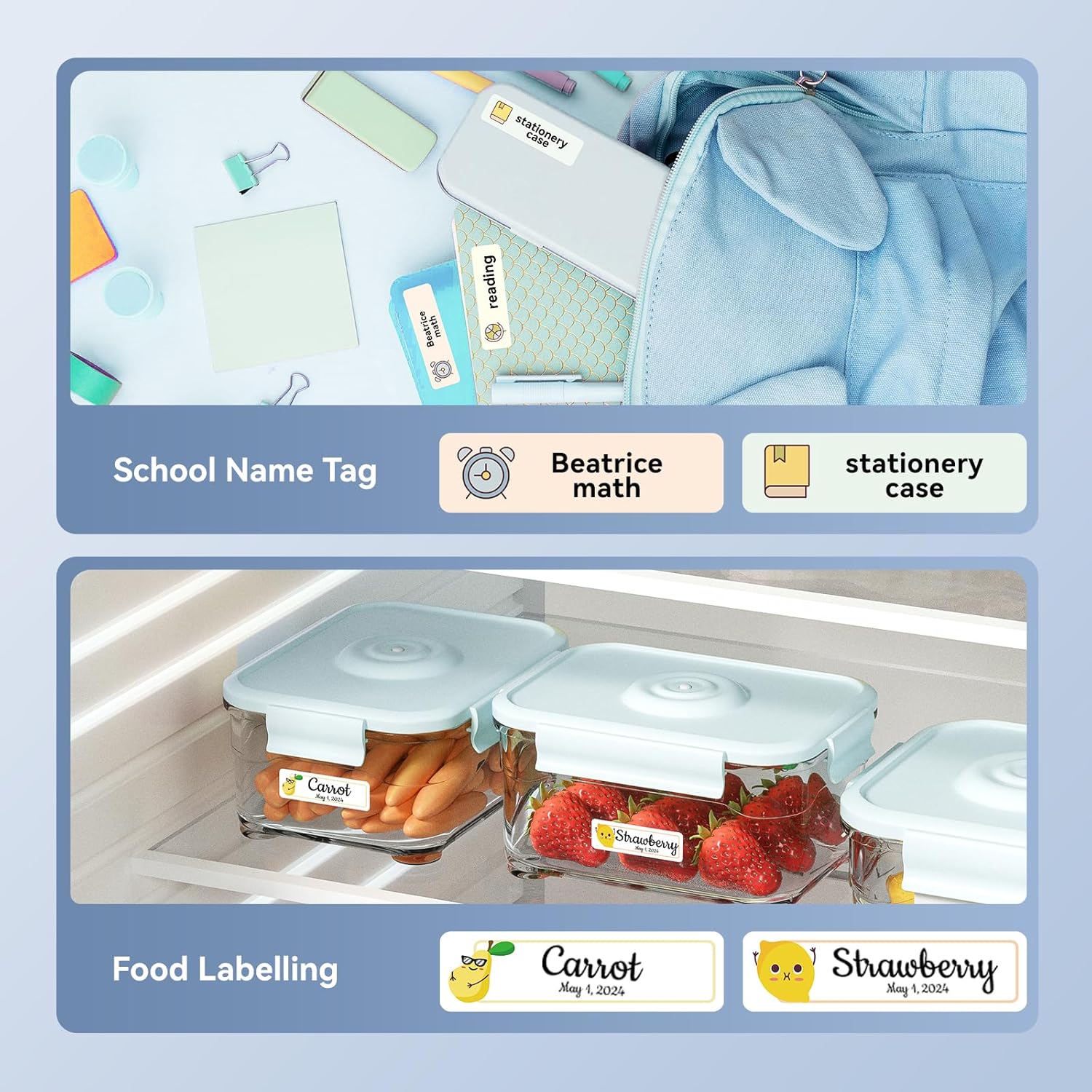
Слика: Прamples of labels created with the NIIMBOT D110, demonstrating use for school name tags on backpacks and stationery, as well as for food labeling on storage containers with contents and dates.

Слика: Прamples of labels created with the NIIMBOT D110, showing application for medication reminders in a pill organizer and decorative labels for gifts.

Слика: Прamples of labels created with the NIIMBOT D110, illustrating use for organizing travel toiletries like shampoo and conditioner, and for identifying makeup products such as eyeliner and eyeshadow.
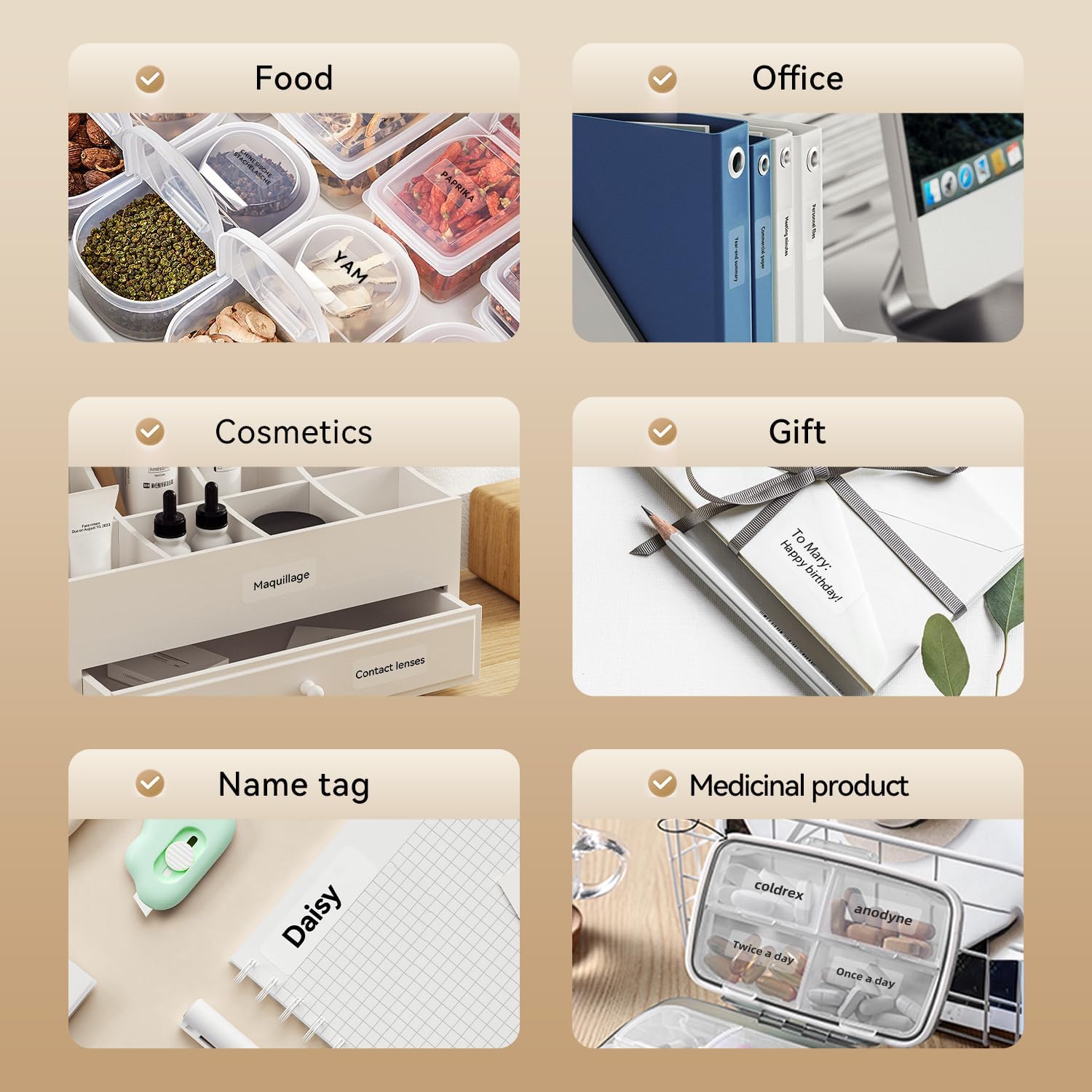
Image: A collage of various application examples for NIIMBOT D110 labels, including organizing food containers, office supplies, cosmetic items, gifts, creating name tags, and labeling medicinal products.
Одржување
1. Чистење на главата за печатење
To ensure optimal print quality, regularly clean the print head.
- Turn off the label maker and disconnect it from any power source.
- Open the label compartment cover.
- Нежно избришете ја главата за печатење со памукче лесно dampобложена со изопропил алкохол.
- Allow the print head to dry completely before closing the cover and resuming use.
2. Нега на батерии
За да го продолжите животниот век на батеријата:
- Избегнувајте често целосно празнење на батеријата.
- Полнете го уредот редовно, дури и ако не е во постојана употреба.
- Чувајте го уредот на ладно и суво место кога не го користите подолг временски период.
3. Складирање
Store the label maker and label rolls in a dry environment, away from direct sunlight and extreme temperatures.
Решавање проблеми
| Проблем | Можна причина | Решение |
|---|---|---|
| Уредот не се вклучува | Слаба батерија | Наполнете го уредот користејќи го дадениот USB-кабел. |
| Не може да се поврзе преку Bluetooth | Bluetooth is off; App not open; Device out of range | Ensure Bluetooth is enabled on your phone, open the NIIMBOT app, and keep the printer within close proximity. Restart both devices if necessary. |
| Лош квалитет на печатење | Dirty print head; Incorrect label type; Low battery | Clean the print head (refer to Maintenance section). Ensure you are using genuine NIIMBOT thermal labels. Charge the device. |
| Етикетите не се внесуваат правилно | Label roll incorrectly installed; Label jammed | Open the cover and re-install the label roll, ensuring it is properly aligned. Remove any jammed labels carefully. |
| "No ink" message | Thermal printers do not use ink. This message is incorrect or a misunderstanding. | The D110 is a thermal printer and does not require ink. Ensure the label roll is correctly installed and is thermal paper. |
Спецификации
| Карактеристика | Детал |
|---|---|
| Модел | NIIMBOT D110 |
| Метод на печатење | Thermal Printing (No Ink Required) |
| Поврзување | Bluetooth, USB (for PC) |
| Поддржана ширина на етикетата | 0.47'' - 0.59'' (12mm - 15mm) |
| Тежина | 0.2 lb (approximately 90g) |
| Димензии | 3.8'' x 2.9'' x 1.1'' (approximately 9.65cm x 7.37cm x 2.79cm) |
| Влез на енергија | Тип-Ц USB |

Image: A visual comparison showing the NIIMBOT D110 as significantly smaller and lighter (0.2 lb, 3.8"x2.9"x1.1") compared to a traditional label printer (1.2 lb, 7"x6.3"x2.2").
Гаранција и поддршка
For warranty information and technical support, please refer to the official NIIMBOT website or contact NIIMBOT customer service directly. Details can typically be found on the product packaging or the manufacturer's webсајт.
Поддршка преку Интернет: Посетете www.niimbot.com за најчесто поставувани прашања, преземања на драјвери и информации за контакт.


