Вовед
This manual provides essential information for the setup, operation, maintenance, and troubleshooting of your AWOW Mini PC, Model BA7. Please read these instructions carefully before using the device.

Слика: Надview of the AWOW BA7 Mini PC, highlighting its compact design and key features.
Содржина на пакетот
Проверете дали сите артикли се присутни во пакувањето:
- AWOW BA7 Mini PC
- Адаптер за напојување
- Завртки за монтирање
- Држач за монтирање VESA
- HDMI кабел
- Упатство за употреба (овој документ)

Image: Illustration of the AWOW BA7 Mini PC and its included accessories: power adapter, screws, VESA mount, HDMI cable, and user manual.
Инструкции за поставување
- Поврзете периферни уреди: Connect your keyboard, mouse, and monitor(s) to the appropriate ports on the Mini PC.
Слика: напред view of the Mini PC showing the Power Button, Type-C port, USB 3.2 ports, and 3.5mm Audio Jack.

Слика: Заден дел view of the Mini PC showing the DC IN, DP1.2, HDMI2.0, USB 2.0 ports, and RJ45 LAN port.
- Поврзување за напојување: Connect the power adapter to the DC IN port on the Mini PC, then plug the adapter into a power outlet.
- Вклучување: Press the power button located on the front of the Mini PC. The system will boot up.
- Почетно поставување: Следете ги упатствата на екранот за да го завршите почетното поставување на Windows 11 Pro, вклучувајќи го јазикот, регионот, мрежната врска и креирањето на корисничка сметка.
- Мрежна конекција:
- Wичен: Connect an Ethernet cable to the RJ45 LAN port for a stable wired connection.
- Безжичен: During Windows setup or via Windows settings, connect to your Wi-Fi network using the built-in WiFi 6.
Упатства за работа
Основно работење
- Вклучување/исклучување: Press the power button to turn on the PC. To shut down, use the Windows Start menu options (Shut down, Restart, Sleep). A short press on the power button can put the PC to sleep. A long press (approx. 5 seconds) will force a shutdown.
- Излез на екранот: The Mini PC supports up to three 4K displays simultaneously via DP, HDMI, and USB-C. Connect your monitors and configure display settings in Windows.

Image: A user working with a triple monitor setup, demonstrating the Mini PC's multi-display capability.
- USB поврзување: Utilize the USB 2.0 and USB 3.0 ports for connecting external devices such as external hard drives, USB flash drives, printers, and other peripherals. The Type-C port also supports data transfer and display output.
- Аудио: Поврзете слушалки или звучници во 3.5 мм аудио приклучокот.
Напредно користење
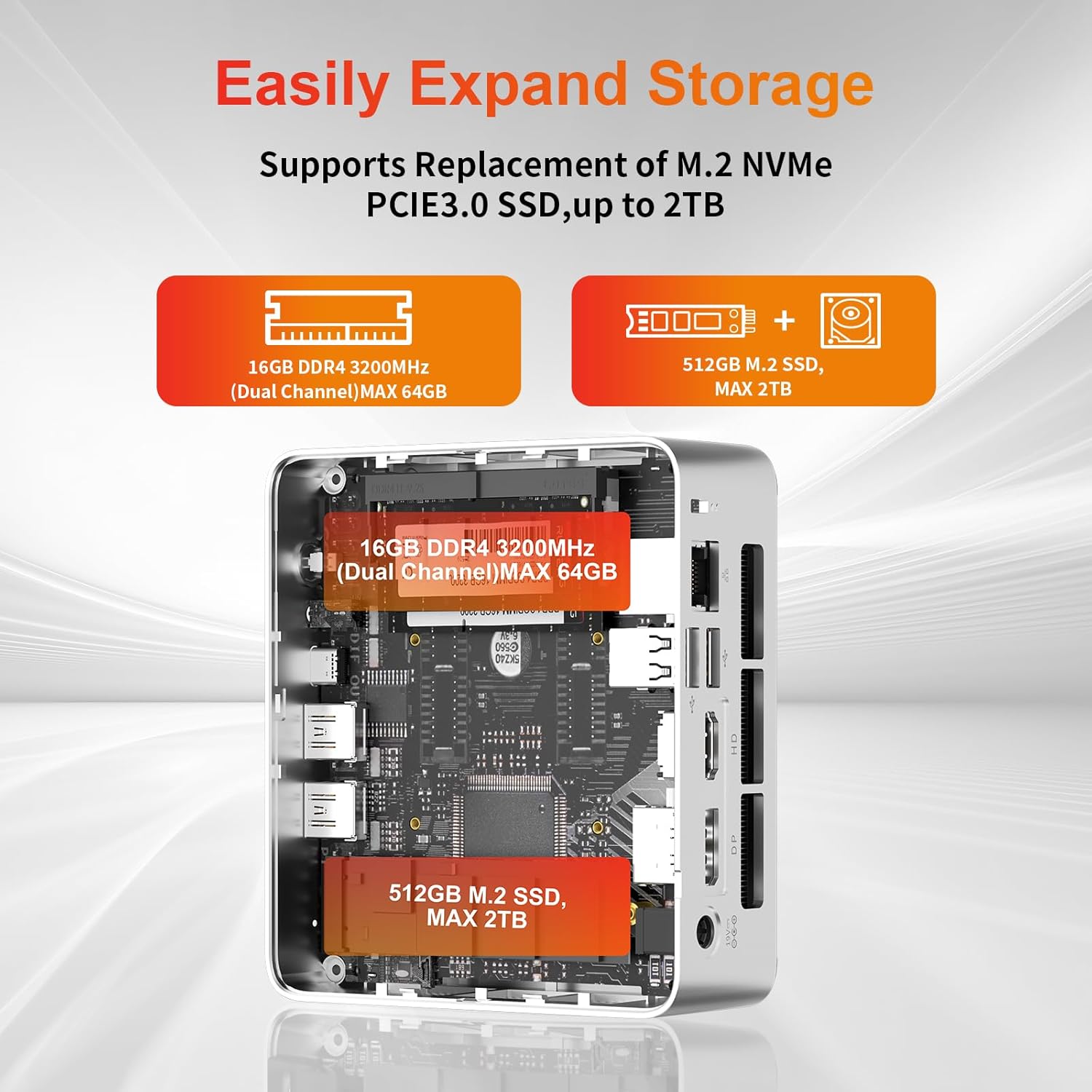
- Проширување на просторот за складирање: The Mini PC supports replacement of the M.2 NVMe PCIe 3.0 SSD up to 2TB. It also supports memory expansion up to 64GB DDR4.

Image: Diagram illustrating the internal components and options for expanding storage (M.2 SSD up to 2TB) and RAM (DDR4 up to 64GB).
- Монтирање VESA: Use the included VESA mount bracket to attach the Mini PC to the back of a compatible monitor or to a wall mount, saving desk space.
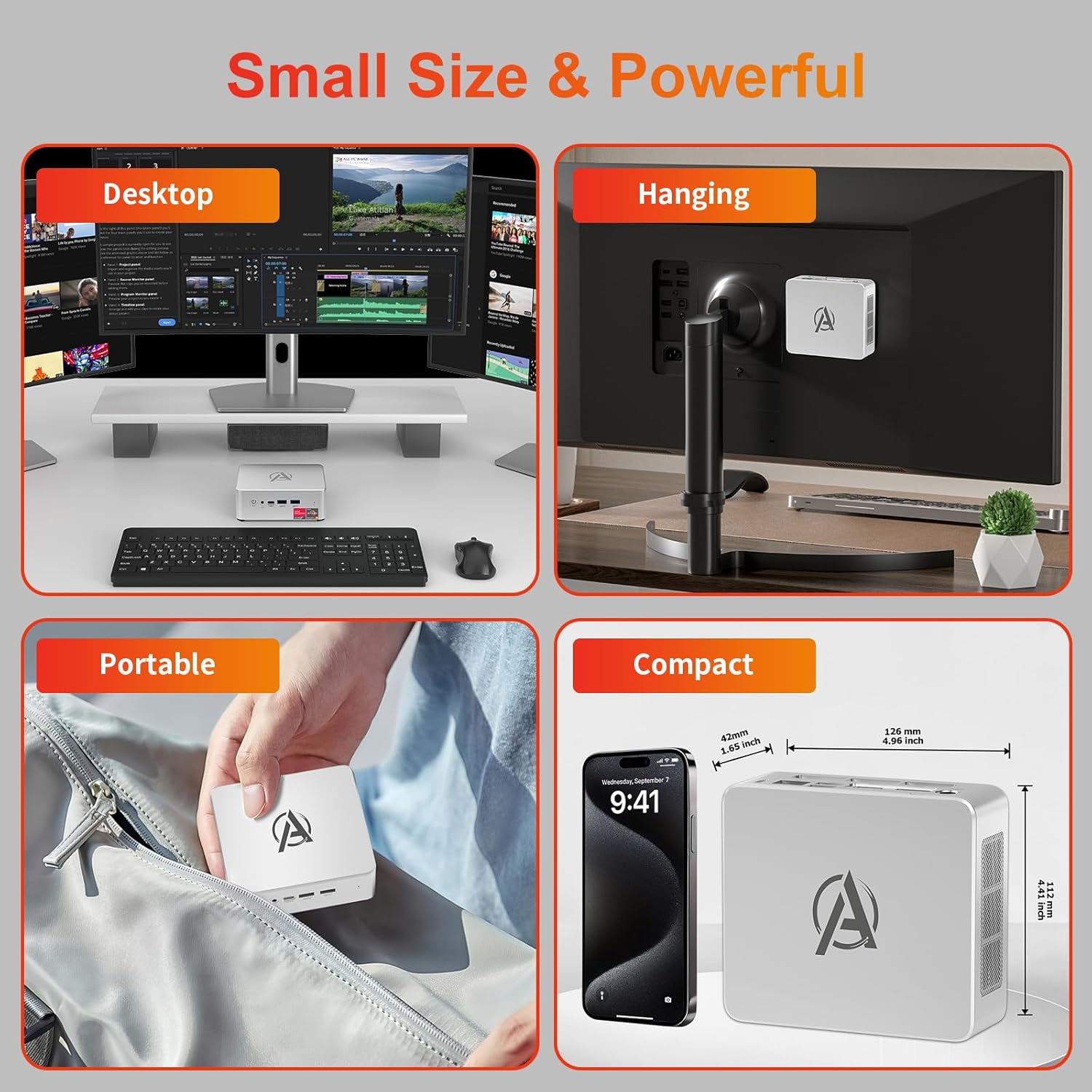
Image: Various usage scenarios for the Mini PC, including desktop, VESA-mounted behind a monitor, portable, and compact size comparison.
Одржување
- Чистење: Use a soft, dry cloth to clean the exterior of the Mini PC. Do not use liquid cleaners or aerosols. Ensure ventilation openings are free from dust.
- Ажурирања на софтверот: Редовно проверувајте и инсталирајте ажурирања на Windows и ажурирања на драјвери за да обезбедите оптимални перформанси и безбедност.
- Управување со топлина: Ensure the Mini PC is placed in a well-ventilated area. Avoid blocking the air vents. The intelligent cooling system is designed for low noise and efficient heat dissipation.

Image: Diagram illustrating the internal cooling fan and heat sink, showing airflow for efficient heat dissipation.
- Управување со складирање: Периодично чистете го непотребното files and applications to maintain system performance.
Решавање проблеми
- Без моќност:
- Проверете дали адаптерот за напојување е безбедно поврзан и со мини компјутерот и со штекерот.
- Проверете дали штекерот е функционален.
- Обидете се со друг штекер.
- Нема приказ:
- Verify that the HDMI/DP/USB-C cable is securely connected to both the Mini PC and the monitor.
- Проверете дали мониторот е вклучен и поставен на точниот влезен извор.
- Пробајте друг кабел за прикажување или монитор доколку е достапен.
- Бавни перформанси:
- Затворете ги непотребните апликации што работат во позадина.
- Проверете и инсталирајте ги сите чекачки ажурирања на Windows или ажурирања на драјвери.
- Ensure there is sufficient free space on the SSD.
- Monitor CPU and RAM usage in Task Manager to identify resource-intensive processes.
- Проблеми со мрежната поврзаност:
- For wired connections, ensure the Ethernet cable is properly connected and the router is working.
- For Wi-Fi, check if the Wi-Fi adapter is enabled and connected to the correct network. Restart your router/modem.
- Системот замрзнува/паѓа:
- Рестартирајте го мини-компјутерот.
- Ensure the system is not overheating (check ventilation).
- Run a system diagnostic or check Windows Event Viewer for error messages.
Спецификации
| Модел | AWOW BA7 Mini PC |
| Процесор | AMD Ryzen 5 7430U (6 јадра, 12 нишки, до 4.3 GHz) |
| Графика | Интегрирана AMD Radeon графика |
| RAM меморија | 16GB DDR4 (може да се прошири до 64GB) |
| Складирање | 512GB PCIe 3.0 M.2 SSD (Expandable up to 2TB) |
| Оперативен систем | Windows 11 Pro |
| Видео излез | DP1.2 (4K@60Hz), HDMI2.0 (4K@60Hz), USB-C (4K@60Hz) - Supports Triple Display |
| Поврзување | WiFi 6, Bluetooth 5.2, 1000Mbps RJ45 LAN |
| Пристаништа | 2x USB 3.2, 2x USB 2.0, 1x Type-C (Full Function), 1x DP1.2, 1x HDMI2.0, 1x RJ45 LAN, 1x 3.5mm Audio Jack, 1x DC IN |
| Димензии | 126мм x 112мм x 42мм (приближно 4.96 x 4.41 x 1.65 инчи) |
| Тежина | 398 g (само уред) Image: The Mini PC with its dimensions (126mm x 112mm x 42mm) and weight (398g) labeled. |
Гаранција и поддршка
AWOW provides comprehensive support for its products.
- Гаранција: This product includes a 12-month service period from the date of purchase, covering manufacturing defects.
- Техничка поддршка: Lifetime technical support is available for all AWOW products.
- Контакт: For technical assistance, warranty claims, or any product-related inquiries, please visit the official AWOW webсајт или контактирајте со нивната служба за корисници.

Image: AWOW brand message emphasizing fulfillment, lifetime technical support, and 12-month service.