1. Важни безбедносни инструкции
Please read all instructions carefully before using your Olvy Contact Grill. Keep this manual for future reference.
- Електрична безбедност: Обезбедете волtage matches your power supply. Do not immerse the appliance, cord, or plug in water or other liquids. Unplug from the outlet when not in use and before cleaning.
- Опасност од топлина и изгореници: Surfaces of the grill become hot during use. Use oven mitts or a cool-touch handle. Do not touch hot surfaces directly. Allow the appliance to cool completely before cleaning or storing.
- Деца и ранливи лица: Овој апарат не е наменет за употреба од страна на лица со намалени физички, сензорни или ментални способности или со недостаток на искуство и знаење, освен ако не се под надзор или им се дадени упатства за употреба на апаратот од страна на лице одговорно за нивната безбедност. Децата треба да бидат под надзор за да се осигури дека не си играат со апаратот.
- Правилна употреба: Use the appliance only for its intended household purpose. Do not use outdoors. Do not operate with a damaged cord or plug.
- Вентилација: Ensure adequate ventilation around the grill during operation. Do not place near flammable materials.
2. Производот завршиview
The Olvy H2010 Contact Grill is designed for versatile cooking, featuring a touch screen interface and 7 automatic programs. Its 1800W power ensures fast heating, and the PFAS-free non-stick plates make cooking and cleaning easy.
Компоненти
- Upper Grill Plate
- Lower Grill Plate
- Рачка за ладно допирање
- Контролен панел со екран на допир
- Послужавник за капење
- Кабел за напојување
Клучни карактеристики
- 7 автоматски програми: Pre-set programs for various foods like meat, fish, paninis, and vegetables.
- Моќност 1800W: For rapid heating and efficient cooking.
- PFAS-Free Non-Stick Plates: Ensures healthy cooking and easy food release.
- 180° Opening: Allows the grill to be used as an open table grill for a larger cooking surface.
- Интегриран тајмер: До 30 минути со автоматско исклучување.
- Рачка со ладен допир: За безбедно работење.
- Отстранлива фиока за капе: Собира вишок маснотии за поздраво готвење и лесно отстранување.
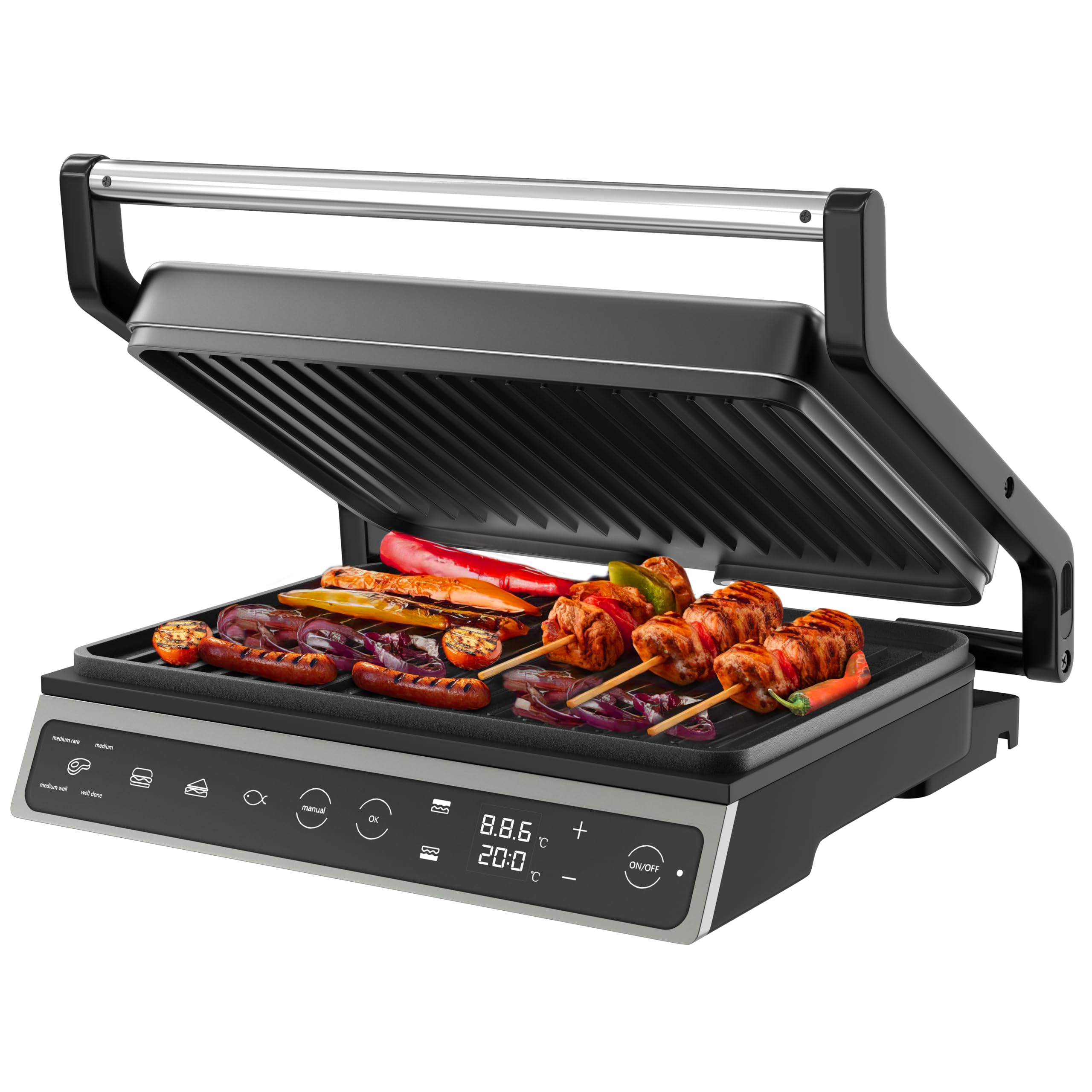
Image: The Olvy H2010 Contact Grill in its closed position, showcasing its sleek design and touch screen control panel.

Слика: Крупен план view of the Olvy H2010 Contact Grill's smart LED touch screen, highlighting its intuitive controls and digital display.
3. Поставување и пред првата употреба
- Отпакувај: Внимателно извадете ја скарата и сите додатоци од пакувањето. Зачувајте ја амбалажата за складирање или отстранување.
- Чисти: Избришете ги плочите за скара со рекламаamp cloth or sponge. Ensure they are completely dry before use. Wash the drip tray with warm, soapy water and dry thoroughly.
- Позиција: Place the grill on a stable, heat-resistant, and flat surface. Ensure there is sufficient space around the appliance for ventilation.
- Првично загревање: Plug the grill into a grounded electrical outlet. The display will light up. Allow the grill to preheat for approximately 5-10 minutes without food. A slight odor or smoke may occur during the first use; this is normal and will dissipate. Unplug and allow to cool.
4. Упатства за работа
Општа операција
- Plug the appliance into a suitable power outlet. The touch screen will illuminate.
- Притиснете го ВКЛУЧЕНО/ИСКЛУЧЕНО копче за вклучување на скарата.
- Select your desired cooking method: Automatic Program or Manual Mode.
Користење на автоматски програми
The Olvy H2010 offers 7 pre-set programs for optimal cooking results. The grill automatically adjusts time and temperature based on the selected program.

Image: The Olvy H2010 Contact Grill displaying its 7 automatic programs for various food types like steak, chicken, fish, bacon, sausage, hamburger, and a manual option.
- Притиснете го Избор на програма button (often represented by an icon like a chef's hat or menu).
- Tap the icon corresponding to the food you are cooking (e.g., Steak, Chicken, Fish, Panini, Vegetables, Bacon, Sausage, Hamburger).
- The grill will begin preheating to the optimal temperature for the selected program. Wait for the 'Ready' indicator (or audible signal) before placing food.
- Place your food on the lower grill plate and close the lid. The grill will automatically detect the thickness and adjust cooking time.
- Monitor the cooking progress on the display. The grill may indicate different doneness levels (e.g., rare, medium, well-done) for certain programs.
- Once cooking is complete, carefully remove the food using heat-resistant utensils.

Image: Visual representation of different doneness levels (rare, medium, well-done) for grilled meat, indicating the grill's ability to achieve desired results.
Manual Mode, Temperature, and Timer Adjustment
For custom cooking, use the manual mode to set your preferred temperature and time.
- Притиснете го Прирачник копче на екранот на допир.
- Користете го + и - buttons to adjust the desired temperature. The temperature can be set for each plate independently if the feature is available.
- Притиснете го Тајмер button (often represented by a clock icon) and use the + и - buttons to set the cooking time (up to 30 minutes).
- Притиснете OK или на Започнете button to begin cooking. The grill will automatically shut off when the timer expires.

Image: A hand adjusting the integrated timer function on the Olvy H2010 Contact Grill's control panel, showing the digital display for time and temperature settings.
Using as an Open Grill (180° Function)
The grill can be fully opened to a 180-degree flat position, providing a larger cooking surface for simultaneous grilling of different foods.

Image: The Olvy H2010 Contact Grill fully opened to a 180-degree flat position, showcasing its expanded cooking surface with various foods being grilled.
- Ensure the grill is unplugged and cool before attempting to open it fully.
- Grasp the handle and gently pull the upper plate upwards until it locks into the 180-degree open position.
- Plug in the grill and select your desired temperature or program. Both plates will heat up.
- Place food on both the upper and lower plates.
- To close, gently lift the upper plate slightly and push it back into the closed position.
5. Одржување и чистење
Regular cleaning ensures optimal performance and extends the life of your Olvy Contact Grill.
- Секогаш исклучувајте го од струја: Пред чистење, секогаш исклучете ја скарата од штекерот и оставете ја целосно да се олади.
- Чисти плочи за скара: Избришете ги нелепливите плочи за скара со мека, дamp cloth or sponge. For stubborn food residue, use a plastic scraper or a small amount of mild dish soap. Do not use abrasive cleaners, metal scouring pads, or sharp objects, as these can damage the non-stick coating.
- Празна фиока за капе: Remove the drip tray from the front of the grill. Empty any collected fat or liquids. Wash the drip tray with warm, soapy water and dry thoroughly before reinserting.

Image: A hand removing the practical drip tray from the front of the Olvy H2010 Contact Grill, designed to collect fat and juices for easy disposal.

Image: A hand cleaning the non-stick grill plates of the Olvy H2010 Contact Grill with a soft cloth, demonstrating the ease of maintenance.
- Чиста надворешност: Избришете ја надворешноста на скарата со рекламаamp крпа. Не користете груби хемикалии или абразивни материјали.
- Складирање: Once clean and completely dry, store the grill in a cool, dry place. The compact design allows for easy storage.
6 Смена на проблеми
If you encounter any issues with your Olvy Contact Grill, please refer to the following common problems and solutions:
| Проблем | Можна причина | Решение |
|---|---|---|
| Скарата не се вклучува. | Не е вклучен во штекер; проблем со штекерот; дефект на апаратот. | Ensure the grill is properly plugged into a working outlet. Check your circuit breaker. If the problem persists, contact customer support. |
| Храната не се готви рамномерно. | Grill not preheated; uneven food thickness. | Always allow the grill to fully preheat before placing food. Ensure food items are of similar thickness for even cooking. |
| Чад или мирис при првата употреба. | Согорување на остатоци од производството. | This is normal for the first use. Ensure good ventilation. It should dissipate quickly. |
| Храната се лепи за чиниите. | Plates not clean; insufficient oil/fat; damaged non-stick coating. | Ensure plates are clean before use. Lightly brush plates with cooking oil if needed. Avoid using metal utensils that can damage the coating. |
7. Технички спецификации
| Спецификација | Детал |
|---|---|
| Број на модел | H2010 |
| Бренд | Олви |
| Моќ | 1800 вати |
| Димензии (затворено) | 31 x 12 x 31 cm (должина x ширина x висина) |
| Површина за готвење | Approximately 27 x 22 cm per plate |
| Тежина | 3.15 кг |
| Материјал | Stainless Steel (Body) |
| Посебни карактеристики | Cool-Touch Handle, 7 Automatic Programs, Touch Screen, 180° Opening, PFAS-free Non-stick Coating, Integrated Timer |
8. Гаранција и корисничка поддршка
Olvy products are manufactured to high-quality standards. This product is covered by a standard manufacturer's warranty against defects in materials and workmanship from the date of purchase.
For warranty claims, technical assistance, or any questions regarding your Olvy Contact Grill, please contact our customer support team. Please have your model number (H2010) and proof of purchase ready when contacting support.
Контакт информации:
Please refer to the contact details provided on your purchase receipt or the official Olvy webстраница за најактуелни информации за корисничка поддршка.


