Вовед
This manual provides comprehensive instructions for the installation, operation, and maintenance of your Imou Cell 3C AIO 5MP Solar Surveillance Camera. Please read this manual thoroughly before use and retain it for future reference.
The Imou Cell 3C AIO is a wireless, rechargeable surveillance camera featuring an integrated 2.2W solar panel for continuous power. It offers 5MP (3K) resolution, IP66 weather resistance, smart color night vision, and advanced human detection with smart tracking. Key features include a built-in siren and spotlight for deterrence, flexible storage options via microSD card or Imou Cloud, and a privacy mode for enhanced security.
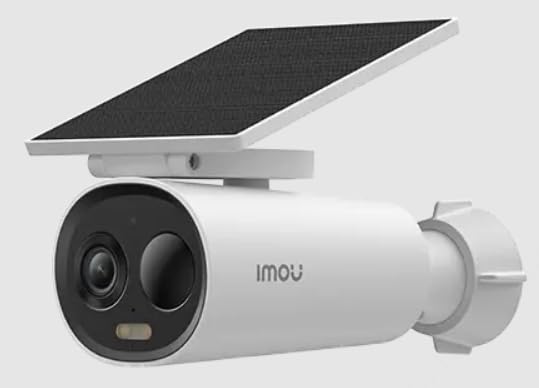
Image of the Imou Cell 3C AIO 5MP Solar Surveillance Camera, showcasing its compact design and integrated solar panel.
Поставување
Follow these steps for initial setup of your Imou Cell 3C AIO camera:
- Отпакувајте и проверете: Carefully remove all components from the packaging and ensure everything is present and undamaged.
- Почетна наплата: Although solar-powered, it is recommended to fully charge the camera using a 5V USB adapter (not included) before the first use to ensure optimal performance.
- Преземете ја апликацијата Imou Life: Download and install the "Imou Life" app from your smartphone's app store (available on iOS and Android).
- Создавање сметка: Open the Imou Life app and create a new account or log in to an existing one.
- Додај уред: Follow the in-app instructions to add your camera. This typically involves scanning a QR code on the camera or its packaging.
- Локација за монтирање: Select a suitable outdoor location for mounting. Ensure the solar panel receives direct sunlight for several hours daily to maintain battery charge. The camera is IP66 weather-resistant, suitable for various outdoor conditions.
- Безбедно монтирање: Use the provided mounting hardware to securely attach the camera to the chosen surface. Adjust the camera angle for optimal surveillance coverage.
Упатства за работа
Utilize the Imou Life app to access and control your camera's features:
- Во живо View: Open the Imou Life app and select your camera from the device list to view видео пренос во реално време.
- Откривање на движење и следење: The camera features advanced human detection and smart tracking. Configure detection sensitivity, activity zones, and alert preferences within the app settings.
- Ноќно гледање: The camera supports smart color night vision, which automatically activates in low-light conditions to provide clear, full-color images.
- Siren and Spotlight: The integrated spotlight and siren can be configured to activate automatically upon detection of an intruder, or they can be manually triggered through the Imou Life app to deter potential threats.
- Складирање видео:
- MicroSD картичка: Insert a microSD card (up to 256GB, not included) into the designated slot for local video storage.
- Иму Облак: Subscribe to Imou Cloud for secure cloud storage of your video recordings. Refer to the app for subscription details and free trial availability.
- Режим на приватност: Activate the privacy mode within the Imou Life app. This feature physically covers the camera lens, ensuring your privacy when desired.
Одржување
Правилното одржување обезбедува долготрајност и оптимални перформанси на вашиот фотоапарат:
- Чистење: Редовно чистете го објективот на камерата и површината на соларниот панел со мека, дamp cloth. Avoid using abrasive cleaners or harsh chemicals, as these can damage the components.
- Ажурирања на фирмверот: Periodically check for and install firmware updates through the Imou Life app. Updates often include performance improvements, new features, and security enhancements.
- Грижа за животната средина: While IP66 rated, extreme environmental conditions (e.g., prolonged exposure to direct salt spray, very high humidity, or temperatures outside the specified operating range) should be minimized to prevent potential damage.
- Здравје на батеријата: Ensure the solar panel receives adequate sunlight daily to maintain the internal battery's charge. If the camera is in a shaded area, occasional manual charging via USB may be required.
Решавање проблеми
Погледнете го овој дел за решенија за вообичаени проблеми:
- Камерата не се вклучува:
- Check if the solar panel is obstructed or receiving insufficient sunlight.
- Ensure the internal battery has sufficient charge. If necessary, manually charge the camera via USB.
- Не може да се поврзе на Wi-Fi:
- Verify that the camera is within range of your Wi-Fi router.
- Double-check the Wi-Fi password entered in the Imou Life app.
- Restart both the camera and your Wi-Fi router.
- Лош квалитет на сликата:
- Исчистете го објективот на камерата за да отстраните каква било нечистотија или дамки.
- Ensure there is adequate lighting in the surveillance area, especially for optimal color night vision.
- Check your network connection stability, as a weak signal can affect video streaming quality.
- Откривањето движење не работи:
- Verify that motion detection is enabled and configured correctly in the Imou Life app settings.
- Adjust the detection sensitivity and ensure activity zones are properly defined.
- Уверете се дека нема физички пречки што го блокираат фотоапаратот view во областа за откривање.
Спецификации
| Карактеристика | Детал |
|---|---|
| Број на модел | IPC-K9DC-5M0WEH-V2 |
| Бренд | Imou |
| Резолуција | 5 мегапиксели (3K) |
| Интегриран соларен панел | 2.2 вати |
| Отпорност на времето | IP66 сертифициран |
| Димензии (Д x Ш x В) | 16.8 x 7.2 x 6 cm |
| Тежина | 650 грама |
| Потрошувачка на енергија | 3.5 вати |
| Voltage | 5 волти |
| Опции за складирање | MicroSD card (up to 256GB), Imou Cloud |
| Карактеристики | Human Detection, Smart Tracking, Smart Color Night Vision, Siren, Spotlight, Privacy Mode |
Гаранција и поддршка
For detailed warranty information, technical assistance, or customer support, please visit the official Imou website or contact their authorized service centers. Retain your proof of purchase for any warranty claims.


