1. Вовед
This manual provides detailed instructions for the safe and effective use of your NJTY Non-Contact Voltage Tester, Model T-03A. This device is designed for non-contact detection of AC voltage, offering a safe method for identifying live wires, checking for circuit breaks, and performing general electrical troubleshooting.

Image 1: NJTY Non-Contact Voltage Tester, Model T-03A. This image shows the overall design of the voltage tester, highlighting its compact and pen-like form factor with a red and black casing, green and red buttons, and an integrated LED flashlight at the tip.
2. Информации за безбедност
Always adhere to local safety regulations and practices when working with electricity. This device is designed to enhance safety, but it does not replace proper electrical safety procedures. Failure to follow these instructions may result in electric shock, injury, or death.
- Do not use the tester if it appears damaged or is not operating correctly.
- Verify the tester's functionality on a known live circuit before and after each use.
- Always wear appropriate personal protective equipment (PPE), such as insulated gloves and safety glasses.
- Не надминувајте го наведениот волtage range (12V-1000V AC or 48V-1000V AC).
- Keep fingers behind the finger guard during operation.
- Avoid direct contact with live conductors. This is a non-contact device.
- Do not use the device in wet conditions or in explosive atmospheres.
- The integrated laser pointer should not be aimed directly at eyes or reflective surfaces.
3. Производот завршиview
Familiarize yourself with the components of your voltagе тестер:

Image 2: Diagram illustrating the key components of the NJTY Voltage Tester. Labels include the NCV sensor head (probe), laser pointer, flashlight, signal/indicator lights, high/low signal indicator, power button, sensitivity switch (H/L), lighting/laser switch, and battery cover.
- Сонда (глава на сензорот NCV): Открива AC волtagд без контакт.
- Ласерски покажувач: Emits a red laser for targeting test points.
- Фенерче: Обезбедува осветлување во услови на слаба осветленост.
- Signal / Indicator: Визуелна индикација на волуменtagд откривање.
- High/Low Signal Indicator: Displays the detected voltagе ниво.
- Копче за вклучување: Го вклучува и исклучува уредот.
- Sensitivity Switch (H/L): Toggles between high and low sensitivity modes.
- Lighting / Laser Switch: Activates the flashlight or laser pointer.
- Капак за батерија: Access point for battery replacement.
4. Поставување
4.1 Инсталација на батерија
The NJTY Voltage Tester requires two AAA batteries (included). To install or replace batteries:
- Unscrew the battery cover at the bottom of the tester (refer to Image 2, item 9).
- Вметнете две батерии од 1.5 V AAA, внимавајќи на точниот поларитет (+/-).
- Replace the battery cover and screw it securely.

Слика 3: Крупен план view of the battery cover at the base of the NJTY Voltage Tester, showing how it can be unscrewed for battery access.
5. Упатства за работа
5.1 Вклучување/исклучување
- За да го вклучите, притиснете и задржете го Копче за напојување (refer to Image 2, item 6) until the indicator lights illuminate.
- За да се исклучи, притиснете и задржете го Копче за напојување again. The device will also automatically shut down after five minutes of inactivity to conserve battery life.
5.2 Sensitivity Modes
The tester features two sensitivity modes for different applications:
- High Sensitivity Mode (12V-1000V AC): Suitable for detecting lower voltages or for general detection. Press the Sensitivity Switch (H/L) (refer to Image 2, item 7) to select this mode.
- Low Sensitivity Mode (48V-1000V AC): Ideal for detecting higher voltages or when precise localization is needed to avoid false positives from adjacent wires. Press the Sensitivity Switch (H/L) за да го изберете овој режим.

Image 4: Comparison of high and low sensitivity modes. The top row shows high sensitivity (12-1000V) detecting live wire and null wire. The bottom row shows low sensitivity (48-1000V) detecting live wire and null wire, demonstrating how the tester indicates voltage presence with visual and audible alerts.
5.3 Неконтактни томtage (NCV) Откривање
За откривање на AC волуменtage:
- Turn on the tester and select the desired sensitivity mode.
- Поставете го Probe (NCV Sensor Head) near the conductor, outlet, or device you wish to test.
- Ако AC voltage is detected, the tester will emit an audible alarm and the Signal / Indicator lights will illuminate, with the High/Low Signal Indicator showing the relative strength of the detected field.

Image 5: The voltage tester in use, demonstrating NCV detection on an electrical outlet and a wire. It also shows the buzzer alarm, flashlight illuminating a circuit box, and the laser pointer targeting a ceiling light.
5.4 Breakpoint Testing
This feature helps locate breaks in live wires:
- Ensure the wire is live and the tester is in an appropriate sensitivity mode.
- Премести го Probe (NCV Sensor Head) along the length of the wire.
- Тестерот ќе покаже волуменtage up to the point of the break. The absence of a signal beyond a certain point indicates a break in the circuit.

Image 6: Illustration of breakpoint testing. The tester indicates voltage on one side of a broken wire, and no voltage on the other side, pinpointing the location of the break.
5.5 фенерче
To activate the integrated LED flashlight for illuminating dark work areas:
- Притиснете го Lighting / Laser Switch (refer to Image 2, item 8) once.
- Press it again to turn off the flashlight.

Image 7: The integrated LED flashlight of the voltage tester illuminating a dark electrical panel, demonstrating its utility in low-light environments.
5.6 Ласерски покажувач
To activate the laser pointer for precise targeting:
- Притиснете и задржете го Lighting / Laser Switch (refer to Image 2, item 8) for a few seconds.
- Release the button to turn off the laser pointer.
- Внимание: Do not stare into the laser beam or point it at people or animals.
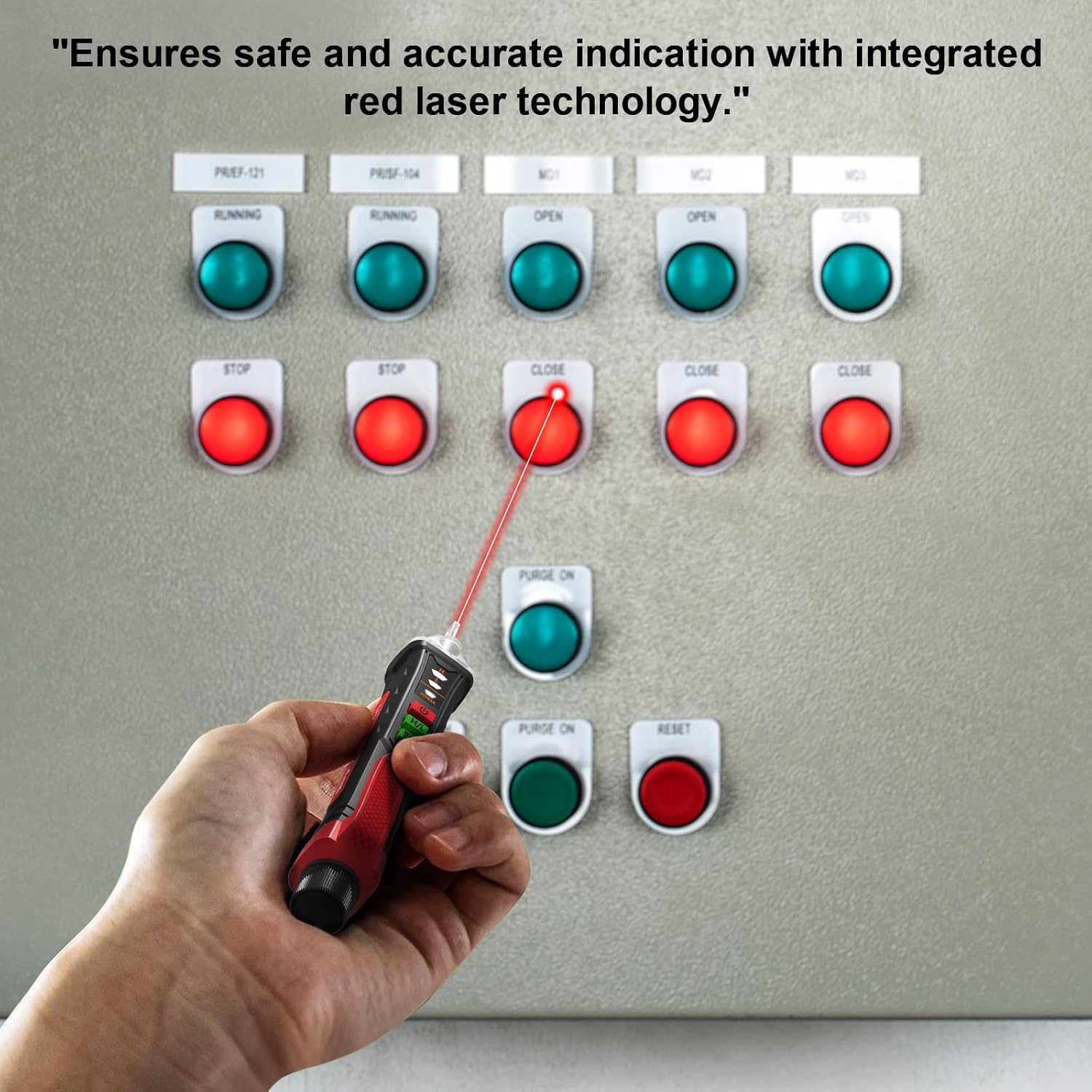
Image 8: A hand holding the voltage tester, using its red laser pointer to indicate a specific button on an electrical control panel, highlighting its precision targeting capability.
6. Одржување
- Чистење: Избришете го уредот со сува, мека крпа. Не користете абразивни средства за чистење или растворувачи.
- Складирање: Чувајте го тестерот на ладно и суво место, подалеку од директна сончева светлина и екстремни температури. Доколку го чувате подолг период, извадете ги батериите за да спречите истекување.
- Замена на батерија: Заменете ги батериите веднаш кога ќе се појави индикаторот за слаба батерија за да се обезбедат точни мерења.
7 Смена на проблеми
| Проблем | Можна причина | Решение |
|---|---|---|
| Тестерот не се вклучува. | Мртви или неправилно инсталирани батерии. | Проверете го поларитетот на батериите; заменете ги батериите. |
| No detection on a known live circuit. | Low battery, incorrect sensitivity mode, or device malfunction. | Replace batteries, switch to high sensitivity mode (12V-1000V), or contact customer support. |
| Лажно позитивни резултати (детектира волуменtage каде што не постои). | High sensitivity mode in a noisy electrical environment. | Switch to low sensitivity mode (48V-1000V). |
8. Спецификации
| Карактеристика | Детал |
|---|---|
| Модел | Т-03А |
| Бренд | NJTY |
| AC Voltagе опсег | 12V-1000V (High Sensitivity), 48V-1000V (Low Sensitivity) |
| Фреквенција | 50/60 Hz |
| Извор на енергија | 2 x 1.5V AAA батерии |
| Автоматско исклучување | По 5 минути неактивност |
| Индикатори | Audible alarm, LED indicator lights |
| Дополнителни карактеристики | Integrated LED flashlight, Laser pointer, Breakpoint testing |
| Димензии на производот | 0.1 x 0.1 x 0.1 инчи |
| Тежина на ставката | 1.8 унци |
9. Што има во кутијата
- 1 x NJTY Voltage Тестер пенкало
- 2 x 1.5V AAA батерии
- 1 x English Manual (This document)
10. Гаранција и поддршка
NJTY provides comprehensive after-sales support for sixty months from the date of purchase. If you encounter any issues with your NJTY Non-Contact Voltage Tester, Model T-03A, please contact our customer service team for assistance. Please refer to your purchase documentation for specific contact details.


