1. Вовед
This manual provides detailed instructions for the FULODE X1-16C 16-Channel Audio Mixer. Please read this manual thoroughly before operating the device to ensure proper usage and to maximize its performance and longevity. This professional audio console is designed for various applications including studio recording, live performances, DJ events, and karaoke.

2. Информации за безбедност
To prevent electric shock, fire, or damage to the device, please observe the following safety precautions:
- Не го отворајте уредот casing. Целото сервисирање обратете се на квалификуван персонал.
- Обезбедете ја јачината на напојувањетоtage одговара на барањата наведени на уредот.
- Keep the device away from water, moisture, and excessive heat.
- Do not operate the device if the power cord is damaged or frayed.
- Секогаш исклучувајте го напојувањето пред чистење или одржување.
- Користете само додатоци/додатоци наведени од производителот.
3. Содржина на пакетот
Проверете дали сите артикли се присутни во пакувањето:
- FULODE X1-16C 16-Channel Audio Mixer
- Power Adapter (AC 90-240V, 50-60Hz)
- Упатство за употреба
4. Производот завршиview: Контроли и врски
The FULODE X1-16C mixer features a comprehensive layout for intuitive control over your audio. Familiarize yourself with the various inputs, outputs, and control elements.

4.1 Контроли на предниот панел
- Composite Interface: Combination XLR/TRS input for microphones and line-level signals.
- Фантомски прекинувач: Активира фантомско напојување од +48V за кондензаторски микрофони.
- Прилагодување на добивка: Controls the input sensitivity of each channel.
- Treble/Midrange/Bass Adjustment (3-Band EQ): Equalization controls for high, mid, and low frequencies on each channel.
- AUX Adjustment: Controls the auxiliary send level for external effects or monitor mixes.
- Adjustment of Effect: Controls the amount of internal DSP effect applied to the channel.
- Pan Balance: Ја прилагодува стерео положбата на сигналот на каналот.
- Channel Mute Switch: Mutes or unmutes the individual channel.
- Channel Volume Pusher: Fader to control the output level of each channel.
- Reverberation Effect Selection: Knob to select from 99 built-in DSP effects.
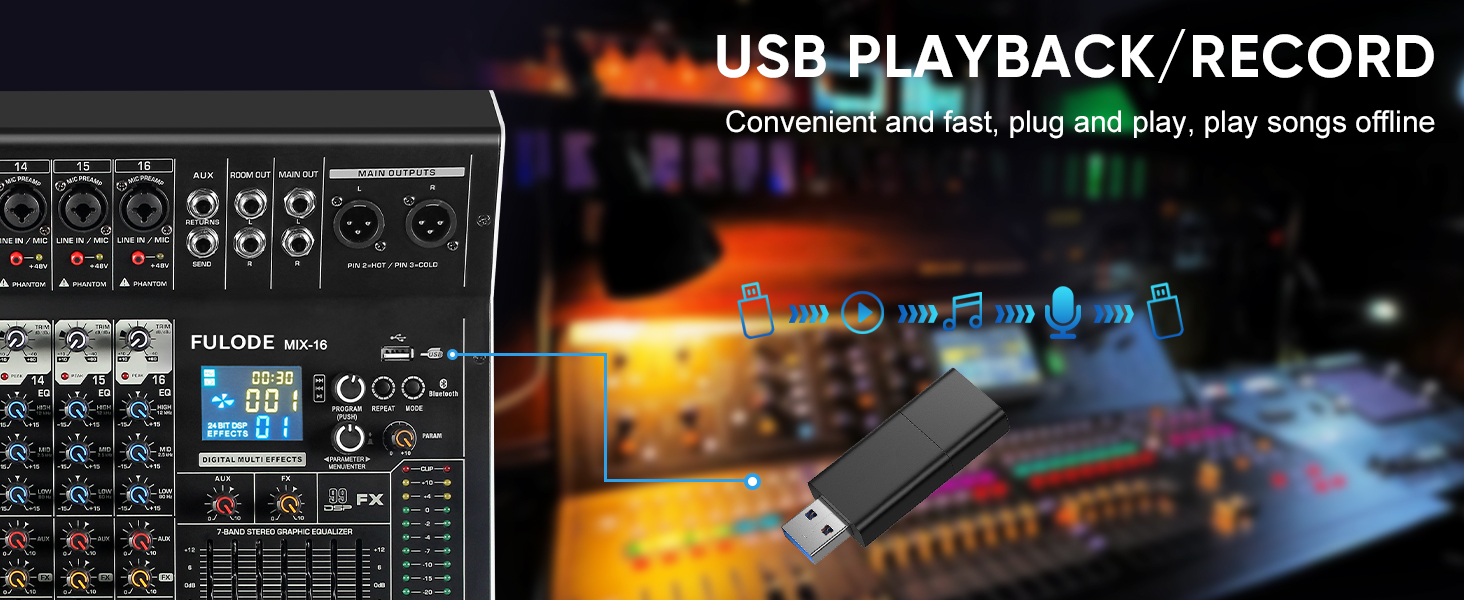
- USB/MP3 репродукција: Section for USB drive and Bluetooth audio input, with transport controls and digital display.
- Светло за индикатор за ниво: Visual display of output levels.
- Main Channel Seven Segment Balance: Graphic equalizer for the main stereo output.
- Monitor Volume Adjustment: Ја контролира јачината на звукот на излезот на слушалките.
- Effect Main Volume Adjustment: Controls the overall level of the selected DSP effect.
- Left/Right Main Volume Adjustment: Faders for the main stereo output.
- Earphone Monitoring Interface: 1/4" jack for headphone monitoring.
- MP3 Main Volume Adjustment: Controls the output level of the USB/MP3/Bluetooth section.
4.2 Приклучоци на задниот панел
- Прекинувач: Вклучува или исклучува миксер.
- Интерфејс за напојување: Се поврзува со испорачаниот адаптер за напојување.
5. Поставување
Follow these steps for initial setup of your FULODE X1-16C Audio Mixer.
5.1 Поврзување за напојување
- Осигурајте се дека прекинувачот за напојување на миксерот е во положба OFF (ИСКЛУЧЕНО).
- Connect the power adapter to the Power Interface on the rear panel of the mixer.
- Plug the power adapter into a suitable AC power outlet (110V).
- Turn the mixer's power switch to the ON position. The digital display should illuminate.
5.2 Поврзување на микрофони и инструменти
- For microphones or line-level instruments, connect them to the Composite Interface (XLR or 1/4" TRS) on the desired channel.
- Ако користите кондензаторски микрофон, притиснете го копчето Фантомски прекинувач (+48V) for that specific channel. An indicator light will confirm activation.
- Прилагодете го Прилагодување на добивка knob for each input channel to achieve an optimal signal level without clipping.

5.3 Поврзување на излезни уреди
- Поврзете ги вашите главни звучници или ampпоживо за Main Output Interface (XLR or 1/4" TRS) on the top right of the mixer.
- For monitoring, connect headphones to the Earphone Monitoring Interface.
6. Упатства за работа
Контрола на 6.1 канали
- Добивка: Adjust the input gain for each channel to prevent clipping (indicated by the PEAK LED) and ensure a strong signal.
- 3-бенд EQ: Use the HI, MID, and LOW knobs to shape the tone of each input.
- AUX: Control the amount of signal sent to the auxiliary output for external effects or monitor mixes.
- FX: Adjust the level of the internal DSP effect applied to the channel.
- ПАН: Position the channel's signal in the stereo field (left to right).
- Исклучи звук: Press the MUTE button to instantly silence a channel.
- Канал Fader: Use the fader to control the overall volume of the channel in the main mix.
6.2 DSP ефекти
The mixer includes 99 built-in 24-bit DSP effects for enhancing your sound.
- Користете го Reverberation Effect Selection knob to browse through the 99 available effects (e.g., Warm Room, Bright Room, Hall, Plate, Chorus, Delay). The digital display will show the selected effect number.
- Притиснете го копчето за да го потврдите вашиот избор.
- Прилагодете го Effect Main Volume Adjustment to control the overall wet/dry mix of the effects.
- Use the individual channel's FX knob to send more or less of that channel's signal to the effects processor.

6.3 USB/MP3/Bluetooth Playback
The mixer supports audio playback from USB drives and Bluetooth-enabled devices.
- Репродукција на USB: Вметнете USB диск што содржи MP3 files into the USB port. Use the transport controls (Play/Pause, Skip) and the MP3 Main Volume Adjustment за контрола на репродукцијата.
- Bluetooth конекција: Press the MODE button on the USB/MP3 section until 'BT' appears on the digital display. On your smart device, search for 'MIX-BT' (or similar) and pair. Once connected, you can stream audio wirelessly to the mixer.


6.4 Главен излез и мониторинг
- Користете го Left/Right Main Volume Adjustment faders to control the overall output level of the mix.
- На Светло за индикатор за ниво provides visual feedback on the main output levels. Adjust faders to keep levels within the optimal range (avoiding red/clipping).
- На Main Channel Seven Segment Balance (graphic EQ) allows for fine-tuning the overall frequency response of your main mix.
- Прилагодете го Monitor Volume Adjustment for comfortable listening through headphones.

6.5 Official Product Video Demonstration
Watch this video for a visual demonstration of the FULODE mixer's features and operation. Note: The video features a MIX-12 model, which shares many similar functionalities with the X1-16C.
7. Одржување
Правилното одржување обезбедува долготрајност и оптимални перформанси на вашиот миксер.
- Чистење: Use a soft, dry cloth to wipe the surface of the mixer. Do not use liquid cleaners or solvents, as they may damage the finish or internal components.
- Складирање: Store the mixer in a cool, dry place away from direct sunlight and extreme temperatures. If storing for extended periods, cover the unit to protect it from dust.
- Вентилација: Обезбедете соодветна вентилација околу миксерот за да спречите прегревање. Не ги блокирајте отворите за вентилација.
8 Смена на проблеми
If you encounter issues with your FULODE X1-16C mixer, refer to the following common problems and solutions:
| Проблем | Можна причина | Решение |
|---|---|---|
| Нема моќ | Power cable not connected; Power switch off; Faulty power adapter/outlet | Check power cable connection; Ensure power switch is ON; Try a different power outlet or adapter. |
| Нема звук од каналот | Channel muted; Gain too low; Cable issue; Phantom power not activated (for condenser mics) | Check MUTE button; Increase Gain; Verify cable connections; Activate +48V phantom power if needed. |
| No sound from main output | Main faders down; Output cables disconnected; Amplifier/speakers off | Raise Main Volume faders; Check output cable connections; Ensure amplifier/speakers are powered on and connected. |
| Bluetooth не се поврзува | Mixer not in Bluetooth mode; Device too far; Already connected to another device | Press MODE until 'BT' appears; Ensure device is within 33 ft; Disconnect from other devices. |
| Искривен звук | Gain too high (clipping); EQ settings extreme; Faulty cable/microphone | Reduce Gain (ensure PEAK LED is not constantly lit); Adjust EQ to neutral or moderate settings; Test with different cables/microphones. |
9. Спецификации
Technical specifications for the FULODE X1-16C 16-Channel Audio Mixer:
- Модел: X1-16C
- Број на канали: 16
- Ефекти на DSP: 99 built-in 24-bit effects
- Изедначување: 3-band EQ per channel, 7-band graphic EQ on main output
- Фантом моќ: +48V (прекинувач по канал)
- Поврзување: USB (playback/recording), Bluetooth, XLR, 1/4" TRS
- Извор на енергија: Електричен со кабел
- Voltage: 110 волти (AC)
- Димензии на производот: 15.55"Д x 18.9"Ш x 4.13"В (39.5 см Д x 48 см Ш x 10.5 см В)
- Тежина на ставката: 18.16 фунти (8.24 кг)
10. Гаранција и поддршка
For warranty information and technical support, please refer to the documentation included with your purchase or contact FULODE customer service through their official channels. Keep your proof of purchase for any warranty claims.


