Вовед
Welcome to the user manual for your new Lenovo Legion 5 16IAX10 Gaming Laptop. This guide provides essential information for setting up, operating, maintaining, and troubleshooting your device. The Lenovo Legion 5 16IAX10 is designed for high-performance gaming and demanding tasks, featuring an Intel Core Ultra 9 275HX processor, NVIDIA GeForce RTX 5060 graphics, a 16-inch WQXGA 240Hz display, and Windows 11 Home.
Што има во кутијата
Carefully unpack your new laptop and ensure all items are present:
- Lenovo Legion 5 16IAX10 Gaming Laptop
- 245W AC адаптер
- USB драјв од 32 GB
Доколку недостасуваат или се оштетени некои предмети, веднаш контактирајте го вашиот продавач или поддршката на Lenovo.
Поставување
1. Првично вклучување и полнење
Before first use, connect the laptop to a power outlet using the provided 245W AC adapter. The battery will begin charging. Press the power button to turn on the laptop.
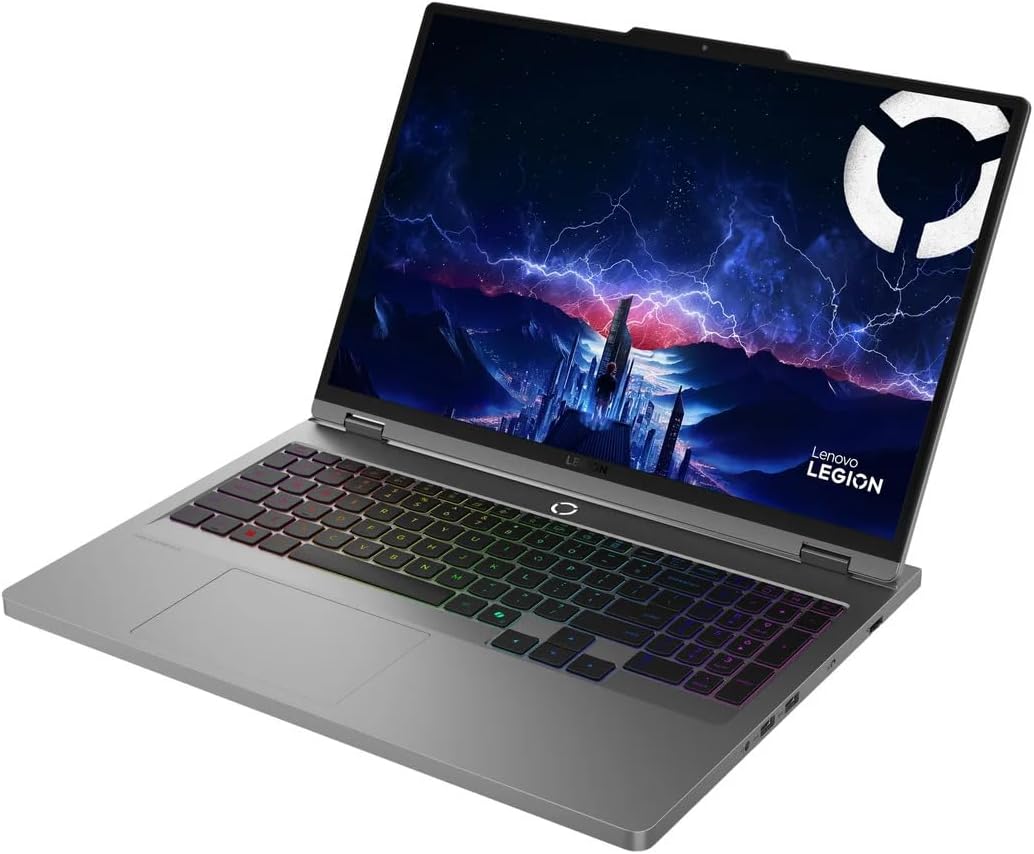
Image: The Lenovo Legion 5 16IAX10 Gaming Laptop in an open, angled view, приказasing екранот и тастатурата.
2. Поставување на Windows 11 Home
Follow the on-screen instructions to complete the initial setup of Windows 11 Home. This includes selecting your region, connecting to a Wi-Fi network, creating a user account, and accepting the license agreement.
3. Поврзување периферни уреди
You can connect external devices such as a mouse, keyboard, or external monitor using the available ports. Refer to the 'Operating Instructions' section for a detailed overview of the ports.
Упатства за работа
Тастатура и подлога за допир
The laptop features a full-size 24-Zone RGB backlit keyboard with a Numpad for enhanced productivity and gaming. The touchpad supports multi-touch gestures for navigation.

Слика: Од горе надолу view of the Lenovo Legion 5 16IAX10 keyboard, highlighting the RGB backlighting and Numpad.
Приказ
Your laptop is equipped with a 16-inch WQXGA (2560 x 1600) IPS display with a 240Hz refresh rate, 500 nits brightness, 100% DCI-P3 color gamut, Dolby Vision, DisplayHDR, and G-SYNC technology. Adjust display settings through Windows settings or the NVIDIA Control Panel for optimal visual experience.
Поврзување
The laptop supports MediaTek Wi-Fi 7 (2x2) for high-speed wireless internet access and Bluetooth 5.4 for connecting wireless peripherals.
Пристаништа надview
The Lenovo Legion 5 16IAX10 offers a variety of ports for connectivity:
- 1x USB-C Thunderbolt 4 / USB4 40Gbps: Supports Power Delivery and DisplayPort 1.4.
- 1x USB-C 3.2 генерација 2: Supports Power Delivery, DisplayPort 1.4, and 10Gbps data transfer.
- 1x USB 3.2 Генерација 2: Always On, 10Gbps data transfer.
- 2x USB 3.2 Генерација 1: 5Gbps пренос на податоци.
- 1x HDMI v2.1: За поврзување на надворешни дисплеи.
- 1x RJ-45: За жична етернет конекција.
- 1x комбиниран приклучок за слушалки/микрофон: За аудио влез/излез.
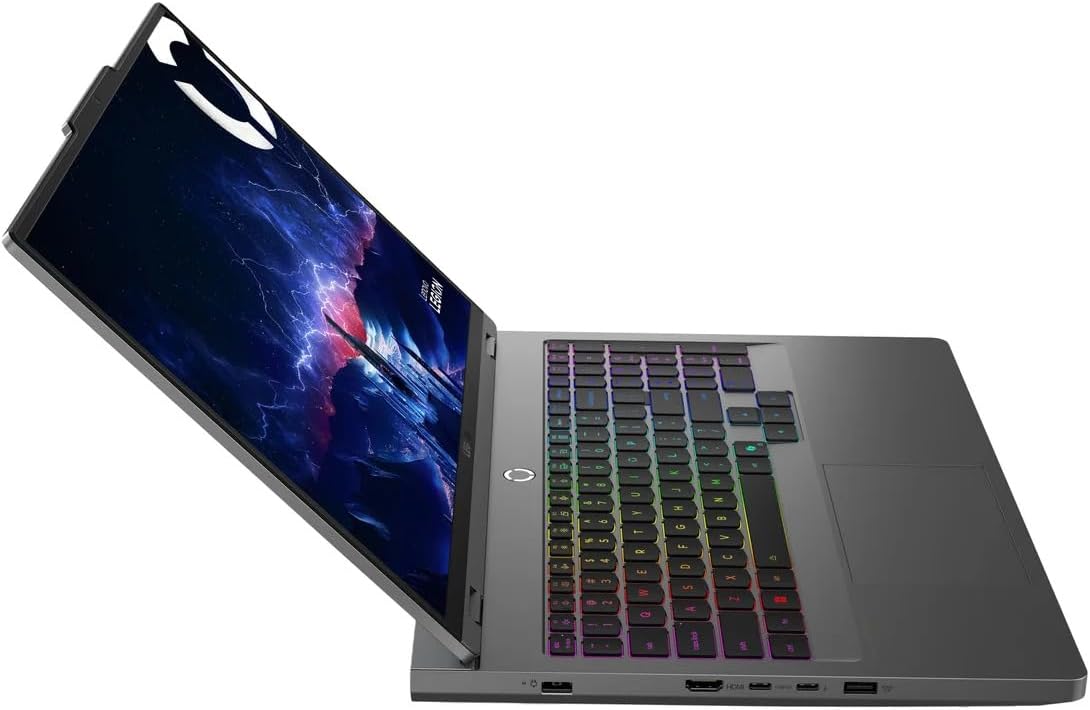
Слика: Страна view of the Lenovo Legion 5 16IAX10, illustrating the various input/output ports available.
Одржување
Чистење на вашиот лаптоп
To maintain optimal performance and appearance, regularly clean your laptop. Use a soft, lint-free cloth dampened with water or a specialized screen cleaner for the display. For the keyboard and chassis, use a soft cloth. Avoid harsh chemicals or abrasive materials.
Нега на батерии
The laptop is equipped with an 80Wh Lithium-Ion battery. To prolong battery life, avoid fully discharging the battery frequently. For extended storage, charge the battery to approximately 50-60% and store the laptop in a cool, dry place.
Софтверски ажурирања
Regularly update your Windows operating system, drivers (especially graphics drivers), and Lenovo software to ensure system stability, security, and performance. These updates often include performance enhancements and bug fixes.
Вентилација
Ensure the laptop's ventilation openings are clear and unobstructed to prevent overheating. Operating the laptop on soft surfaces like beds or carpets can block airflow. Periodically clean dust from the vents using compressed air.

Слика: Дното view of the Lenovo Legion 5 16IAX10, showing the extensive ventilation grilles designed for efficient cooling.
Решавање проблеми
This section addresses common issues you might encounter with your Lenovo Legion 5 16IAX10.
Нема струја / Лаптопот не се вклучува
- Осигурајте се дека адаптерот за наизменична струја е безбедно поврзан и со лаптопот и со функционален штекер.
- Проверете дали штекерот е функционален со вклучување на друг уред.
- Обидете се да го држите копчето за вклучување 10-15 секунди за да извршите хардверско ресетирање.
Прикажи прашања
- Ако екранот е празен, проверете дали лаптопот е вклучен.
- Connect an external monitor to check if the issue is with the laptop's display or the graphics output.
- Ажурирајте ги драјверите за графика.
Забавување на перформансите
- Затворете ги непотребните апликации што работат во позадина.
- Проверете и инсталирајте ги сите чекачки ажурирања за Windows или драјвери.
- Ensure the laptop's vents are not blocked and it is not overheating.
- Извршете скенирање за малициозен софтвер.
Wi-Fi or Bluetooth Connectivity Problems
- Проверете дали Wi-Fi и Bluetooth се овозможени во поставките на Windows.
- Рестартирајте го вашиот рутер/модем за проблеми со Wi-Fi.
- Update your wireless and Bluetooth drivers.
- Try forgetting and re-connecting to the network or device.
За посложени проблеми, погледнете ја поддршката на Lenovo. webсајт или контактирајте со службата за корисници.
Спецификации
Detailed technical specifications for the Lenovo Legion 5 16IAX10 Gaming Laptop (Model 83NX0000US):
| Компонента | Спецификација |
| Име на моделот | Легија 5 16IAX10 |
| Број на модел на ставка | 83NX0000US |
| Процесор | Intel Core Ultra 9 275HX (Up to 5.4GHz, 24 Cores: 8P+12E, 24 Threads, 36 MB Intel Smart cache) |
| Графика | NVIDIA GeForce RTX 5060 8GB GDDR7 |
| Приказ | 16" WQXGA (2560 x 1600) IPS 240Hz, 500 nits, Anti-glare, 100% DCI-P3, Dolby Vision, DisplayHDR, G-SYNC |
| RAM меморија | 32GB DDR5 SDRAM 5600 MHz |
| Складирање | 1TB NVMe M.2 SSD |
| Оперативен систем | Windows 11 Home |
| Тастатура | 24-Zone RGB Backlit Keyboard with Numpad |
| Безжично поврзување | MediaTek Wi-Fi 7 (2x2), Bluetooth 5.4 |
| Пристаништа | 1x USB-C Thunderbolt 4, 1x USB-C 3.2 Gen 2, 1x USB 3.2 Gen 2 (Always On), 2x USB 3.2 Gen 1, 1x HDMI v2.1, 1x RJ-45, 1x Headphone/Mic Combo Jack |
| Webкамера | Камера од 5.0 MP |
| Батерија | 80Wh литиум-јонска батерија (просечно траење на батеријата до 6 часа) |
| Адаптер за напојување | 245W AC адаптер |
| Димензии (ДxШxВ) | 14.37 x 10.58 x 1.03 инчи |
| Тежина | 8.18 фунти |
| Боја | Бура Греј |
Информации за гаранцијата
Your Lenovo Legion 5 16IAX10 Gaming Laptop comes with a 12-month warranty. This warranty covers manufacturing defects and hardware malfunctions under normal use. For specific terms, conditions, and to register your product, please visit the official Lenovo support webстраница. Зачувајте го доказот за купување за гаранциски побарувања.
Поддршка
For further assistance, technical support, driver downloads, or service requests, please visit the official Lenovo Support website. You can also find FAQs and community forums there to help resolve common issues.
Поддршка на Lenovo Webсајт: поддршка.lenovo.com