1. Вовед
This manual provides essential information for the safe and efficient operation of your Telefunken 50FTV825 50-inch 4K UHD Smart Fire TV. Please read these instructions thoroughly before using the television and retain them for future reference.
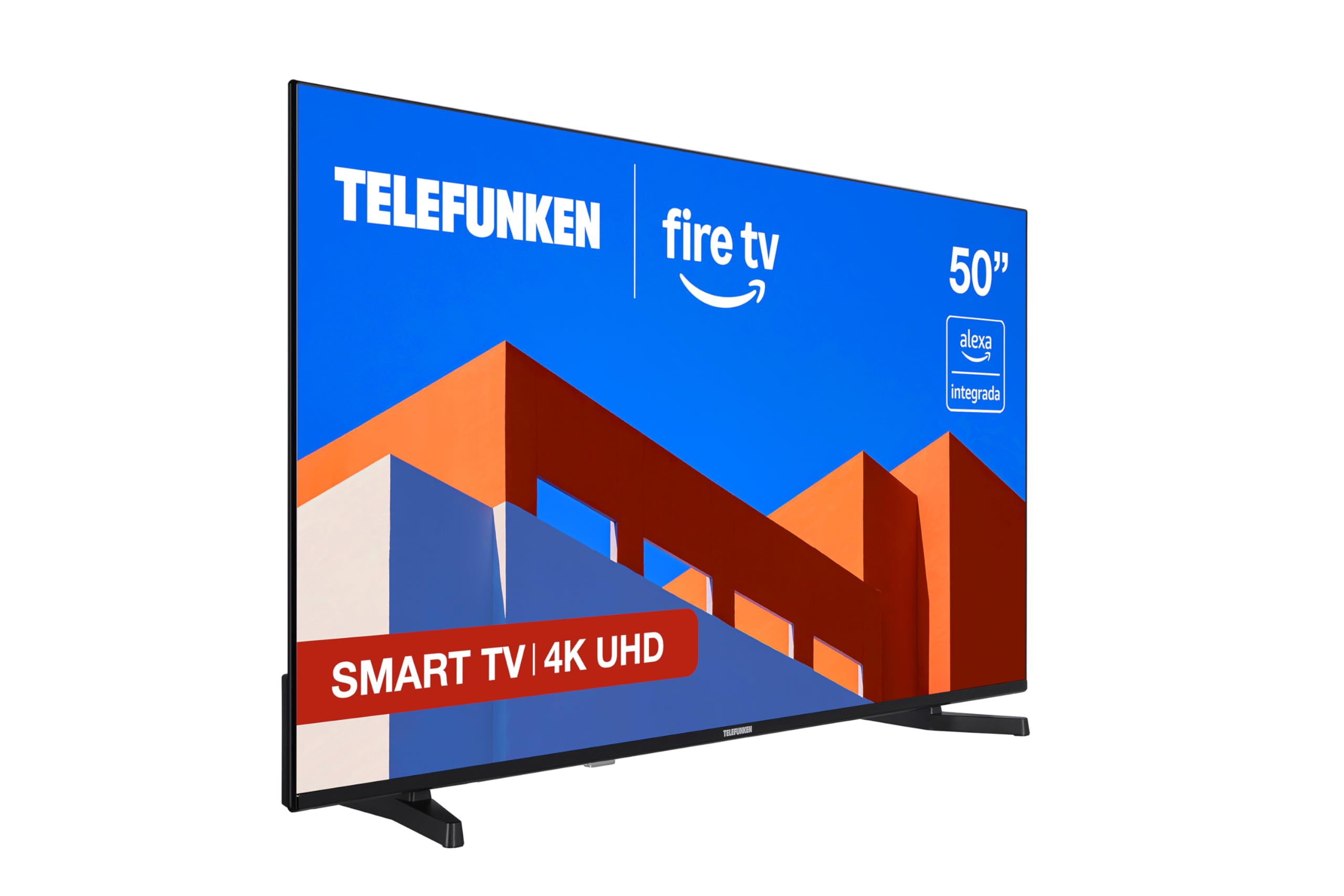
Слика: напред view of the Telefunken 50FTV825 50-inch 4K UHD Smart Fire TV.
2. Информации за безбедност
Секогаш следете ги основните безбедносни мерки на претпазливост при користење на овој телевизор за да го намалите ризикот од пожар, електричен удар и повреди.
- Не го изложувајте телевизорот на дожд или влага.
- Обезбедете соодветна вентилација околу телевизорот.
- Do not block ventilation openings with items like newspapers, table-cloths, or curtains.
- Do not place the TV on unstable carts, stands, tripods, brackets, or tables.
- Исклучете го телевизорот од струја за време на грмотевици или кога не се користи подолг период.
- Целото сервисирање упатете го на квалификуван сервисен персонал.
3. Што има во кутијата
По отпакувањето, проверете дали сите компоненти се присутни:
- Telefunken 50FTV825 50-inch 4K UHD Smart Fire TV
- Далечински управувач
- Батерии (за далечинско управување)
- Упатство за употреба (овој документ)
4. Поставување
4.1. Прикачување на држачот или монтирање на ѕид
Carefully place the TV face down on a soft, flat surface. Attach the stand using the provided screws, ensuring it is securely fastened. If wall-mounting, follow the instructions provided with your VESA-compatible wall mount (sold separately).
4.2. Поврзување на напојување и уреди
- Поврзете го кабелот за напојување со телевизорот, а потоа со штекер.
- Connect external devices (e.g., cable box, gaming console, Blu-ray player) to the HDMI ports.
- For internet access, connect an Ethernet cable to the LAN port or prepare for Wi-Fi setup.
4.3. Волшебник за почетно вклучување и поставување
Press the power button on the remote control. The TV will guide you through the initial setup process, including language selection, network connection, and Fire TV account login.
5. Operating Your Telefunken Fire TV
5.1. Интерфејс за исклучување на телевизорот
Your TV features an integrated Fire OS, providing access to a wide range of streaming services and applications. Navigate the home screen using the remote control to browse content from Netflix, Prime Video, Disney+, and more.

Image: The Fire TV home screen displaying available streaming applications.
5.2. Гласовна контрола на Alexa
The remote control includes an integrated Alexa button. Press and hold this button to activate voice commands. You can ask Alexa to:
- Променете канали или прилагодете ја јачината на звукот.
- Пребарај за movies, TV shows, or music.
- Контролирајте компатибилни паметни домашни уреди.
- Проверете ја временската прогноза или добијте информации.

Image: Close-up of the remote control highlighting the Alexa voice button.
5.3. Apple AirPlay
Utilize Apple AirPlay to stream content directly from your iPhone, iPad, or Mac to the television. This allows for easy sharing of photos, videos, and screen mirroring without complex configurations.
5.4. Подобрувања на сликата и звукот
- 4K UHD + HDR10: Experience stunning visuals with four times the resolution of Full HD, enhanced by HDR10 for vibrant colors and deep contrasts.
- Dolby Audio: Enjoy immersive and clear sound quality, bringing movies, series, and games to life.
- MEMC: Motion Estimation, Motion Compensation technology ensures smoother motion in fast-paced scenes.
6. Одржување
6.1. Чистење на екранот
Нежно избришете го екранот со мека, сува крпа што не остава влакненца. За тврдокорни дамки, лесно избришете гоampИзмијте ја крпата со вода или со специјализирано средство за чистење екрани. Избегнувајте употреба на груби хемикалии или абразивни материјали.
6.2. Чистење на кабинетот
Wipe the TV cabinet with a soft, dry cloth. Do not use liquid or aerosol cleaners directly on the cabinet.
6.3. Софтверски ажурирања
Your Fire TV will periodically receive software updates. Ensure your TV is connected to the internet to receive these updates, which improve performance and add new features.
7 Смена на проблеми
Доколку наидете на проблеми со вашиот телевизор, погледнете ги следниве вообичаени решенија:
| Проблем | Можна причина | Решение |
|---|---|---|
| Нема моќ | Power cord not connected, power outlet not working. | Проверете го поврзувањето на кабелот за напојување. Тестирајте го штекерот со друг уред. |
| Нема слика, но звукот е присутен | Избран е неточен влезен извор. | Притиснете го копчето „Влез“ на далечинскиот управувач за да го изберете точниот извор. |
| Нема звук, но сликата е присутна | Volume is muted or too low. External audio device issues. | Unmute or increase volume. Check connections to external audio systems. |
| Далечинскиот управувач не работи | Batteries are dead or incorrectly inserted. Obstruction between remote and TV. | Replace batteries. Ensure clear line of sight to the TV's IR sensor. |
| Проблеми со Wi-Fi конекцијата | Incorrect password, router issues, TV too far from router. | Re-enter Wi-Fi password. Restart router. Move TV closer to router or use Ethernet. |
For further assistance, please contact Telefunken customer support.
8. Спецификации
| Карактеристика | Детал |
|---|---|
| Бренд | Телефункен |
| Број на модел | 50FTV825 |
| Големина на екранот | 50 инчи |
| Технологија на прикажување | LED |
| Резолуција | 4K UHD (3840 x 2160) |
| Стапка на освежување | 120 Hz |
| Оперативен систем | Огнен оперативен систем |
| Посебни карактеристики | Alexa Compatible, Bezel-less Design, VESA Wall Mountable, HDR - HLG, Smart TV |
| Технологија за поврзување | Bluetooth, Ethernet, HDMI, USB, Wi-Fi |
| Сооднос на аспект | 16:9 |
| Димензии на производот (Ш x Д x В) | 112 x 26.1 x 68.6 cm |
| Тежина на производот | 9.56 кг |
| Земја на потекло | Турција |
| Оцена за енергетска ефикасност (SDR) | E |
| Оценка за енергетска ефикасност (HDR) | G |
For detailed energy information, refer to the product information sheet and energy label:

Image: Product Information Sheet detailing technical specifications and energy consumption.
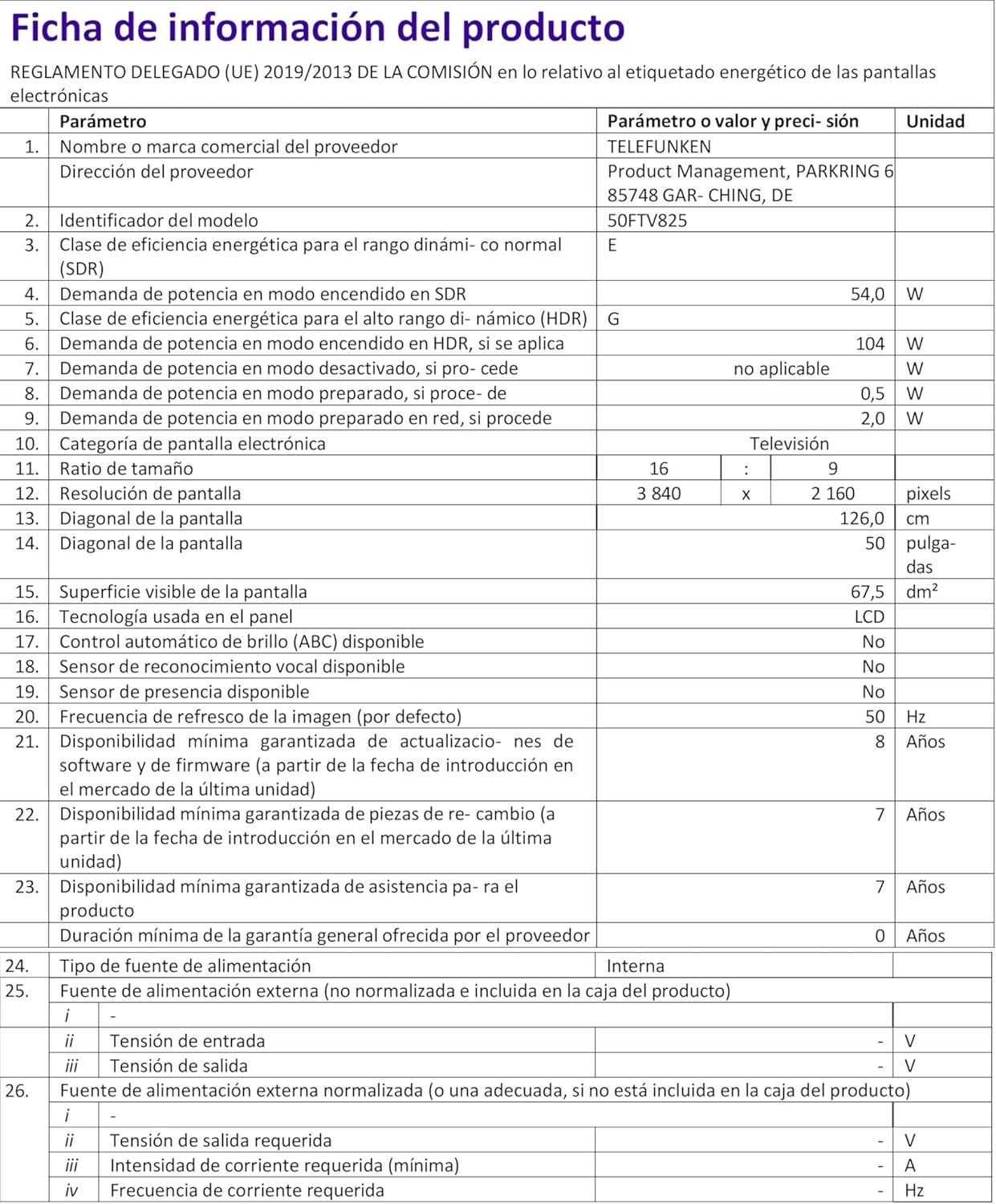
Image: Energy Efficiency Label showing ratings for SDR and HDR modes.
Additional energy information can be found at: https://eprel.ec.europa.eu/qr/2400040
9. Гаранција и поддршка
Your Telefunken 50FTV825 television comes with a standard manufacturer's warranty. Please refer to the warranty card included in your packaging for specific terms and conditions, including warranty duration and coverage details.
For technical support, troubleshooting assistance beyond this manual, or warranty claims, please contact Telefunken customer service through their official webлокација или контакт информациите наведени во вашата гарантна документација.


