Вовед
The MAONO PD100W is a versatile wireless and USB dynamic microphone designed for high-quality audio recording, streaming, podcasting, and gaming. It offers dual-mode connectivity, advanced noise reduction, customizable RGB lighting, and real-time monitoring for a professional audio experience.
Што има во кутијата
- Wireless Dynamic Microphone with Stand
- RX USB-C Receiver
- 2-in-1 USB-A&C to USB-C Charging Cable
- 2-in-1 USB-A&C to USB-C Adapter
- Упатство за употреба
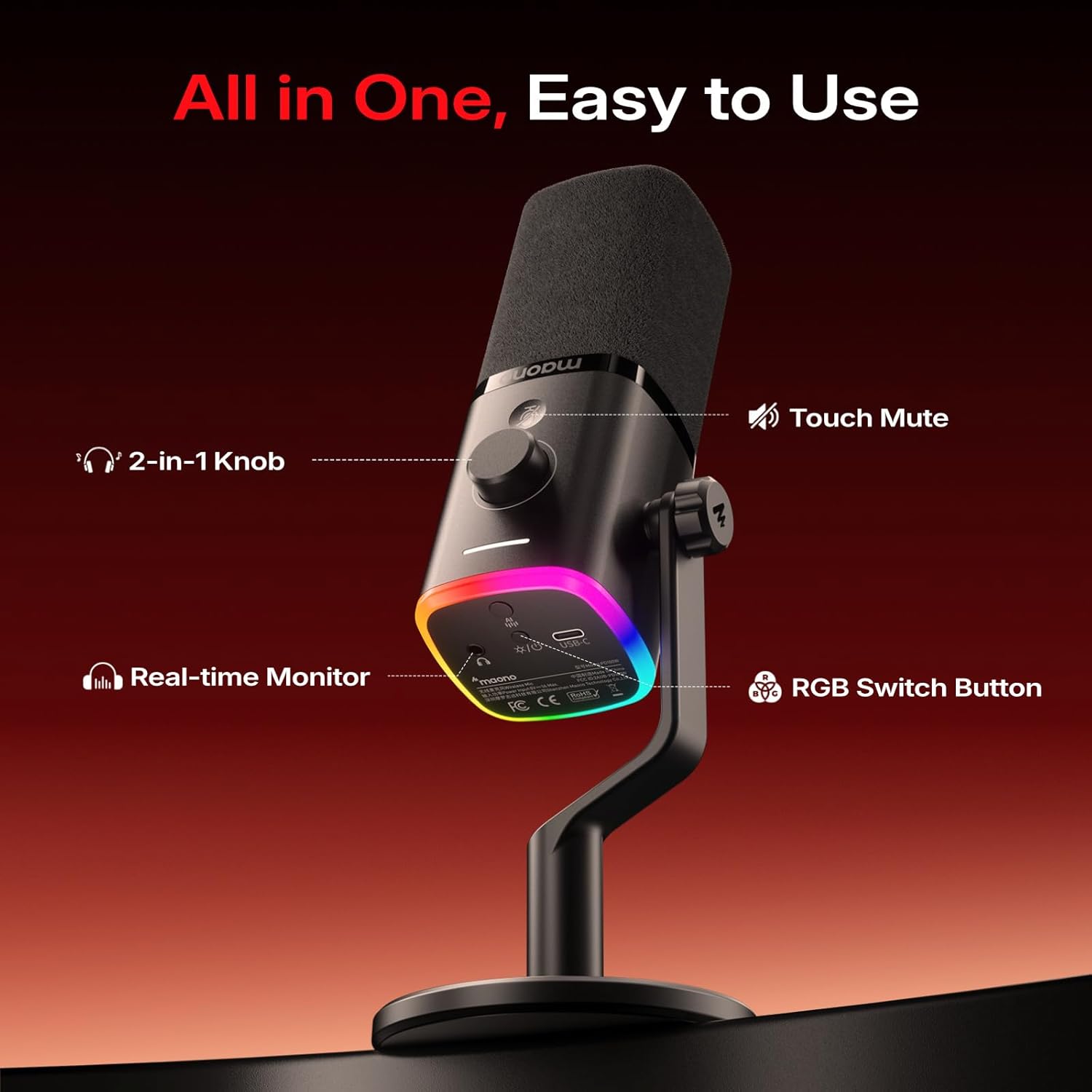
Image: Contents of the MAONO PD100W package. Includes the microphone with its desk stand, a USB-C receiver, a USB-A&C to USB-C charging cable, a USB-A&C to USB-C adapter, and the user manual.
Инструкции за поставување
Составување на микрофонот
- Attach the microphone to the included desk stand by screwing it onto the 3/8-inch or 5/8-inch thread.
- Ensure the microphone is securely fastened to prevent accidental movement.

Слика: Крупен план view of the microphone's base showing the dual-thread design (3/8-inch and 5/8-inch) for attaching to the desk stand or other compatible mounts.
Поврзување со уреди
The MAONO PD100W supports both wireless (2.4G) and USB wired connections.
Безжичен режим (2.4G)
- Insert the RX USB-C Receiver into your device's USB-C port (PC, Laptop, Phone, PS5). Use the provided 2-in-1 USB-A&C to USB-C Adapter if your device only has a USB-A port.
- Press and hold the power button at the bottom of the microphone to turn it on. The RGB lights will illuminate.
- The microphone and receiver should automatically pair. A stable indicator light on the microphone confirms a successful connection.
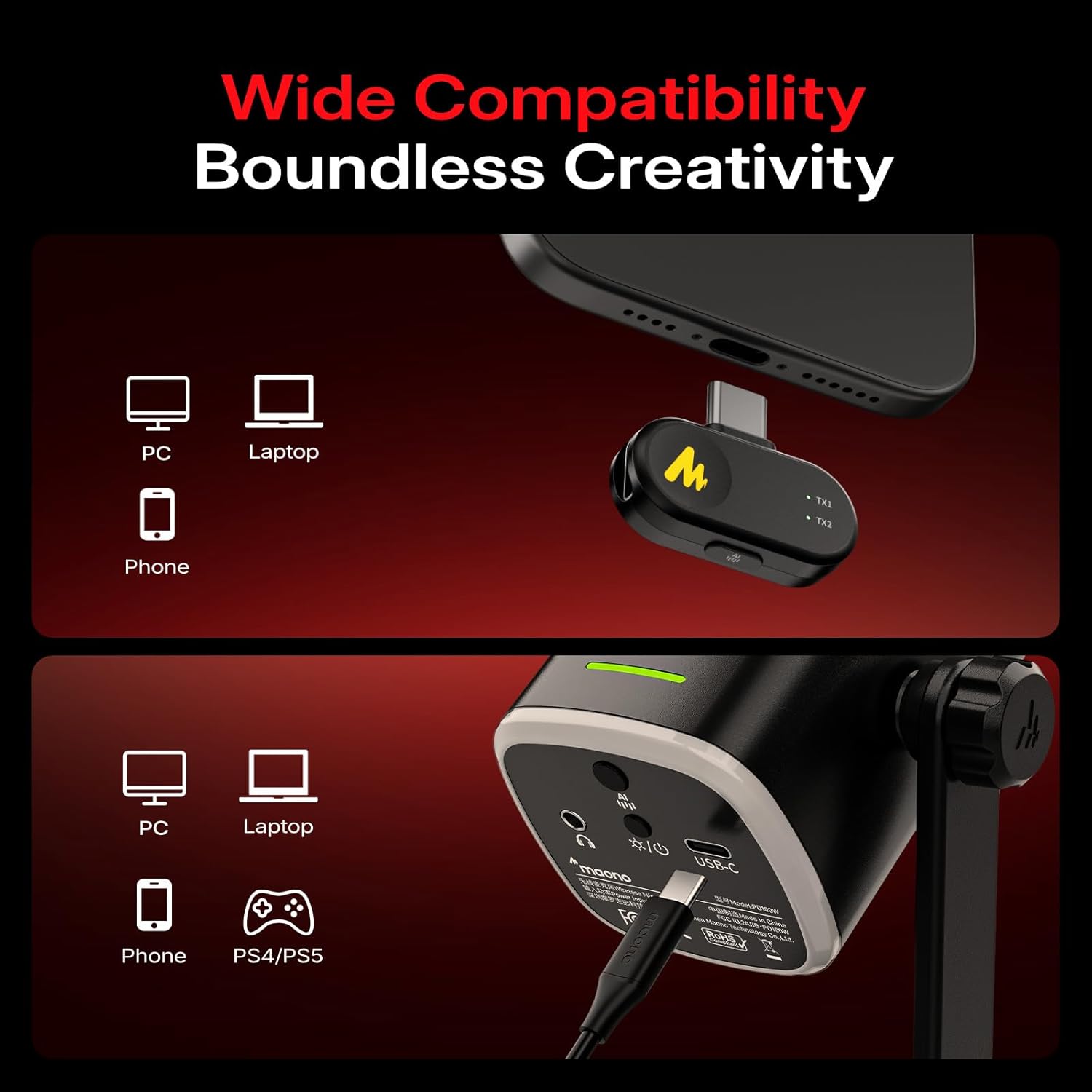
Image: A visual guide illustrating how to connect the MAONO PD100W microphone to various devices (PC, laptop, phone, PS5) using both wireless (via USB-C receiver) and wired (via USB-C cable) methods.
УСБ-жичен режим
- Connect the microphone to your device (PC, Laptop, Phone, PS5) using the provided 2-in-1 USB-A&C to USB-C Charging Cable.
- The microphone will be recognized as an audio input device. No additional drivers are typically required for basic functionality.
Упатства за работа
Вклучување/исклучување
Press and hold the power button located at the bottom of the microphone to turn it on or off.
Функција за исклучување
Tap the touch-sensitive mute button on the microphone for instant silence. The RGB lights will turn off when muted, providing a visual indicator.
Намалување на бучавата
The microphone features one-click noise reduction with 3 adjustable levels (low, medium, high). Press the dedicated noise reduction button to cycle through the levels or activate/deactivate the feature. This helps isolate background noises from your computer, keyboard, and fan.
Video: This video demonstrates the indicator light guide for the MAONO PD100W microphone, showing how different light patterns correspond to various functions like charging, mute, volume adjustment, gain adjustment, noise reduction levels, and RGB lighting modes.
Gain and Volume Control
Use the 2-in-1 smart knob to adjust both microphone gain and headphone volume. Short press the knob to switch between controlling gain (white indicator light) and headphone volume (blue indicator light).
Мониторинг во реално време
The 3.5mm headphone jack allows you to monitor your audio in real-time, ensuring optimal sound quality during recording or streaming.
Приспособливо RGB осветлување
The microphone features customizable RGB lighting with multiple colors and 3 lighting modes. Press the RGB switch button to cycle through 8 dynamic colors or turn the lighting off. Brightness and color customization can also be managed via the Maono Link software.

Image: A user interacting with the MAONO PD100W microphone, highlighting its customizable RGB lighting feature. The microphone is placed on a desk with a computer setup.
Maono Link Software
The accompanying Maono Link software, compatible with Windows, iOS, and Android, allows for fine-tuning of various microphone settings:
- Прилагодување на EQ: Customize the equalizer settings for your desired sound profile.
- Намалување на бучавата: Adjust noise cancellation levels beyond the hardware buttons.
- RGB ефекти: Personalize lighting effects, brightness, and color.
- Поставки за звук: Utilize one-click presets for vocal recording, streaming, and podcasting.
- Индикатор за батерија: Monitor real-time battery levels.

Image: Screenshots of the Maono Link software interface on both a laptop and a smartphone, displaying options for microphone gain, monitor volume, noise reduction, scene modes, and RGB lighting controls.
Траење на батеријата
The MAONO PD100W features a built-in 1500 mAh rechargeable battery, offering up to 40 hours of continuous use on a single charge. An orange indicator flashes when the battery level drops below 20%. Real-time battery monitoring is available via the Maono Link software.
Спецификации
| Карактеристика | Детал |
|---|---|
| Аудио чувствителност | 94 децибели |
| Импеданса | 32 оми |
| Форма фактор на микрофон | Десктоп |
| Извор на енергија | Напојува со батерии, електричен кабел |
| Број на батерии | 1 нестандардна батерија (вклучена) |
| Материјал | Пластика, метал |
| Сооднос на сигнал до бучава | 82 dB |
| Хардверска платформа | Лаптоп, компјутер, паметен телефон |
| Број на канали | 1 |
| Фреквентен одговор | 16000 Hz |
| Тежина на ставката | 1.57 фунти |
| Тип на батерија | Литиум Јон |
| Препорачана употреба | Gaming, Online-Chatting, Recording, Streaming, Video Conference |
| Технологија за поврзување | USB, безжичен |
| Тип на конектор | USB тип-А, USB тип-C |
| Поларен модел | Еднонасочно |
Решавање проблеми
- Нема излез на звук: Ensure the microphone is powered on and correctly connected (either via USB cable or the wireless receiver). Check your device's audio input settings to confirm the MAONO PD100W is selected. Verify that the microphone is not muted and the gain is adequately adjusted.
- Лош аудио квалитет: Adjust the microphone gain to an appropriate level to avoid clipping or low volume. Utilize the built-in noise reduction feature or the Maono Link software to minimize background noise. Ensure the microphone is positioned correctly, ideally 2-6 inches from your mouth.
- Проблеми со безжичната конекција: Ensure the RX USB-C Receiver is securely plugged into your device. If issues persist, try re-pairing the microphone and receiver (refer to the user manual for specific pairing instructions). Check for potential interference from other 2.4Ghz devices.
- RGB светлата не работат: Press the RGB switch button to cycle through modes or turn them on. Check settings in the Maono Link software.
- Батеријата брзо се троши: Ensure the microphone is fully charged before use. Monitor battery levels via the Maono Link software. Reduce RGB brightness or turn off RGB lights if extended battery life is needed.
Одржување
- Чистење: Користете мека, сува крпа за чистење на куќиштето на микрофонот. Избегнувајте употреба на груби хемикалии или абразивни материјали.
- Складирање: Чувајте го микрофонот на ладно и суво место, подалеку од директна сончева светлина и екстремни температури кога не е во употреба.
- Нега на батеријата: For optimal battery longevity, avoid fully discharging the battery frequently. Charge the microphone regularly, even if not in constant use.
Гаранција и поддршка
MAONO products typically come with a manufacturer's warranty. Please refer to the warranty card included in your product packaging or visit the official MAONO website for detailed warranty information and customer support options. For additional product function tutorials and FAQs, please visit https://faq.maono.com.


