Вовед
This manual provides detailed instructions for the proper use, setup, and maintenance of your Trevi EAR 100 AID Wireless Headphones. Please read this manual carefully before using the product to ensure optimal performance and longevity.
Содржина на пакетот
Проверете дали сите артикли се присутни во пакувањето:
- Trevi EAR 100 AID Wireless Headphones (Left and Right Earbuds)
- Футрола за полнење со екран на допир
- USB-C кабел за полнење
- 2 Pairs of Ear Tips (various sizes)
- Упатство за употреба (овој документ)
Производот завршиview
Familiarize yourself with the components of your Trevi EAR 100 AID headphones.
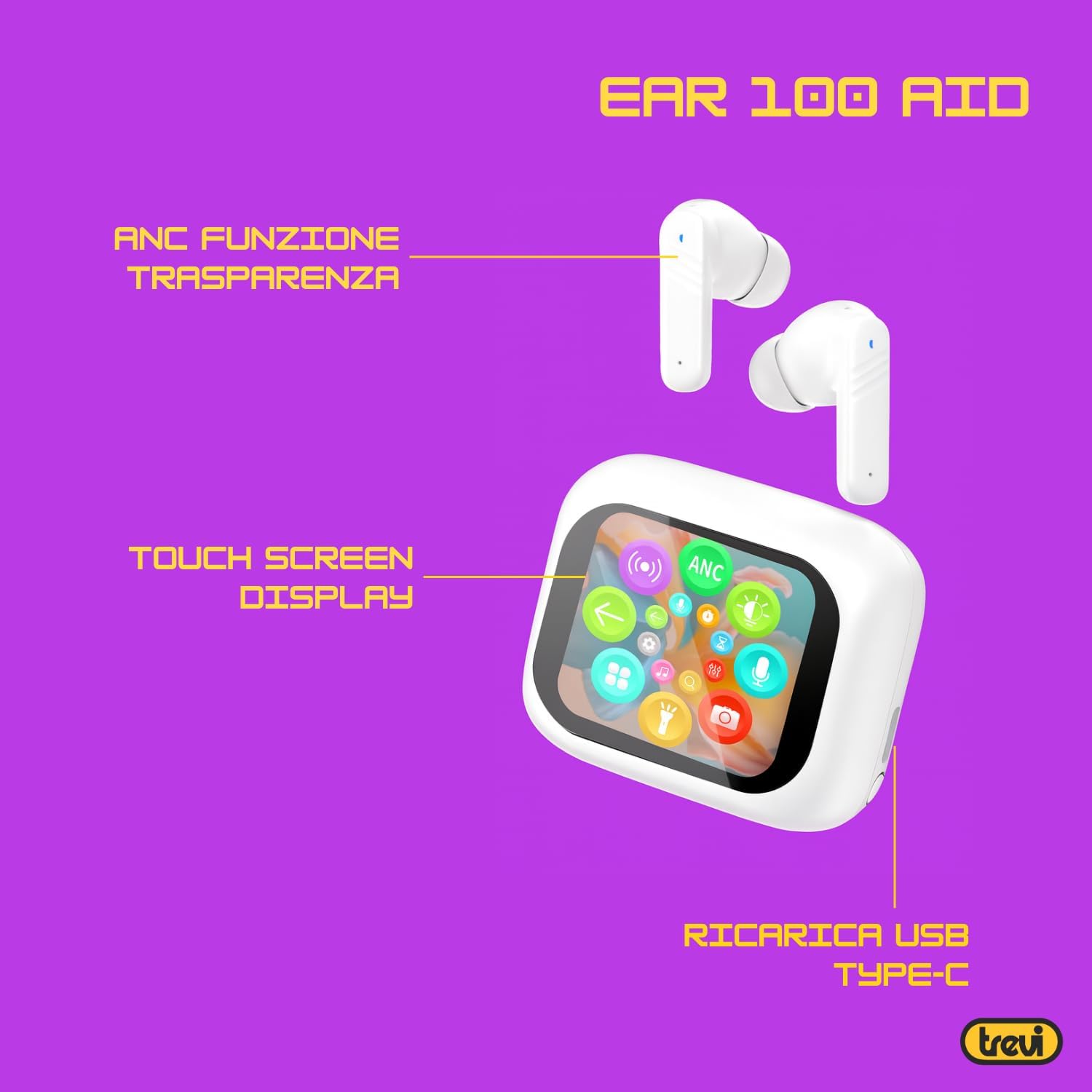
Image: Trevi EAR 100 AID Wireless Headphones and Charging Case. This image shows the earbuds and the charging case from a front-facing perspective.

Слика: Страна view of Trevi EAR 100 AID Wireless Headphones and Charging Case. This image provides a profile view of the earbuds and their charging case.

Слика: Назад view of Trevi EAR 100 AID Wireless Headphones and Charging Case. This image displays the rear aspect of the earbuds and their charging case.

Слика: Надview of Trevi EAR 100 AID features. This graphic highlights the Active Noise Cancellation (ANC) and Transparency function, the Touch Screen Display on the charging case, and the USB-C charging port.
Поставување
1. Полнење на слушалките и футролата
Пред првата употреба, целосно наполнете ги слушалките и кутијата за полнење.
- Ставете ги слушалките во кутијата за полнење.
- Поврзете го USB-C кабелот за полнење со приклучокот за полнење на куќиштето и со извор на енергија.
- The display on the charging case will indicate the charging status.
- A full charge provides up to 5 hours of earbud autonomy, extendable with the charging case.

Image: Smart Charging Case with Rapid Charging. This image shows the open charging case with earbuds inside, emphasizing its quick charging capability via USB Type-C. A QR code for the AI COOL app download is also visible.
2. Спарување со уред
- Проверете дали слушалките се во кутијата за полнење и дали кутијата е отворена.
- На вашиот уред (паметен телефон, таблет итн.), овозможете Bluetooth.
- Пребарај за "Trevi EAR 100 AID" in the list of available Bluetooth devices.
- Select it to pair. A voice prompt will confirm successful connection.
- The headphones use Wireless V5.4 technology for a fast and reliable connection.
3. AI COOL App Installation
For AI simultaneous translation and advanced features, download the AI COOL app.
- Scan the QR code found on the charging case or in the product packaging.
- Алтернативно, посетете https://www.xuanjiai.cn/app/download за да ја преземете апликацијата.
- Follow the on-screen instructions to install and set up the app.
Упатства за работа
1. Носење на слушалките
Select the appropriate ear tips for a comfortable and secure fit. Insert the earbuds gently into your ears and adjust them until they feel snug.

Image: A woman wearing Trevi EAR 100 AID earbuds comfortably while relaxing in a park. This illustrates the in-ear fit and comfort of the headphones.
2. Touch Controls on Charging Case Display
The charging case features a touch display for smart controls.
- Репродукција на музика: Control play, pause, skip tracks directly from the display.
- Управување со повици: Одговарајте, завршувајте или одбивајте повици.
- Аудио режими: Префрлувајте се помеѓу режимите ANC, Транспарентност и Нормално.
- Еквилајзер (EQ): Прилагодување на звукотfiles.
- Пронајдете слушалки: Use this function to locate misplaced earbuds.

Image: Trevi EAR 100 AID charging case with color LED touch screen. The screen displays various functions such as call answering, music playback, and other smart controls.

Image: Customizable screen options for the Trevi EAR 100 AID charging case. This image shows four dynamic and one static high-quality display options that can be changed at any time.
3. Активно поништување на бучава (ANC) и режим на транспарентност
The headphones offer two distinct audio modes for different environments:
- Активно поништување на шум (ANC): Eliminates external noise, providing a quiet listening experience. This mode is ideal for travel or noisy environments, reducing external noise by up to 35 dB with an effectiveness of up to 99.44%.
- Режим на транспарентност: Allows you to hear your surroundings while still enjoying your audio. This is useful for situations where you need to be aware of your environment, such as walking in a city or listening to announcements.
Switch between these modes using the touch controls on the charging case or through the connected app.

Image: A person using Trevi EAR 100 AID earbuds on an airplane, demonstrating the deep active noise reduction (ANC) feature. The image highlights the intelligent external noise cancellation up to 35 dB.
4. AI Simultaneous Translation
Utilize the AI COOL app for real-time language translation.
- Ensure the AI COOL app is installed and connected to your headphones.
- Open the app and select the desired translation mode (e.g., conversation mode, interpreter mode).
- Speak into your device's microphone or the earbud's microphone, and the translation will be provided in real-time through the earbuds.
- This feature is designed for seamless communication across language barriers during travel, work, or multilingual conversations.
5. Clear Calls with ENC Technology
The headphones feature Environmental Noise Cancellation (ENC) technology for clear voice calls.
- ENC reduces background noise during calls, making your voice clearer to the person on the other end.
- This technology is optimized for crowded environments, ensuring conversations are clear and free from interference.

Image: A man making a phone call using Trevi EAR 100 AID earbuds. This image illustrates the ENC (Environmental Noise Cancellation) technology for clear calls, optimized for crowded environments.
Одржување
- Чистење: Редовно чистете ги слушалките и кутијата за полнење со мека, сува крпа што не остава влакненца. Не користете абразивни средства за чистење или растворувачи.
- Совети за уши: Remove and clean the ear tips with mild soap and water, then dry thoroughly before reattaching.
- Складирање: Кога не ги користите, чувајте ги слушалките во нивната кутија за полнење за да ги заштитите од прашина и оштетување.
- Нега на батеријата: За да го зачувате животниот век на батеријата, избегнувајте често целосно празнење на батеријата. Полнете го уредот редовно, дури и ако не го користите подолг период.
Решавање проблеми
| Проблем | Можно решение |
|---|---|
| Слушалките не се вклучуваат. | Ensure the charging case and earbuds are fully charged. Place earbuds in the case and close it, then open again. |
| Не може да се спари со уредот. | Make sure Bluetooth is enabled on your device. Ensure earbuds are in pairing mode (usually by opening the case). Forget the device from your Bluetooth list and try pairing again. |
| Нема звук или има ниска јачина на звук. | Check volume levels on both your device and the headphones. Ensure earbuds are properly seated in your ears. Reconnect the Bluetooth connection. |
| Преводот со вештачка интелигенција не работи. | Verify the AI COOL app is installed, updated, and properly connected to the headphones. Check your internet connection for translation services. |
| Проблеми со полнењето. | Check the USB-C cable and power adapter. Ensure the charging contacts on the earbuds and case are clean and free of debris. |
Спецификации
| Карактеристика | Детал |
|---|---|
| Бренд | Треви |
| Име на моделот | EAR 100 AID |
| Боја | Бело |
| Поставување на увото | Во уво |
| Форма фактор | Во уво |
| Контрола на бучава | Активно откажување на бучавата (ANC) |
| Џек за слушалки | No Jack (Wireless) |
| Технологија за поврзување | Безжичен |
| Технологија на безжична комуникација | Bluetooth V5.4 |
| Вклучени компоненти | 2 Ear Tips, Cable, User Manual |
| Траење на батеријата (слушалки) | Up to 5 hours (extendable with charging case) |
| ANC Effectiveness | Up to 35 dB reduction, 99.44% shielding effectiveness |
Гаранција и поддршка
For warranty information and technical support, please refer to the official Trevi webлокација или контактирајте ја нивната служба за корисници. Зачувајте го доказот за купување за гаранциски барања.
За понатамошна помош, посетете ја Trevi Store on Amazon.


