Вовед
Thank you for choosing Kanto UKI 100W Active Desktop Computer Speakers. These speakers are designed to provide an elevated audio experience for your music, games, and movies, featuring seamless connectivity and intelligent subwoofer integration. This manual will guide you through the setup, operation, and maintenance of your new speakers.

Kanto UKI Speakers: Shaped by nature, tuned for balance.
Што има во кутијата
- Kanto UKI Active Desktop Computer Speakers (2 units)
- Кабел за напојување
- Жица за звучници
- Водич за брз почеток
Карактеристики на производот
- Богат звук: Би-amplified design delivering 100W to 3" woofers and ¾" silk dome tweeters for smooth mids and airy highs.
- Беспрекорно поврзување: USB-C, Bluetooth, and RCA inputs for versatile device connection.
- Intelligent Sub Integration: Automatically routes frequencies below 100 Hz to a connected subwoofer for balanced, full-range sound.
- Everyday Ease of Use: Intuitive controls, including a front-mounted control knob for volume, input switching, and power. Stereo orientation can be flipped for convenience.
- Compact, Stylish Design: Space-saving form factor with various color options to complement any workspace.

Key features of Kanto UKI speakers.
Поставување
1. Поставување звучници
Place the active speaker (with controls and inputs) on your preferred side (left or right). The passive speaker connects to the active speaker via the included speaker wire. For optimal sound, position speakers at ear level and equidistant from your listening position.

Kanto UKI speakers integrated into a desktop workspace.
2. Поврзување на звучниците
Connect the active speaker to the passive speaker using the provided speaker wire. Ensure correct polarity (positive to positive, negative to negative) for optimal audio performance.

Rear panel of Kanto UKI speakers with connection ports.
3. Поврзување за напојување
Connect the power cord to the active speaker and then to a wall outlet.
4. Поврзување со аудио извор
The Kanto UKI offers multiple input options:
- USB-C: Connect your computer or laptop using a USB-C cable for high-quality digital audio.
- Bluetooth: For wireless connection, refer to the 'Operating Instructions' section for pairing.
- RCA: Use RCA cables to connect analog audio sources.
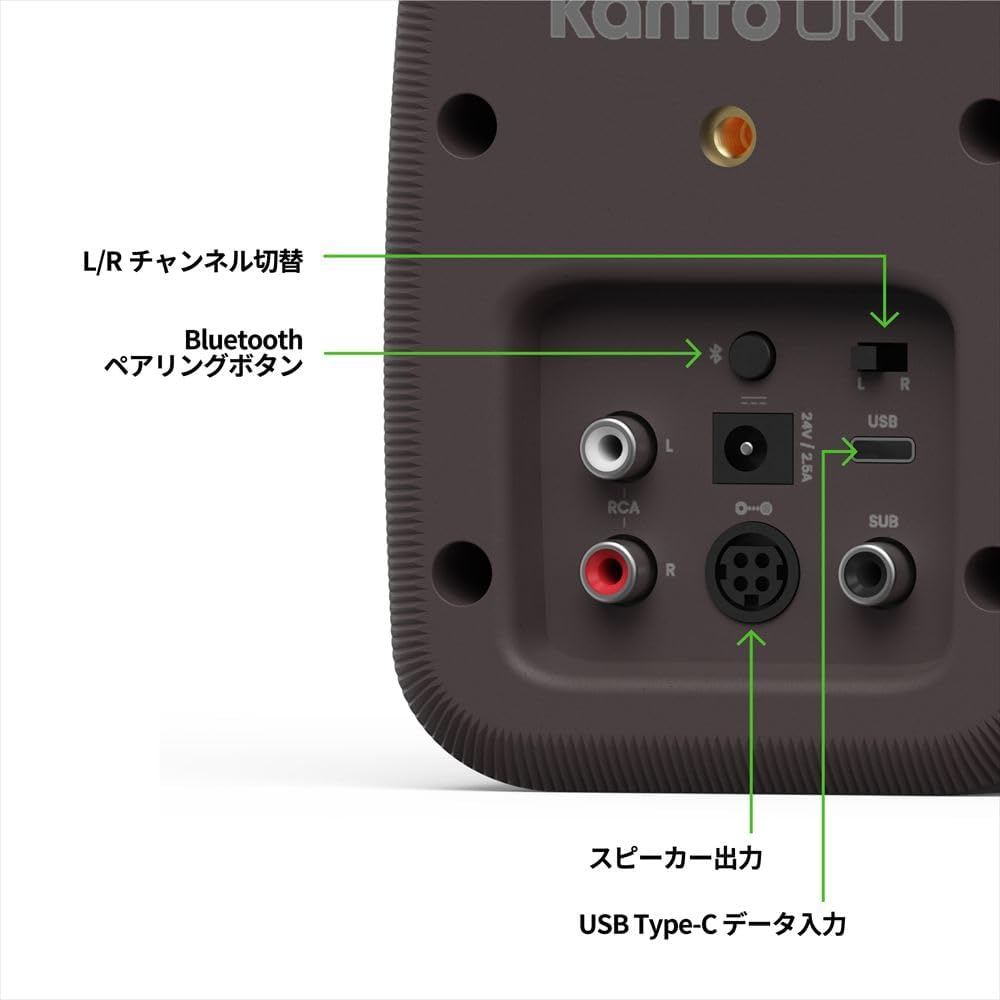
Детално view of Kanto UKI connectivity options.
5. Subwoofer Integration (Optional)
If you wish to add a subwoofer, connect it to the 'SUB OUT' port on the active speaker. The UKI speakers will automatically route frequencies below 100 Hz to the subwoofer, optimizing the sound profile.

Kanto UKI speakers with an optional subwoofer.
Упатства за работа
1. Вклучување/исклучување и контрола на јачината на звукот
Use the front-mounted control knob on the active speaker to turn the speakers on or off and adjust the volume.
2. Избор на влез
Press the control knob to cycle through the available inputs (USB-C, Bluetooth, RCA).
3. Bluetooth спарување
- Select Bluetooth input using the control knob.
- On your device, search for 'Kanto UKI' in the Bluetooth settings and select to pair.
- The LED indicator on the speaker will confirm successful pairing.
4. Stereo Orientation
A switch on the rear of the active speaker allows you to flip the stereo orientation (Left/Right) to ensure the headphone output and controls are always within easy reach, regardless of speaker placement.

Adjusting stereo orientation for convenience.
5. Излез на слушалки
Connect your headphones to the front-mounted headphone jack for private listening. The speakers will automatically mute when headphones are connected.
Одржување
1. Чистење
Wipe the speaker cabinets with a soft, dry cloth. Avoid using harsh chemicals or abrasive cleaners, as they may damage the finish.
2. Општа нега
Keep the speakers away from direct sunlight, heat sources, and moisture. Ensure adequate ventilation around the speakers to prevent overheating.
Решавање проблеми
Нема звук
- Проверете дали звучниците се вклучени и дали јачината на звукот е зголемена.
- Check all cable connections (power, speaker wire, audio source).
- Verify the correct input source is selected on the speakers.
- Ако користите Bluetooth, проверете дали уредот е поврзан и во опсег.
- If headphones are connected, disconnect them to enable speaker output.
Искривен звук
- Намалете ја јачината на звукот и на звучниците и на аудио изворот.
- Проверете дали има лабави или оштетени кабли.
- Ensure the audio source is not overdriving the speakers.
Проблеми со спарување Bluetooth
- Ensure the speakers are in Bluetooth pairing mode.
- Заборавете го уредот од поставките за Bluetooth и обидете се повторно да го спарите.
- Move your device closer to the speakers to ensure it is within range.
Спецификации
| Карактеристика | Детал |
|---|---|
| Тип на монтирање | Компјутерски звучник |
| Материјал | Пластика |
| Име на моделот | UKIDSBB |
| Тип на звучник | Компјутерски звучник |
| Специјална карактеристика | 100W Peak Power (50 Watts Total RMS), 3" Paper Cone Drivers, 3/4" Silk Dome Tweeters, 80 Hz - 22 kHz Frequency Response, Class D Bi-Ampживописен |
| Препорачана употреба | Затворен |
| Компатибилни уреди | Desktop, Kanto SU2 |
| Број на единици | 1.0 број (пар) |
| Конфигурација на каналот за опкружувачки звук | 2.0 |
| Боја | Пемза |
| Вклучени компоненти | Power Cord, Quick Start Guide, Speaker Wire, Speakers x 2 |
| Димензии на производот | 4.3" Д x 4.4" Ш x 6.5" В |
| Тежина на ставката | 1.9 килограми (4.18 фунти) |
| Вид на гаранција | Ограничени |
| Број на артикли | 2 |
| Контролен метод | Допир (преку копче) |
| Технологија на безжична комуникација | Bluetooth |
| Големина на звучникот | 3 инчи |
| Извор на енергија | Електричен со кабел |
| Вуфер со дијаметар | 3 инчи |
| Дијаметар на високотонецот | 0.75 инчи |
| Тип на драјвер за аудио | Динамичен драјвер |
| UPC | 800152724669 |

Kanto UKI Speaker Dimensions and Weight.
Официјални видеа за производи
Kanto YU2 Bookshelf Speaker Product Video
An official product video from Walts TV showcasing the Kanto YU2 Bookshelf Speakers, highlighting their design and features. While not the UKI model, it provides insight into Kanto's product philosophy and quality.
Kanto ORA Desktop Speakers Product Review
Еден производ повторноview from Walts TV for the Kanto ORA Desktop Speakers. This video offers a closer look at the features and performance of a similar Kanto desktop speaker model, which can be helpful for understanding the brand's offerings.
Гаранција и поддршка
Информации за гаранцијата
Kanto UKI speakers come with a limited warranty. Please refer to the included Quick Start Guide or visit the official Kanto webстраница за детални услови за гаранција.
Поддршка за корисници
For technical assistance, troubleshooting, or any product-related inquiries, please contact Kanto customer support through their official webстраницата или информациите за контакт дадени во вашето упатство за брз почеток.


