Производот завршиview
The DIERYA DK68 is a 60% compact mechanical keyboard designed for versatility and performance. It features triple-mode connectivity, allowing seamless switching between Bluetooth 5.0, 2.4GHz wireless, and USB-C wired connections. Equipped with clicky blue mechanical switches and vibrant RGB backlighting, it offers a responsive and customizable typing experience for both gaming and office use.

Figure 1: DIERYA DK68 Wireless Mechanical Keyboard showcasing its compact design and RGB lighting.
Содржина на пакетот
Проверете дали сите предмети се присутни во пакувањето:
- DIERYA DK68 Wireless Mechanical Keyboard
- USB-C на USB-A кабел
- Привлечник за клучеви
- 2.4 GHz USB приемник (складиран во задниот дел од тастатурата)
- Упатство за употреба (овој документ)
Поставување и поврзување
The DK68 keyboard supports three connection modes: USB-C wired, 2.4GHz wireless, and Bluetooth 5.0. Choose the mode that best suits your needs.
1. USB-C жичен режим
- Поврзете го испорачаниот USB-C кабел со USB-C портата на тастатурата.
- Поврзете го USB-A крајот од кабелот со слободен USB порт на вашиот компјутер.
- Тастатурата ќе биде автоматски препознаена и подготвена за употреба.
2. Безжичен режим од 2.4 GHz
- Locate the 2.4GHz USB receiver in the compartment on the back of the keyboard.
- Remove the receiver and plug it into an available USB port on your computer.
- Turn on the keyboard using the switch located on the back.
- The keyboard should automatically connect to the receiver. If not, press Fn + G (labeled '2.4G' on the key) to activate 2.4GHz pairing mode.

Figure 2: Triple-mode connectivity options including 2.4GHz wireless.
3. Режим Bluetooth 5.0
Тастатурата може да се поврзе со до три Bluetooth уреди.
- Turn on the keyboard using the switch on the back.
- Притиснете и задржете Fn+Z (labeled 'BT1'), Fn + X (labeled 'BT2'), or Fn + C (labeled 'BT3') for 3-5 seconds until the corresponding key's backlight flashes rapidly. This indicates pairing mode.
- On your device (PC, laptop, tablet, phone), enable Bluetooth and search for "DIERYA DK68".
- Select the keyboard to pair. The key's backlight will stop flashing once connected.
- За да се префрлате помеѓу спарени Bluetooth уреди, едноставно притиснете Fn + Z/X/C.

Слика 3: Bluetooth поврзување за повеќе уреди.
Упатства за работа
Контрола на RGB позадинско осветлување
The DK68 features 20 built-in RGB lighting effects and 16.8 million customizable colors. Use the following key combinations to control the lighting:
- Fn + Backspace: Turn backlighting On/Off.
- Fn+Shift: Switch light colors.
- Fn + Enter: Switch light modes (20 dynamic RGB modes).
- Fn + стрелка нагоре: Зголемете ја осветленоста.
- Fn + стрелка надолу: Decrease brightness.
- Fn + Лева стрелка: Decrease light speed.
- Fn + Десна стрелка: Increase light speed.

Figure 4: RGB lighting control key combinations for the DK68 keyboard.
Key Customization and Macros
The DIERYA DK68 supports full key anti-ghosting and N-Key Rollover (NKRO) for accurate input. For advanced customization, including key remapping, macro programming, and additional lighting effects, dedicated software is available. Please refer to the official DIERYA webстраница за преземање софтвер и упатства.

Figure 5: Full N-Key Rollover and software customization capabilities.
Механички сини прекинувачи
The keyboard is equipped with clicky blue mechanical switches, providing a distinct tactile bump and an audible click with each keystroke. These switches are ideal for users who prefer clear feedback and a satisfying typing experience. They feature a medium 60gf actuation force (±15gf) and 2.3mm travel (±0.6mm), with a lifespan of 50 million clicks.

Слика 6: Детално view of mechanical blue switches and their specifications.
Одржување
Управување со батерии
The keyboard is powered by a 3000mAh lithium battery. To charge, connect the keyboard via the USB-C cable to a power source. The keyboard can be used while charging.
- Usage Time (Backlighting On): До 12 часа.
- Usage Time (Backlighting Off): До 333 часа.
- Режим за автоматско спиење: The keyboard enters auto-sleep mode after 3 minutes of inactivity to conserve power.
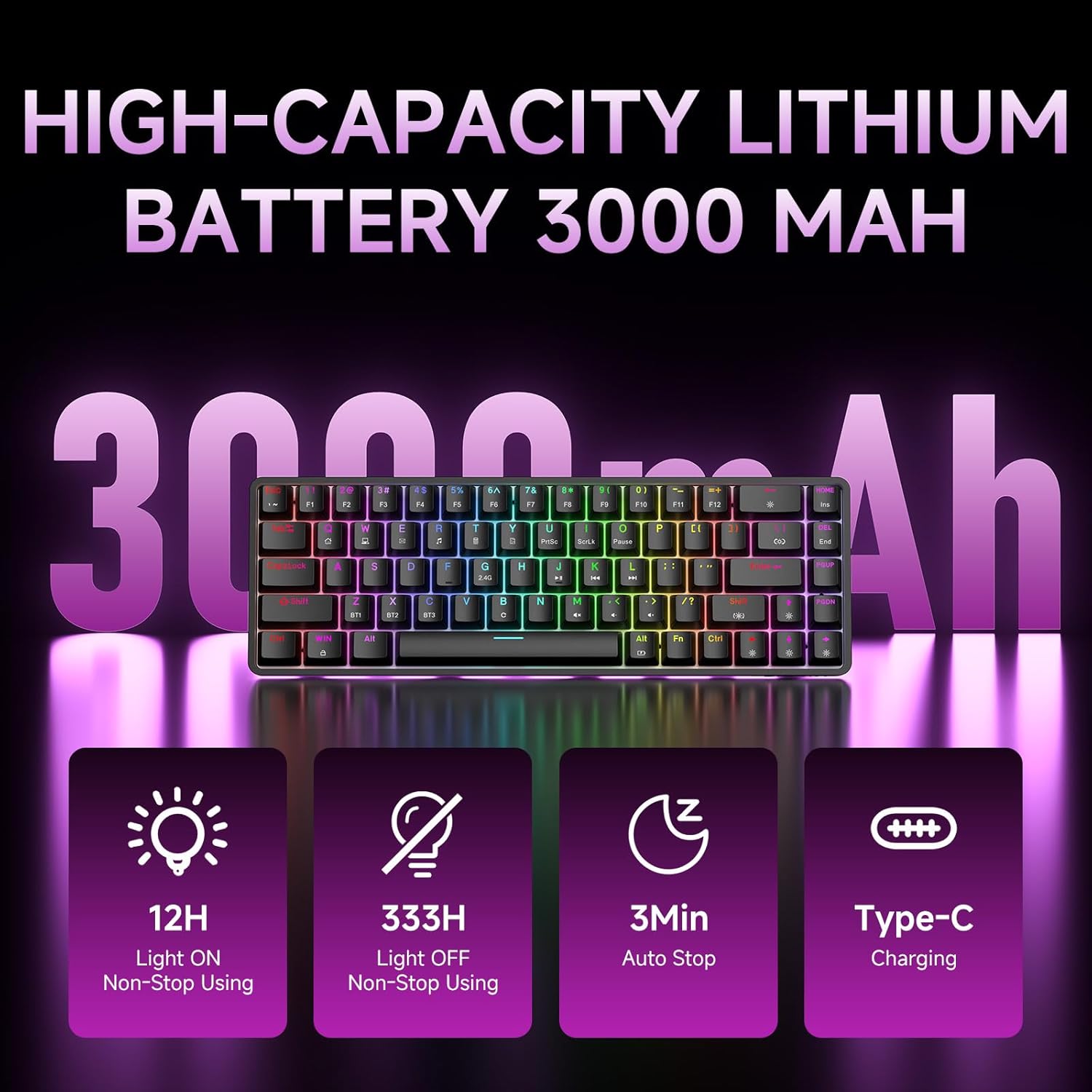
Figure 7: Battery capacity and power-saving features of the DK68.
Чистење и нега
- Use the provided keycap puller to carefully remove keycaps for cleaning.
- Исчистете ја површината на тастатурата со мека, дamp крпа. Избегнувајте прекумерна влага.
- Не користете груби хемикалии или абразивни средства за чистење.
- Пред чистење, проверете дали тастатурата е исклучена од струја.
Решавање проблеми
- Тастатурата не реагира:
- Check the power switch on the back of the keyboard.
- Ensure the correct connection mode (wired, 2.4GHz, or Bluetooth) is selected.
- За 2.4 GHz, проверете дали USB приемникот е безбедно вклучен.
- За Bluetooth, проверете дали тастатурата е спарена и избрана на вашиот уред. Обидете се повторно да ја спарите доколку е потребно.
- If using wired mode, try a different USB port or cable.
- Задното осветлување не работи:
- Притиснете Fn + Backspace to toggle the backlighting.
- Проверете го нивото на батеријата; слабата батерија може да го оневозможи задното осветлување.
- Клучевите не се регистрираат:
- Ensure the keyboard is properly connected and powered on.
- If specific keys are not working, try removing and re-seating their keycaps.
Спецификации
| Карактеристика | Детал |
|---|---|
| Број на модел | DK68 |
| Технологија за поврзување | 2.4 GHz безжичен, Bluetooth 5.0, USB-C кабелски |
| Тип на прекинувач | Clicky Blue Mechanical Switches |
| Распоред на копчињата | 68 копчиња (60% распоред) |
| Задно осветлување | RGB (16.8 Million Colors, 20 Effects) |
| Капацитет на батеријата | Литиум полимер од 3000 mAh |
| Компатибилни уреди | Играчка конзола, лаптоп, компјутер, таблет |
| Анти-Ghosting | Full Key Anti-Ghosting & NKRO |
| Материјал | Пластика |
| Тежина на ставката | 1.76 фунти (приближно 800 г) |
| Димензии на пакетот | 14.33 x 4.37 x 1.73 инчи |

Figure 8: Keyboard dimensions and compact 68-key layout.
Гаранција и поддршка
For warranty information and technical support, please refer to the documentation included with your product or visit the official DIERYA website. Amazon's return policy for this product is 30 days from the date of receipt.


