1. Вовед
The COUGAR CFV235 is an innovative PC case featuring a Central Floating Ventilation (CFV) structure. This design separates the power supply unit compartment from the main chamber, utilizing the space between them as a highly effective ventilation channel to enhance cooling performance. The CFV235 combines a full panoramic view, a compact footprint, and structurally reinforced cooling capabilities to achieve superior airflow beyond traditional case designs.
This manual provides essential information for the proper installation, operation, and maintenance of your COUGAR CFV235 PC case. Please read it thoroughly before beginning assembly.
2. Клучни карактеристики
- Central Floating Ventilation (CFV) Structure: Innovative design for enhanced cooling efficiency.
- Full Panoramic View: Clear tempered glass panels for showcasing internal components.
- Дизајн со висок проток на воздух: Optimized for superior air circulation.
- Широка компатибилност: Supports Mini ITX, Micro ATX, ATX, and CEB motherboards.
- AmpОпциите за складирање: Multiple drive bays for 3.5" HDDs and 2.5" SSDs.
- Generous Component Clearance: Accommodates long GPUs, tall CPU coolers, and standard PSUs.
- Издржлива конструкција: Built with robust materials for longevity.

Слика 2.1: Предна страна view of the COUGAR CFV235 PC case, highlighting its panoramic glass panels and illuminated interior.

Figure 2.2: The COUGAR CFV235 PC case showcasing its design in both black and white variants, with internal components and customizable RGB lighting.
3. Водич за поставување
3.1 Unpacking the Case
- Внимателно извадете го куќиштето на компјутерот од пакувањето.
- Inspect the case for any signs of damage during transit. Contact your retailer immediately if any damage is found.
- Remove all protective films and internal packaging materials.
3.2 Инсталација на компоненти
Before installing components, ensure you have all necessary tools, including a Phillips head screwdriver.
- Инсталација на матична плоча:

Figure 3.1: Interior of the CFV235 case, showing pre-installed motherboard standoffs.
- Инсталирајте го I/O штитот во задниот отвор на куќиштето.
- Align your Mini ITX, Micro ATX, ATX, or CEB motherboard with the pre-installed standoffs.
- Прицврстете ја матичната плоча со приложените завртки.
- Инсталација на единицата за напојување (PSU):
- The CFV235 features a dedicated PSU compartment. Install your ATX PSU (up to 200mm length) into this compartment.
- Прицврстете го напојувањето со завртки од задната страна на куќиштето.
- Инсталација на диск за складирање:

Figure 3.2: Rear interior of the CFV235, illustrating cable management options and locations for 2.5" and 3.5" drive bays.
- Install 3.5" HDDs into the designated drive bays (up to 2 drives).
- Install 2.5" SSDs into the dedicated SSD mounts (up to 4 drives, 2 of which are shared with 3.5" bays).
- Ensure all drives are securely fastened.
- Инсталација на графичка картичка (GPU):

Figure 3.3: Diagram indicating the maximum GPU length of 430mm supported by the CFV235 case.
- The case supports GPUs up to 430mm in length.
- Insert your GPU into the appropriate PCIe slot on the motherboard and secure it with the retention clip and screw.
- Инсталација на ладилник за процесор:
- The case supports CPU coolers up to 175mm in height.
- Инсталирајте го ладилникот на процесорот според упатствата на производителот.
- Управување со кабли:
- Utilize the cable routing cutouts and tie-down points behind the motherboard tray to manage cables neatly.
- Proper cable management improves airflow and aesthetics.
4. Упатства за работа
4.1 Преден влезно/излезен панел

Figure 4.1: The front I/O panel of the CFV235, featuring USB ports, audio jacks, and the power button.
Предниот I/O панел овозможува лесен пристап до основните порти и контроли:
- Копче за вклучување: Press to power on/off your system.
- Копче за ресетирање: Press to restart your system.
- USB порти: Поврзете USB уреди.
- Аудио приклучоци: Connect headphones and microphones.
4.2 Проток на воздух и ладење
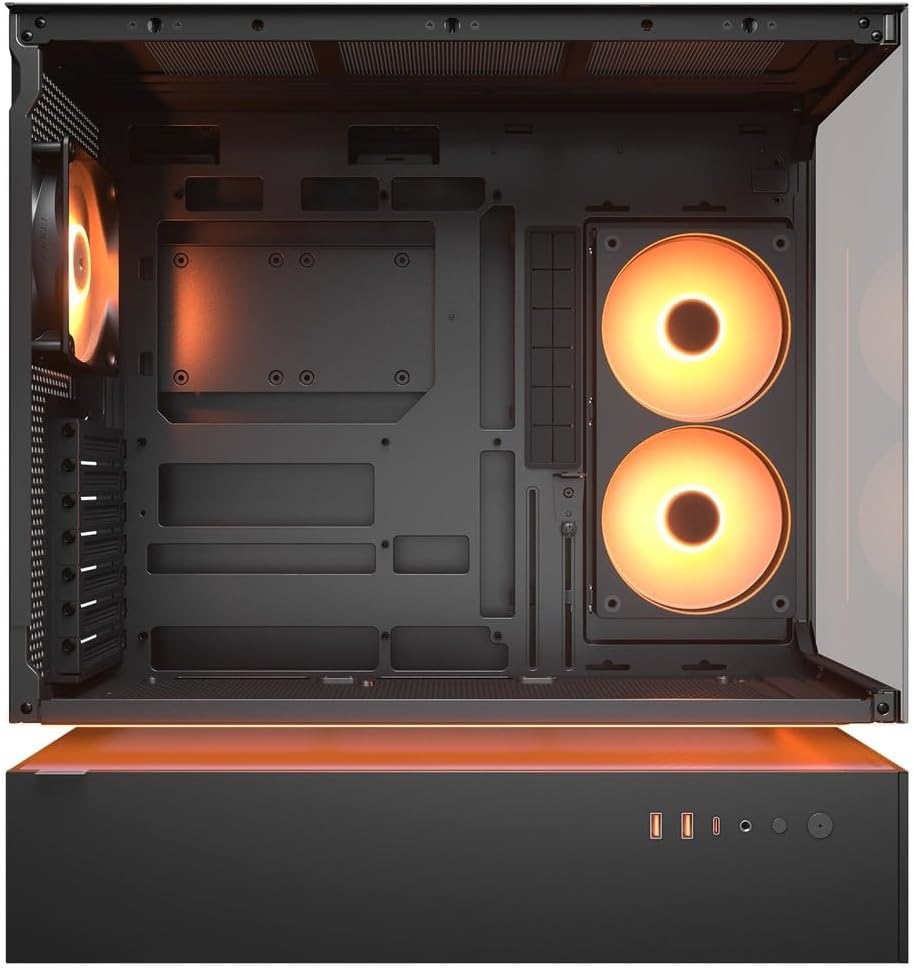
Слика 4.2: Внатрешно view of the CFV235 with fans installed, demonstrating the potential for high airflow.
The CFV235 is designed for optimal airflow. Ensure all fans are correctly installed and oriented to facilitate efficient cooling. The Central Floating Ventilation structure promotes direct airflow to critical components.
5. Одржување
5.1 Чистење на филтерот за прашина

Figure 5.1: Removable magnetic dust filter for easy cleaning.
Regular cleaning of dust filters is crucial for maintaining optimal airflow and preventing dust buildup inside your PC. The CFV235 features easily removable dust filters:
- Gently remove the magnetic dust filters located on the top and bottom of the case.
- Исчистете ги филтрите со компримиран воздух или со плакнење со вода. Пред повторно да ги монтирате, проверете дали се целосно суви.
- Reattach the filters to their respective positions.
5.2 Општо чистење
- Користете мека, гamp cloth to wipe down the exterior surfaces of the case.
- Avoid using harsh chemicals or abrasive materials that could damage the finish or tempered glass.
- For internal cleaning, use compressed air to remove dust from components and fan blades.
6 Смена на проблеми
Овој дел се однесува на вообичаени проблеми со кои може да се соочите. За посложени проблеми, погледнете го делот за поддршка.
6.1 Системот не се вклучува
- Проверете дали кабелот за напојување е безбедно поврзан и со напојувањето и со ѕидниот штекер.
- Ensure the PSU switch is in the "ON" position.
- Проверете дали кабелот од копчето за вклучување на предниот панел е правилно поврзан со матичната плоча.
- Confirm that all internal power connections (24-pin ATX, CPU, GPU) are firmly seated.
6.2 Проблеми со прегревање
- Ensure all case fans and CPU/GPU coolers are functioning correctly.
- Clean any dust buildup from fans and dust filters (refer to Section 5.1).
- Verify that fans are oriented for optimal airflow (intake and exhaust).
- Check for proper cable management to avoid obstructing airflow.
6.3 USB/Audio Ports Not Working
- Ensure the front panel USB and audio cables are correctly connected to the motherboard headers.
- Check your operating system's device manager for any driver issues.
7. Спецификации
| Карактеристика | Спецификација |
|---|---|
| Бренд | КУГАР |
| Име на моделот | CFV235 |
| Димензии на производот (Ш x В x Д) | 235 x 493 x 460 mm |
| Тежина на производот | 9.5 кг |
| Поддржани матични плочи | Мини ITX / Микро ATX / ATX / CEB |
| Диск Бејс | 5.25" x0 / 3.5" x2 / 2.5" SSD x2+2 (2 shared with 3.5" bays) |
| Максимална должина на графичкиот процесор | 430 мм |
| Максимална висина на ладилникот на процесорот | 175 мм |
| Максимална должина на PSU | 200 мм |
| Боја | Црното |
| Карактеристики | Central Floating Ventilation, Panoramic Glass, High Airflow, Built-in Fans |
8. Гаранција и поддршка
Your COUGAR CFV235 PC case comes with a 1 година гаранција од датумот на купување. Оваа гаранција ги покрива производствените дефекти и материјалните недостатоци при нормална употреба.
For technical support, warranty claims, or further assistance, please visit the official COUGAR website or contact your local retailer. Please have your product model number (CFV235) and proof of purchase ready when contacting support.
Official COUGAR Webсајт: cougargaming.com


