1. Производот завршиview
The TECKNET TK-KB041 is a versatile, slim wireless keyboard designed for multi-device compatibility and comfortable typing. It offers both 2.4GHz USB-A and Bluetooth connectivity, allowing seamless switching between up to three devices. Its low-profile scissor-switch keys provide a quiet and fluid typing experience, while the integrated numeric keypad enhances productivity. The keyboard features a rechargeable battery with long standby time and power-saving auto-sleep functionality.

Figure 1: TECKNET TK-KB041 Slim Wireless Keyboard.
2. Што има во кутијата
- Wireless Keyboard (Model TK-KB041) x 1
- USB-C Кабел за полнење x 1
- Упатство за употреба x 1
- USB-A Receiver (stored in the keyboard's back slot) x 1
3. Упатства за поставување
3.1 Powering On the Keyboard
- Locate the ON/OFF switch on the side of the keyboard.
- Лизнете го прекинувачот во положба „ВКЛУЧЕНО“.

Figure 2: The keyboard's ultra-slim profile, истакнувајќи го неговиот компактен дизајн.
3.2 Connecting via 2.4GHz USB-A Receiver
- Locate the USB-A receiver stored in the magnetic slot on the back of the keyboard.
- Plug the USB-A receiver into an available USB port on your computer or device.
- Тастатурата треба автоматски да се поврзе.

Figure 3: Location of the USB-A receiver slot on the back of the keyboard.
3.3 Поврзување преку Bluetooth
- Проверете дали тастатурата е вклучена.
- Притиснете и задржете го Fn копче и едно од копчињата на Bluetooth каналот (Fn + 1, Fn + 2, или Fn + 3) for 3 seconds. The corresponding Bluetooth indicator light (B1, B2, or B3) on the keyboard will start blinking, indicating it's in pairing mode.
- На вашиот уред (компјутер, таблет, паметен телефон), одете во поставките за Bluetooth.
- Пребарај за available devices and select "TK-KB041" (or similar name) from the list.
- Follow any on-screen prompts to complete the pairing process. The indicator light on the keyboard will stop blinking and remain solid for a few seconds, then turn off, indicating a successful connection.
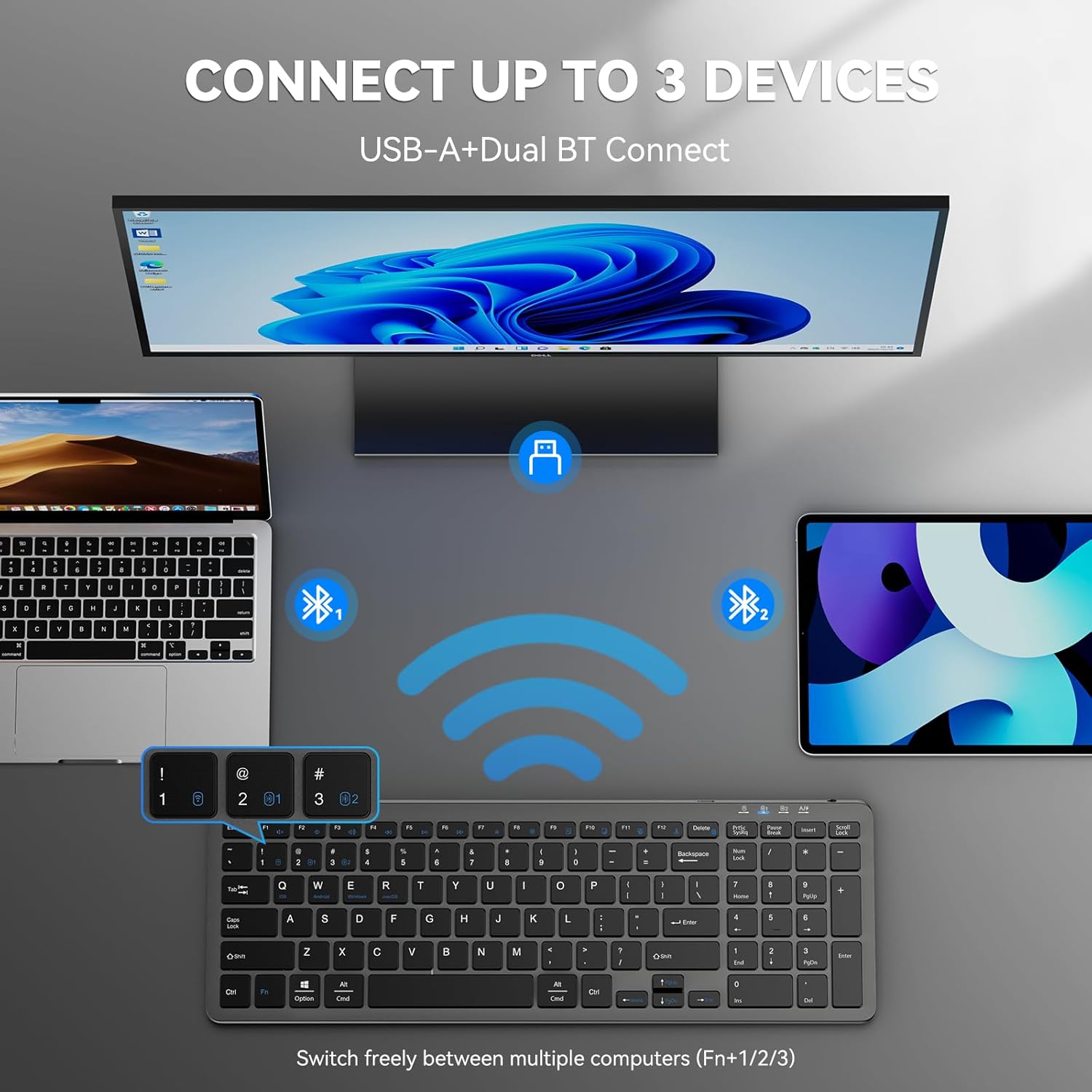
Figure 4: The keyboard connected to multiple devices via Bluetooth and USB-A.
4. Упатства за работа
4.1 Префрлување помеѓу поврзани уреди
The keyboard supports connecting to up to three devices via Bluetooth and one via 2.4GHz USB-A. To switch between devices:
- За Bluetooth уреди: Притиснете fn+1, fn+2, или fn+3 to switch to the corresponding Bluetooth-paired device.
- For 2.4GHz USB-A device: Press fn+4 to switch to the device connected via the USB-A receiver.
4.2 Префрлување на оперативен систем
The keyboard is compatible with Windows, macOS, iOS, and Android. To optimize key functions for your operating system:
- За Windows: Притиснете Fn + W
- For macOS: Press Fn + E
- For iOS: Press Fn + Q
- For Android: Press Fn + R

Figure 5: Keyboard layout highlighting function keys and OS switch keys.
4.3 Multimedia Function Keys (F1-F12)
The F1-F12 keys have secondary multimedia functions. To use these functions, press the Fn притиснете го копчето истовремено со саканото F-копче.
- F1: Home
- F2: Пребарување
- F3: Изберете Сите
- F4: Копирај
- F5: Вметни
- F6: Исечете
- F7: Претходна песна
- F8: Репродукција/Пауза
- F9: Следна песна
- F10: Исклучи звук
- F11: Намалување на јачината на звукот
- F12: Јачина на звук

Figure 6: Illustration of the multimedia function keys (F1-F12).
4.4 Индикаторски светла
Тастатурата има неколку индикаторски светла:
- B1/B2/B3: Bluetooth connection indicators. Blink during pairing, solid when connected, then turn off.
- Големи букви: Свети кога е активно Caps Lock.
- Num Lock: Illuminates when Num Lock is active.
- Состојба на полнење: A red light indicates charging. A green light indicates fully charged.
- Слаба батерија: The charging state indicator will blink blue when the battery is low, signaling that a recharge is needed.
5. Одржување
5.1 Полнење на тастатурата
The keyboard has a built-in 280mAh rechargeable battery. To charge:
- Connect the provided USB-C charging cable to the USB-C port on the keyboard.
- Поврзете го другиот крај од кабелот со USB извор на напојување (на пр., USB порт на компјутер, USB адаптер за ѕид).
- The charging indicator light will illuminate red during charging and turn green when fully charged.
- A full charge takes approximately 2 hours and provides up to 200 hours of use or 90 days of standby time. The keyboard can be used while charging.

Figure 7: USB-C charging port on the keyboard.
5.2 Чистење
- Исклучете ја тастатурата пред чистење.
- Користете мека, гamp крпа за бришење на површината на тастатурата.
- Избегнувајте употреба на груби хемикалии или абразивни материјали.
- For cleaning between keys, use compressed air or a soft brush.
5.3 Режим на заштеда на енергија
The keyboard automatically enters sleep mode after 10 minutes of inactivity to conserve power. Press any key to wake it up.
6 Смена на проблеми
6.1 Тастатурата не се поврзува
- Проверете дали тастатурата е вклучена.
- Проверете го нивото на батеријата; дополнете ако е потребно.
- For 2.4GHz connection: Ensure the USB-A receiver is securely plugged into your device. Try a different USB port.
- За поврзување со Bluetooth:
- Проверете дали Bluetooth е овозможен на вашиот уред.
- Put the keyboard into pairing mode (Fn + 1/2/3 for 3 seconds).
- Remove any previous "TK-KB041" pairings from your device's Bluetooth list and try pairing again.
- Ensure the keyboard is within the 33ft (10m) operating range.
6.2 Копчињата не реагираат
- Check the connection (USB-A or Bluetooth) as described above.
- Осигурајте се дека батеријата на тастатурата е наполнета.
- Рестартирајте го уредот и обидете се повторно да се поврзете.
6.3 Incorrect Key Output
- Ensure the correct operating system mode is selected (Fn + Q/W/E/R).
- Check your device's language and keyboard layout settings.
7. Спецификации на производот
| Карактеристика | Детал |
|---|---|
| Број на модел | TK-KB041 |
| Технологија за поврзување | 2.4GHz USB-A, Bluetooth |
| Компатибилни уреди | PC, Laptop, Mac, MacBook, Tablet, Smartphone, iPhone, iPad (Windows, macOS, iOS, Android) |
| Капацитет на батеријата | 280 mAh (се полни) |
| Време на полнење | Прибл. 2 часа |
| Работно време | До 200 часа |
| Време на мирување | До 90 дена |
| Оперативен опсег | До 33 стапки (10 метри) |
| Тип на тастатура | Ниско-проfile Прекинувач за ножици |
| Димензии на производот | 14.42 x 5 x 0.46 инчи (36.63 x 12.7 x 1.17 см) |
| Тежина на ставката | 14.1 унци (400 грама) |
| Материјал | Пластика |
| Боја | Црното |
8. Гаранција и поддршка
TECKNET provides 36-Month Support for registered products. If you encounter any problems in using the product, please reach out to the TECKNET professional customer service team for assistance.
For further support and warranty registration, please visit the official TECKNET webстраницата или директно контактирајте ја нивната служба за корисници.

Figure 8: TECKNET's commitment to technology and customer support.
9. Видео водич
Video 1: Official product video demonstrating the features and usage of the Tecknet Slim Rechargeable Bluetooth Wireless Keyboard.


