1. Водич за поставување
This section provides detailed instructions for assembling your FLEXISPOT ErgoX Max Ergonomic Office Chair. Please follow the steps carefully to ensure proper setup and functionality.
1.1 Распакување и идентификација на компоненти
Carefully unpack all components from the box. Verify that all parts listed in the user manual are present. Assembly tools are included.

Image: All components of the FLEXISPOT ErgoX Max Ergonomic Office Chair laid out on the floor before assembly.
1.2 Чекори на склопување
- Прикачете ја основата: Secure the five-star aluminum base with casters. Ensure casters are firmly inserted.
- Инсталирајте гасен лифт: Insert the gas lift cylinder into the center of the five-star base.
- Склопување на механизмот на седиштето: Прикачете го механизмот за седиште на долната страна од перницата за седиште користејќи ги приложените завртки. Осигурајте се дека предниот дел од механизмот се порамнува со предниот дел од седиштето.
- Поврзете го седиштето со гасниот лифт: Внимателно поставете го склопеното седиште на цилиндарот за гасен лифт.
- Прикачете потпирачи за раце: Secure the 5D adjustable armrests to the seat base using the designated screws.
- Закачете го потпирачот за грб: Connect the backrest to the seat mechanism. Ensure all screws are tightened securely.
- Инсталирајте го потпирачот за глава: Attach the 4D adjustable headrest to the top of the backrest.
- Install Footrest (Optional): If included, attach the retractable footrest to the designated points on the chair.
Assembly required. Comes with user manual and assembly tools. Do not exceed the maximum weight capacity of 661 lbs. Always follow the assembly instructions carefully.
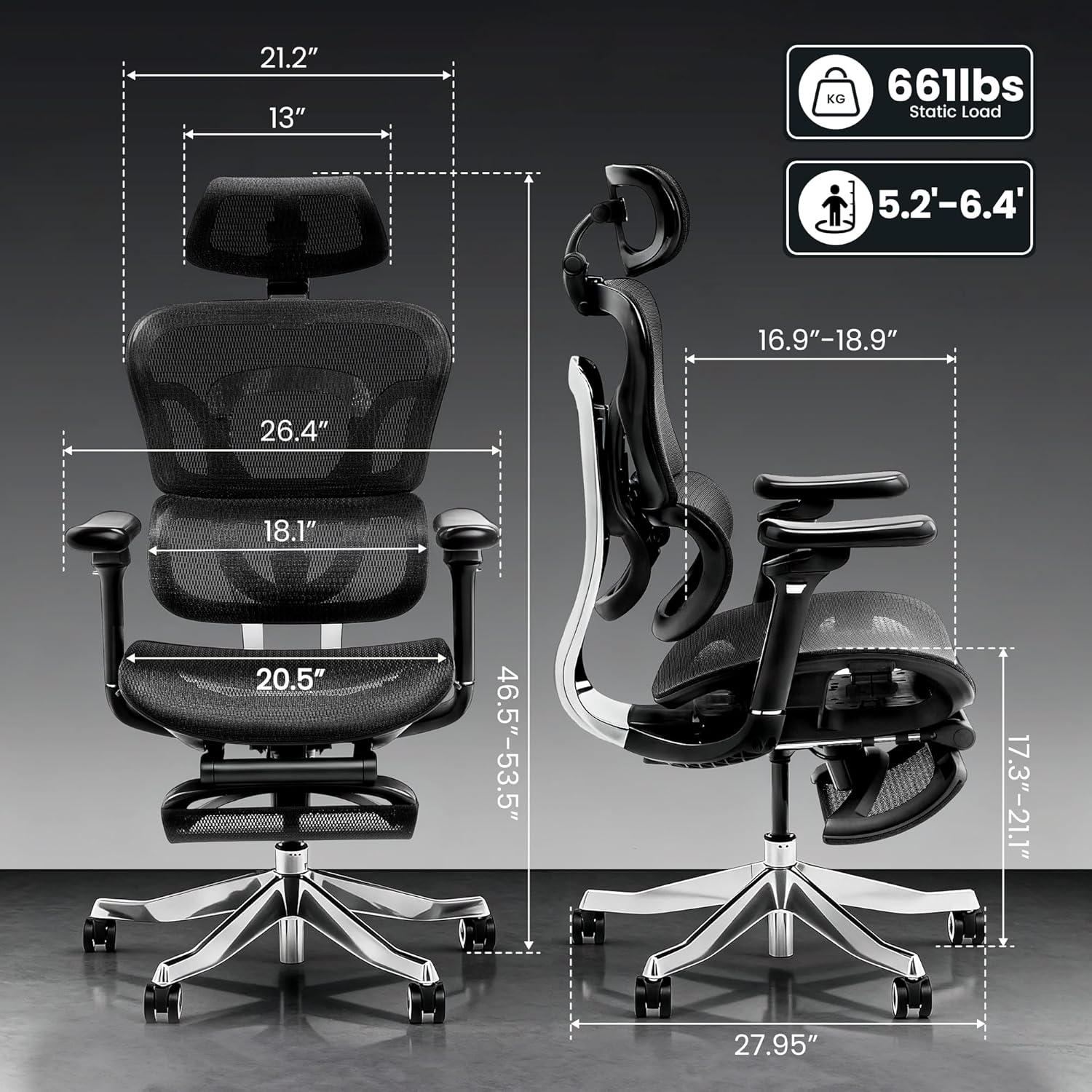
Image: Detailed dimensions of the FLEXISPOT ErgoX Max Ergonomic Office Chair, including height, width, and depth, along with its 661 lbs static load capacity.
2. Упатства за работа
Your ErgoX Max chair offers extensive adjustability to customize your seating experience for optimal comfort and ergonomic support.
2.1 Chair Height Adjustment
- Лоцирајте ја рачката од десната страна, под седиштето.
- To raise the chair, lift the lever while taking your weight off the seat.
- To lower the chair, lift the lever while remaining seated.
2.2 Recline System
The chair features a 3-level recline system, allowing you to transition from work mode to relax mode.
- Агол на навалување: Adjust the recline angle between 104°, 113°, and 123.5° using the lever on the left side.
- Backrest Forward Tilt: The backrest can tilt forward 2-8° for precise back positioning.

Image: Illustration of the 3-level recline system, showing adjustable angles from 104° to 123.5°.
2.3 Подесување на потпирачот за рака
The 5D adjustable PU armrests provide multi-directional support.
- Прилагодување на висината: Press the button on the side of the armrest to raise or lower it.
- Forward/Backward/Pivot: Armrests can slide forward/backward and pivot inward/outward for optimal positioning.

Image: Visual guide demonstrating the multi-directional adjustments of the 5D armrests, including height, forward/backward, and pivot functions.
2.4 Прилагодување на лумбалната потпора
The 4D adaptive lumbar support automatically adjusts to your posture. You can also fine-tune it manually.
- Прилагодување на длабочина: Use the knob on the side of the backrest to adjust the depth of the lumbar support.
- Прилагодување на висината: The lumbar support can be moved up or down to align with your lower back curve.

Image: Illustration of the 4D adaptive lumbar support, highlighting its pull-out design for precise back positioning and lasting comfort.
2.5 Подесување на потпирачот за глава
The 4D headrest allows for height, angle, and depth customization for neck comfort.
- Прилагодување на висината: Slide the headrest up or down to your desired height.
- Прилагодување на аголот: Tilt the headrest forward or backward.
- Прилагодување на длабочина: Adjust the depth to provide optimal neck support.

Image: Visual guide demonstrating the height, angle, and depth customization options for the 4D adjustable headrest.
2.6 Retractable Footrest (Optional)
The optional retractable footrest can be pulled out for a complete reclining and relaxation experience.
- Pull the footrest out from beneath the seat when needed.
- Push it back in when not in use to save space.
3. Одржување
Proper maintenance will extend the life and appearance of your ergonomic office chair.
3.1 Инструкции за чистење
- Mesh Components: For the mesh backrest and seat, use dry methods only. A soft brush or vacuum cleaner with a brush attachment can be used to remove dust and debris.
- Рамка и основа: Wipe the aluminum alloy frame and base with a soft, dry cloth. Avoid abrasive cleaners.
- Потпирачи за раце: Clean padded armrests with a dry cloth. For stubborn spots, a slightly damp може да се користи крпа, по што веднаш се суши.
- Avoid contact with liquids directly on mesh or padded surfaces.
3.2 Општа нега
- Regularly check all screws and bolts to ensure they are tight. Re-tighten if necessary.
- Avoid placing heavy objects on the armrests or backrest when not in use.
- Ensure smooth and silent mobility by keeping the electroplated chrome casters clean and free of debris.
4 Смена на проблеми
Доколку наидете на било какви проблеми со вашиот стол, погледнете ги вообичаените проблеми и решенија подолу.
| Проблем | Можна причина | Решение |
|---|---|---|
| Столот не се прилагодува на висината | Гасниот лифт не е вклучен или е неисправен. | Ensure the height adjustment lever is fully engaged. If issue persists, contact customer support. |
| Столот се ниша или се чувствува нестабилно | Лабави завртки или нерамномерно склопување. | Check and tighten all assembly screws, especially those connecting the base and seat mechanism. Ensure the chair is on a flat surface. |
| Наслонот за грб не се спушта | Recline lock engaged. | Disengage the recline lock lever. If still stuck, ensure no obstruction is preventing movement. |
| Тркалцата не се тркалаат непречено | Остатоци во тркалата или оштетени тркала. | Исчистете ги влакната или остатоците од тркалата. Доколку се оштетени, размислете за замена на тркалата. |
If you cannot resolve the issue using these steps, please contact FLEXISPOT customer support.
5. Спецификации на производот
| Карактеристика | Детал |
|---|---|
| Бренд | ФЛЕКСИСПОТ |
| Име на моделот | Ergonomic Executive Chair (FLEXISPOT ERGOX MAX) |
| Боја | Црн обсидијан |
| Материјал | Aluminum, Mesh, Nylon |
| Димензии на производот | 27.95" Д x 27.95" Ш x 53.5" В |
| Тежина на ставката | 46 фунти |
| Препорака за максимална тежина | 661 фунти |
| Назад стил | High-back, Mesh |
| Посебни карактеристики | Adjustable Headrest, Adjustable Height, Ergonomic, Adjustable Armrest, Dynamic Lumbar Support, Tilt, Back Support, Adjustable Recliner |
| Број на лежечки позиции | 3 |
| UPC | 840460490979 |
6. Гаранција и поддршка
FLEXISPOT is committed to providing high-quality products and customer satisfaction.
6.1 Гаранција за производот
This product may be eligible for a 3-Year Protection Plan. Please refer to your purchase documentation for specific warranty details and coverage.
6.2 Поддршка за корисници
For any questions, troubleshooting assistance, or warranty claims, please contact FLEXISPOT customer support. Contact information can typically be found on the manufacturer's webстраницата или вашата сметка за купување.


