1. Поставување и склопување
This section guides you through the initial setup and assembly of your iScooter DX5 Electric Scooter. Please follow these steps carefully to ensure safe and proper operation.
1.1 Распакување и идентификација на компоненти
Внимателно извадете ги сите компоненти од пакувањето. Проверете дали сите делови наведени во списокот на пакувањето се присутни и неоштетени.

Figure 1: All components of the iScooter DX5 Electric Scooter laid out after unboxing.
1.2 Видео водич за склопување
For a visual step-by-step guide on assembling your iScooter DX5, please watch the official installation video below. This video covers all major assembly steps from unboxing to final checks.
Video 1: Official iScooter DX5 Adults Electric Scooter with Seat Installation Video. This video demonstrates the complete assembly process, including handlebar, brake, mirror, and wheel installation.
1.3 Detailed Assembly Steps (Key Points from Video)
- Инсталација на рачката: Secure the handlebar stem to the fork using the provided hex keys. Ensure all bolts are tightened evenly for stability.

Figure 2: The handlebar assembly with the 9-inch full-color LCD display and control buttons.
- Brake Lever and Mirror Attachment: Attach the brake levers and rearview mirrors to the handlebars. Adjust their positions for comfortable reach and optimal visibility.
- Управување со кабли: Use zip ties to neatly secure all cables along the frame, preventing interference with moving parts and ensuring a clean appearance.
- Headlight and Reflector Installation: Mount the front headlight and side reflectors onto the fork. Connect the headlight wiring securely.
- Инсталација на преден браник: Attach the front fender to the fork using the designated screws. Ensure it is securely fastened and does not obstruct the wheel.
- Инсталација на предните тркала: Carefully align the front wheel with the fork, ensuring the brake rotor slides correctly between the brake pads. Insert and tighten the axle bolt.
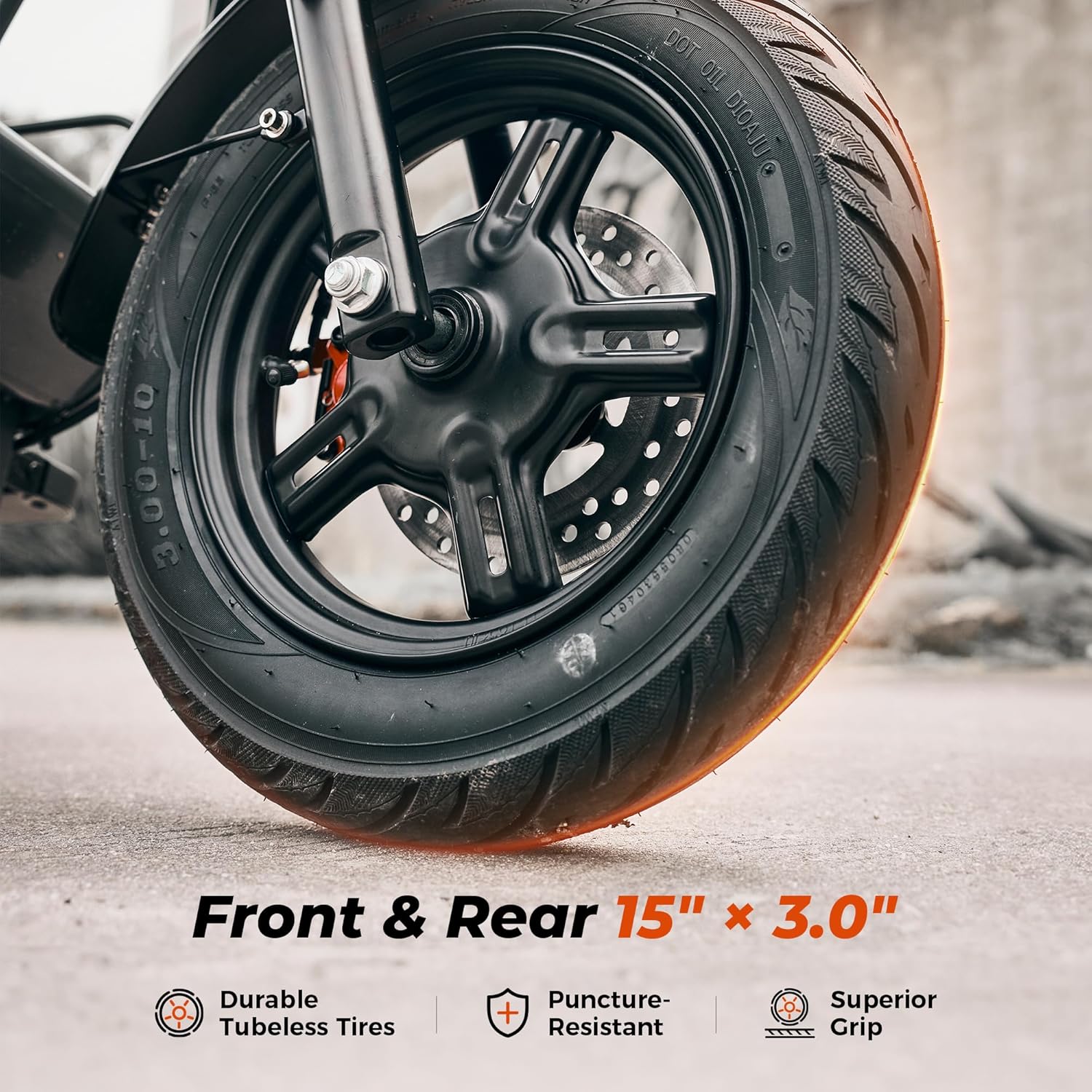
Слика 3: Детално view of the 15-inch vacuum pneumatic tire and front hydraulic disc brake system.
- Инсталација на потпирач за нозе: Attach the foldable footrests to the side of the scooter frame. Ensure they can be securely folded and unfolded.
- Инсталација на седишта: Place the seat onto the rear rack and secure it with the provided hardware.

Figure 4: The enlarged comfort saddle designed for reduced pressure and improved breathability.
- Front Basket and Scooter Bag: Install the detachable front basket and attach the scooter bag as desired for storage.

Figure 5: The iScooter DX5 featuring its detachable front basket for convenient storage.
2. Упатства за работа
Familiarize yourself with the controls and features of your iScooter DX5 before your first ride.
2.1 Power On/Off and NFC Unlock
- Вклучување: Ensure the battery disconnect switch (located near the footrest) is in the "ON" position. Tap your NFC smart card to the display to unlock and power on the scooter.
- Исклучено: Tap the NFC card again or hold the power button to turn off the scooter.

Слика 6: Готовоview of the handlebar controls, including the NFC unlock area on the display.
2.2 режими на брзина
The iScooter DX5 offers four speed modes to adapt to various riding conditions and preferences. Use the 'S' button on the handlebar to cycle through the modes:
- 1st Gear Mode: 15 MPH (Energy-saving mode)
- 2nd Gear Mode: 21 MPH (Urban commuting, steady speed)
- 3rd Gear Mode: 28 MPH (Balanced power, faster ride)
- 4th Gear Mode: 35 MPH (Turbo sprint, full power)

Figure 7: Visual representation of the four available speed modes and their corresponding speeds.
2.3 Lighting System and Horn
- Предно светло: Press the headlight switch on the left handlebar to turn the front LED headlight on or off.
- Tail Light & Turn Signals: The tail light automatically brightens when braking. Use the turn signal button on the left handlebar to activate left or right turn signals.
- Рог: Press the horn button on the left handlebar to alert pedestrians or traffic.

Figure 8: Details of the advanced lighting system, including front headlight, tail light, and integrated turn signals.
2.4 Anti-theft Alarm Feature
The iScooter DX5 includes a built-in anti-theft alarm. When activated, any unauthorized movement of the scooter will trigger an audible alarm and lock the motor, deterring theft.
3. Одржување
Regular maintenance ensures the longevity and optimal performance of your iScooter DX5.
- Систем за сопирање: Regularly inspect the dual hydraulic disc brakes for wear and tear. Ensure brake fluid levels are adequate and brake pads are not excessively worn. Adjust as necessary or consult a professional.

Figure 9: The dual hydraulic disc brake system provides instant and reliable stopping power.
- Притисок во гумите: Check the pressure of the 15" x 3.0" vacuum pneumatic tires regularly. Maintain recommended pressure for optimal ride comfort, range, and tire lifespan.

Figure 10: Rugged 15" x 3.0" tires offer superior grip and puncture resistance, supporting up to 330 lbs.
- Систем за суспензија: Periodically inspect the front hydraulic and rear air spring suspension for any signs of damage or leaks. Ensure all mounting bolts are tight.

Figure 11: The advanced dual suspension system, featuring front hydraulic and rear air spring suspension for a smooth ride.
- Нега на батеријата: To prevent battery drain from the alarm system during long periods of inactivity, ensure the battery disconnect switch is in the "OFF" position.

Figure 12: The 48V 15.6Ah long-range battery, offering up to 45 miles on a single charge.
- Општо чистење: Редовно чистете го скутерот со рекламаamp крпа. Избегнувајте употреба на млазници за вода под висок притисок директно врз електричните компоненти.
4 Смена на проблеми
This section addresses common issues you might encounter with your iScooter DX5.
| Проблем | Можна причина | Решение |
|---|---|---|
| Скутерот не се вклучува. | Battery disconnect switch is OFF; Low battery; Loose connections. | Ensure battery switch is ON. Charge the battery. Check all cable connections. |
| Моторот не се вклучува. | NFC card not tapped; Parking mode active; Brake engaged. | Tap NFC card to activate. Release the brake or shift gear to unlock parking mode. |
| Намален опсег или брзина. | Low tire pressure; Heavy load; Uphill riding; Cold weather. | Check and inflate tires. Reduce load. Consider riding conditions. |
| Сопирачките се чувствуваат слаби. | Worn brake pads; Low brake fluid; Air in brake lines. | Inspect and replace brake pads. Check brake fluid. Consult a professional for bleeding brake lines. |
| Алармот се активира неочекувано. | Sensitive alarm setting; Accidental movement. | Ensure scooter is stable when armed. Refer to the full manual for alarm sensitivity adjustment. |
5. Спецификации
Key technical specifications for the iScooter DX5 Electric Scooter:
- Име на модел: DX5
- Мотор: Peak 1500W (1000W rated) Brushless Motor
- Батерија: 48V 15.6Ah (748.8Wh) Lithium Battery
- Максимална брзина: 35 MPH (Four speed modes: 15/21/28/35 MPH)
- Макс опсег: 38-45 Miles (depending on riding conditions)
- Гуми: 15" x 3.0" Vacuum Pneumatic E-Motorcycle Tires
- Сопирачки: Двојни хидраулични диск сопирачки
- Суспензија: Front Hydraulic Suspension & Rear Air Spring Suspension (Dual Suspension)
- Максимален капацитет на носивост: 330 фунти
- Димензии на производот (ДxШxВ): 58.27" x 26.8" x 55.1"
- Тежина на ставката: 100 фунти
- Отпорност на вода: IPX4
- Посебни карактеристики: 9" LCD Color Instrument Panel, NFC Unlocking, Anti-Theft Alarm, Removable Storage Basket, Scooter Bag

Слика 13: Надview of the iScooter DX5 highlighting its main features and specifications.
6. Гаранција и поддршка
6.1 Информации за гаранцијата
iScooter offers a limited warranty on different parts of the DX5 Electric Scooter. We provide a 360-day or 180-day warranty depending on the specific component. Please refer to your purchase documentation or contact customer support for detailed warranty terms and conditions.
6.2 Поддршка за корисници
For any questions, technical assistance, or warranty claims, please contact iScooter customer support. You can find contact details on the official iScooter webвеб-страница или преку вашата платформа за купување.
Visit the official iScooter Store: iScooter Store on Amazon


