1. Вовед
This manual provides detailed instructions for the setup, operation, and maintenance of your GEEKOM Mini PC IT12. This compact desktop computer is equipped with a 12th Gen Intel Core i7-1260P processor, 32GB of DDR4 RAM, and a 1TB NVMe PCIe 4.0 SSD, running Windows 11 Pro. Its design focuses on efficient performance and versatile connectivity for various applications.
2. Водич за поставување
2.1. Откачување и првична проверка
Внимателно отстранете ги сите компоненти од пакувањето. Проверете дали сите предмети наведени во делот „Што има во кутијата“ се присутни и неоштетени.
- 1x GEEKOM Mini PC IT12
- 1x HDMI кабел
- 1x VESA држач
- 1x адаптер за напојување
- 1x Упатство за корисник
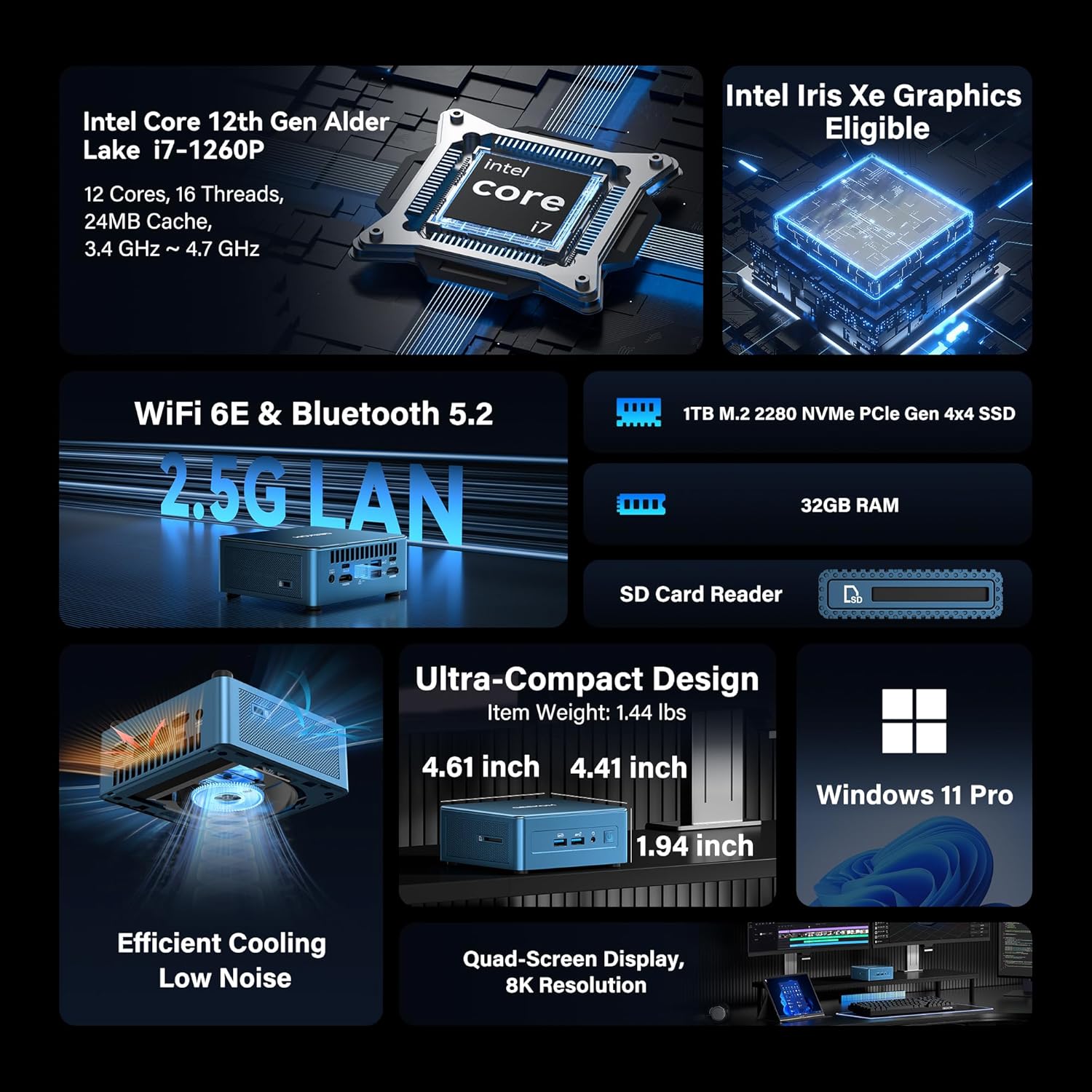
Image: GEEKOM Mini PC IT12 and its accessories, including the mini PC unit, power adapter, HDMI cable, and VESA mount.
Unboxing Video Guide
Video: A hands-on unboxing of the GEEKOM Mini PC, showing the contents of the box and the initial presentation of the device and its accessories.
2.2. Поврзување периферни уреди
- Поврзување на дисплеј: Use the provided HDMI cable to connect your monitor to one of the HDMI 2.0 ports on the back of the Mini PC. Alternatively, use a USB4 port for DisplayPort output.
- Поврзете ја тастатурата и глувчето: Plug your USB keyboard and mouse into the available USB 3.2 Gen 2 ports on the front or USB ports on the back.
- Поврзете напојување: Connect the power adapter to the DC-in port on the back of the Mini PC, then plug the adapter into a power outlet.
- Мрежна конекција: For a wired connection, connect an Ethernet cable to the 2.5GbE LAN port. For wireless, ensure the Wi-Fi antenna is connected (if external) or rely on the internal Wi-Fi 6E.

Слика: Заден дел view of the GEEKOM Mini PC IT12, showing the arrangement of ports including DC-in, USB4, HDMI, 2.5GbE LAN, USB 3.2, and USB 2.0. Cables are connected to some ports.
2.3. Прва чизма
Притиснете го копчето за вклучување на предната страна од мини компјутерот. Системот ќе се стартува во Windows 11 Pro. Следете ги упатствата на екранот за да го завршите почетното поставување на Windows.
3. Упатства за работа
3.1. Вклучување/исклучување
- Вклучување: Притиснете го копчето за вклучување на предниот панел.
- Исклучено: Кликнете на копчето „Старт“ во Windows, потоа изберете „Напојување“ > „Исклучи“.
- Рестартирајте: Кликнете на копчето „Старт“ во Windows, потоа изберете Вклучување > Рестартирај.
3.2. Конфигурација на екранот
The GEEKOM Mini PC IT12 supports up to four displays simultaneously via its dual USB4 (8K DP1.4) and dual HDMI 2.0 (4K@120Hz) ports. To configure multiple displays in Windows 11:
- Кликнете со десното копче на работната површина и изберете „Поставки за приказ“.
- Under "Multiple displays", you can detect, identify, and arrange your displays.
- Choose your preferred display mode (e.g., Extend these displays, Duplicate these displays).

Image: A GEEKOM Mini PC IT12 connected to two large monitors and a tablet, demonstrating its quad-display capability for a multi-screen workstation.
3.3. Мрежа и поврзување
- Жичен LAN: The 2.5Gb Ethernet port provides high-speed internet access.
- Wi-Fi 6E: Connect to wireless networks for fast and stable internet.
- Bluetooth 5.2: Pair with compatible Bluetooth devices such as keyboards, mice, and headphones.
4. Одржување и надградби
4.1. Систем за ладење
The IT12 Mini PC features an upgraded IceBlast cooling system with an all-copper module and a silent fan. To ensure optimal performance and longevity, keep the ventilation grilles clear of obstructions. Regularly clean dust from the vents using compressed air.

Слика: Експлодира view diagram illustrating the internal components of the GEEKOM Mini PC IT12, highlighting the IceBlast cooling system with its fan and copper heat pipes.
4.2. Проширување на просторот за складирање и меморијата
The GEEKOM Mini PC IT12 offers flexible upgrade options:
- RAM меморија: The 32GB DDR4 RAM can be expanded up to 96GB.
- NVMe SSD: The 1TB NVMe PCIe 4.0 SSD can be expanded up to 4TB.
- Дополнителен простор за складирање: The unit includes additional slots for M.2 2242 SATA SSD (up to 2TB) and 2.5" SATA HDD (up to 4TB) expansion.
For detailed instructions on how to access internal components for upgrades, please refer to the official GEEKOM support resources or consult a qualified technician.

Слика: Детален дијаграм прикажанasing the expandable storage options within the GEEKOM Mini PC IT12, illustrating slots for M.2 NVMe PCIe SSD, M.2 SATA SSD, and a 2.5-inch SATA HDD/SSD.
5 Смена на проблеми
5.1. Нема моќ
- Осигурајте се дека адаптерот за напојување е безбедно поврзан и со мини компјутерот и со функционален штекер.
- Проверете дали штекерот е функционален со вклучување на друг уред.
- Проверете го адаптерот за напојување за видливи оштетувања.
5.2. Нема излез на екранот
- Confirm the display cable (HDMI or USB4) is firmly connected to both the Mini PC and the monitor.
- Проверете дали мониторот е вклучен и поставен на точниот влезен извор.
- Пробајте друг кабел за прикажување или монитор доколку е достапен.
5.3. Проблеми со мрежната поврзаност
- Wичен: Check the Ethernet cable connection and router status.
- Безжичен: Verify Wi-Fi is enabled in Windows settings and you are connected to the correct network. Restart your router if necessary.
5.4. Проблеми со перформансите на системот
- Осигурајте се дека мини компјутерот има соодветна вентилација и не се прегрева.
- Затворете ги непотребните апликации што работат во позадина.
- Check for available Windows updates and driver updates.
6. Спецификации
| Карактеристика | Детал |
|---|---|
| Процесор | 12th Gen Intel Core i7-1260P (12 Cores, 16 Threads, up to 4.70 GHz, 24MB Cache) |
| Графика | Интел Iris Xe графика (интегрирана) |
| RAM меморија | 32GB DDR4 (може да се прошири до 96GB) |
| Складирање | 1TB NVMe PCIe 4.0 SSD (Expandable to 4TB) + M.2 2242 SATA SSD slot (up to 2TB) + 2.5" SATA HDD (up to 4TB) |
| Оперативен систем | Windows 11 Pro |
| Видео излез | 2x USB4 (8K DP1.4), 2x HDMI 2.0 (4K@120Hz) - Supports Quad Display |
| USB порти | 2x USB4, 3x USB 3.2 Gen 2, 1x USB 2.0 |
| Мрежа | 2.5Gb Ethernet, Wi-Fi 6E, Bluetooth 5.2 |
| Читач на картички | SD Card Reader (UHS-II) |
| Димензии (ДxШxВ) | 4.6 x 4.4 x 1.9 инчи |
| Тежина | 3.3 фунти |
7. Енергетска ефикасност
The GEEKOM Mini PC IT12 is designed for low power consumption, making it an energy-efficient alternative to traditional desktop PCs. Its 12th Gen Intel Core P-series CPU (28W single-CPU power draw) consumes significantly less power than high-performance H/HK series processors (45W+), reducing electricity costs and enabling 24/7 reliable operation with a quiet experience.
Video: A comparison demonstrating the energy consumption between a traditional desktop PC and the GEEKOM Mini PC IT12 under both light and heavy workloads.
8. Гаранција и поддршка
Your GEEKOM Mini PC IT12 comes with a 3-year limited warranty. For technical assistance or warranty claims, please contact GEEKOM support through the following channels:
- Поддршка на продавачот на Амазон: Log into your Amazon buyer's account, find your order, and click "Get help" for product assistance.
- Поддршка за е-пошта: Send an email to the After-sales Team at shirley.li@geekom.tw.
GEEKOM is committed to providing dedicated US-based technical support and ensures full certification including CE, FCC, CB, and CC for guaranteed safety and compliance.


