1. Вовед
The Honeywell Xenon 1902GSR is a high-performance wireless handheld barcode scanner designed for efficient and reliable data capture. This device utilizes advanced area-imaging technology to read both 1D and 2D barcodes, including those that are damaged, smudged, or displayed on digital screens. With Bluetooth connectivity, it offers cordless operation, enhancing mobility and reducing workspace clutter. This manual provides essential information for the proper setup, operation, and maintenance of your barcode reader.
2. Информации за безбедност
- Не го изложувајте уредот на екстремни температури, влага или корозивни супстанции.
- Avoid direct eye exposure to the scanner's light source.
- Користете само додатоци и адаптери за напојување одобрени од производителот.
- Не обидувајте се сами да го расклопите или поправите уредот. Обратете се кај квалификуван сервисер.
- Фрлете ги батериите според локалните прописи.
3. Содржина на пакетот
Проверете дали сите артикли се присутни во вашиот пакет:
- Honeywell Xenon 1902GSR Barcode Reader
- Communication/Charging Cradle (CCB01-010BT)
- USB кабел
- Водич за брз почеток (овој прирачник)
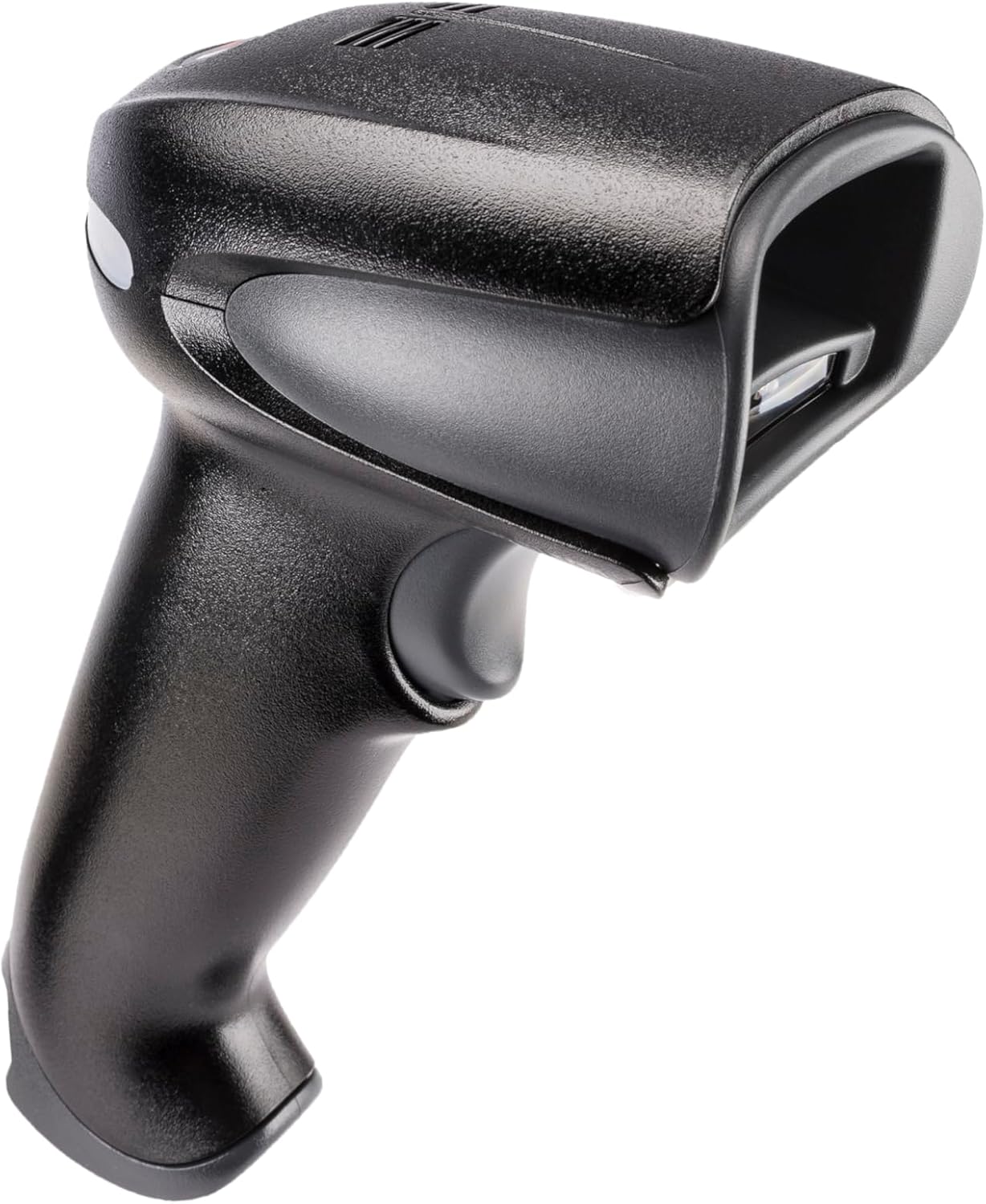
Figure 1: Honeywell Xenon 1902GSR Barcode Reader (Handheld Unit)

Figure 2: Honeywell Xenon 1902GSR Barcode Reader with its Communication/Charging Cradle
4. Поставување и инсталација
4.1 Полнење на батеријата
- Connect the USB cable to the communication/charging cradle.
- Plug the other end of the USB cable into a powered USB port on your computer or a USB wall adapter.
- Place the barcode reader into the cradle. Ensure it is seated correctly.
- The scanner's indicator light will show charging status. Allow several hours for a full charge before first use.
4.2 Connecting the Cradle to a Host System
The cradle connects to your host system (e.g., computer, POS terminal) via the supplied USB cable.
- Ensure the host system is powered on.
- Connect the USB cable from the cradle to an available USB port on your host system.
- The system should automatically detect and install the necessary drivers. If not, refer to the Honeywell support webстраница за преземање драјвери.
4.3 Pairing the Scanner with the Cradle
The scanner and cradle are typically pre-paired at the factory. If re-pairing is necessary:
- Проверете дали скенерот е наполнет и вклучен.
- Scan the "Link" barcode found on the bottom of the communication/charging cradle.
- The scanner will emit a series of beeps to indicate successful pairing.
5. Упатства за работа
5.1 Основно скенирање
- Држете го скенерот со прозорецот за скенирање свртен кон баркодот.
- Притиснете го и задржете го копчето за активирање. Ќе се појави нишан.
- Центрирајте го нишанениот зрак над бар-кодот.
- Once the barcode is successfully read, the scanner will emit a beep and the indicator light will flash green.
- Ослободете го чкрапалото.
5.2 Reading 1D and 2D Barcodes
The Xenon 1902GSR is capable of reading a wide variety of 1D (e.g., UPC/EAN, Code 39) and 2D (e.g., QR Code, Data Matrix, PDF417) barcodes. For optimal performance, ensure the barcode is well-lit and the scanner is held at an appropriate distance.
5.3 Опсег на Bluetooth
The scanner operates wirelessly up to 33 feet (10 meters) from its communication cradle. Performance may vary depending on environmental factors and obstacles.
6. Одржување
6.1 Чистење на уредот
- Користете мека, чиста крпа dampened with water or a mild cleaning solution to wipe the exterior of the scanner and cradle.
- Не користете абразивни средства за чистење, растворувачи или груби хемикалии.
- Keep the scan window clean and free of dust and smudges for optimal reading performance.
6.2 Грижа за батерии
- For best battery life, avoid fully discharging the battery frequently.
- Чувајте го уредот на ладно и суво место кога не го користите подолг временски период.
- If the battery performance significantly degrades, it may need replacement. Contact Honeywell support for authorized battery replacement options.
7 Смена на проблеми
| Проблем | Можна причина | Решение |
|---|---|---|
| Скенерот не се вклучува | Ниска или потрошена батерија | Place scanner in cradle to charge. Ensure cradle is powered. |
| Скенерот не чита баркодови | Barcode damaged/poor quality; improper scanning technique; dirty scan window | Try scanning a different barcode. Adjust distance/angle. Clean scan window. |
| No data transmitted to host | Scanner not paired; USB cable disconnected; incorrect host interface settings | Re-pair scanner with cradle. Check USB cable connection. Verify host system settings. |
| Наизменична врска | Out of range; interference | Move scanner closer to cradle. Reduce sources of interference (e.g., other Bluetooth devices, Wi-Fi routers). |
8. Спецификации
| Карактеристика | Детал |
|---|---|
| Модел | 1902GSR |
| Поврзување | Bluetooth Class 2, v2.1 EDR; USB (via cradle) |
| Шема за скенирање | Слика на површина (низа од 838 x 640 пиксели) |
| Способност за декодирање | 1D, 2D, PDF417 |
| Опсег | Up to 33 ft (10 m) line of sight |
| Батерија | Lithium-Ion, 1800 mAh (minimum) |
| Dimensions (Scanner) | 4 x 6 x 3 инчи (приближно) |
| Weight (Scanner) | 1 pound (approximate) |
| Работна температура | 0°C до 50°C (32°F до 122°F) |
9. Гаранција и поддршка
Honeywell products are designed for reliability and performance. For specific warranty details, please refer to the warranty card included with your product or visit the official Honeywell webстраница. За техничка поддршка, преземање драјвери или прашања за услуги, посетете ја страницата www.honeywell.com/us/en/support or contact your local Honeywell representative.
ASIN: B0G1PTY418
Прво достапен датум: 10 ноември 2025 година


