1. Вовед
The KONNWEI MAXOBD OBD2 Scanner is a professional diagnostic tool designed to read and clear diagnostic trouble codes (DTCs) from your vehicle's engine control unit (ECU). It provides access to various vehicle systems, allowing users to monitor live data, perform I/M readiness tests, and retrieve vehicle information. This manual provides detailed instructions for the proper use and maintenance of your MAXOBD scanner.
2. Информации за безбедност
Before operating the MAXOBD OBD2 Scanner, please read and understand all safety messages and instructions in this manual. Failure to do so may result in personal injury or damage to the vehicle or the scanner.
- Секогаш вршете автомобилско тестирање во безбедно опкружување.
- Носете заштита за очи што ги исполнува стандардите ANSI.
- Чувајте ја облеката, косата, рацете, алатите, опремата за тестирање итн., подалеку од сите подвижни или врели делови на моторот.
- Управувајте со возилото во добро проветрена работна површина; издувните гасови се отровни.
- Ставете го менувачот во PARK (за автоматски менувач) или НЕУТРАЛНО (за рачен менувач) и проверете дали е заглавена рачната сопирачка.
- Држете противпожарен апарат соодветен за пожари на бензин/електрична енергија во близина.
- Не поврзувајте или исклучувајте ја опремата за тестирање додека палењето е вклучено или додека моторот работи.
3. Производот завршиview
The MAXOBD scanner features a clear display and intuitive button layout for easy navigation and operation. It connects directly to your vehicle's OBD-II port to retrieve diagnostic information.
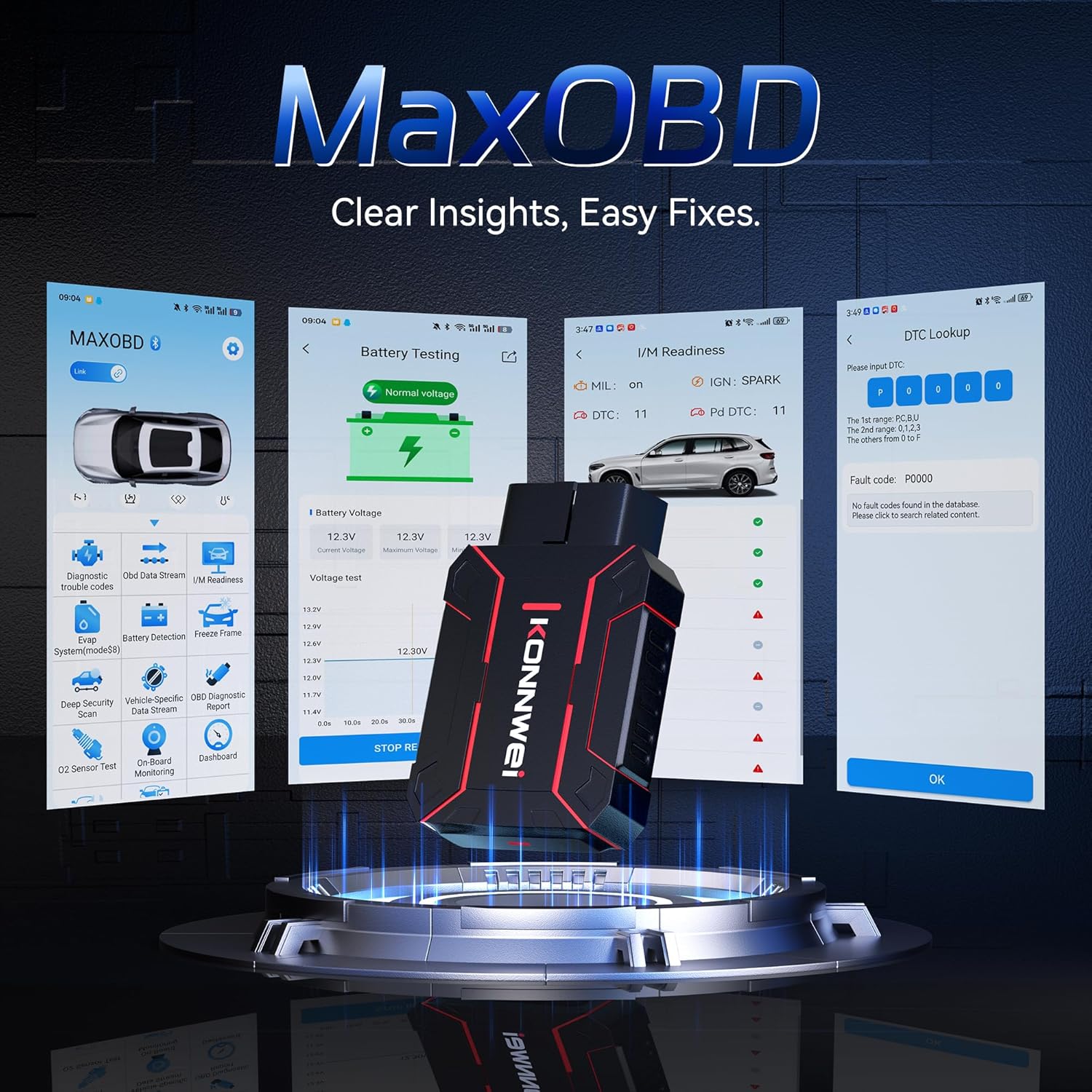
Image: The KONNWEI MAXOBD OBD2 Scanner device, illustrating its physical form and various diagnostic screen interfaces such as battery testing, I/M readiness, and DTC lookup.
Клучни компоненти:
- OBD-II конектор: Connects to the vehicle's Data Link Connector (DLC).
- LCD дисплеј: Shows test results and menu options.
- Копчиња за навигација: Used to scroll through menus and select options.
- Enter/Exit Buttons: Confirm selections or return to previous screens.
4. Поставување
Follow these steps to set up your MAXOBD OBD2 Scanner:
- Locate the Vehicle's OBD-II Port: The 16-pin Data Link Connector (DLC) is usually located under the dashboard on the driver's side of the vehicle. Refer to your vehicle's service manual for the exact location if you cannot find it.
- Поврзете го скенерот: Plug the MAXOBD scanner's OBD-II connector firmly into the vehicle's DLC. Ensure a secure connection.
- Вклучување: Once connected, the scanner will automatically power on. If it does not, turn the vehicle's ignition to the 'ON' position (engine off).
5. Упатства за работа
The MAXOBD scanner offers various diagnostic functions. Use the navigation buttons to move through menus and the Enter button to select options.

Image: A visual representation of a vehicle highlighting various systems (Engine, ABS, SAS, SRS, DPF, TPMS) that the MAXOBD scanner can perform a full system scan on.
Функции на главното мени:
- Прочитајте ги кодовите: Retrieves Diagnostic Trouble Codes (DTCs) from the vehicle's ECU. These codes indicate specific issues detected by the vehicle's onboard diagnostic system.
- Избришете ги кодовите: Clears all DTCs from the vehicle's ECU and turns off the Malfunction Indicator Lamp (MIL). Ensure the underlying issue is resolved before clearing codes.
- Подготвеност за I/M: Checks the status of emission-related monitoring systems to determine if they are ready for an emissions test.
- Тек на податоци: Displays real-time operational parameters from the vehicle's sensors and components. This can include engine RPM, vehicle speed, oxygen sensor readings, and more.
- Замрзната рамка: Captures a snapshot of sensor data at the moment a DTC was set. This data can help identify the conditions under which a fault occurred.
- Тест на сензор за О2: Retrieves O2 sensor monitoring test results for the most recently completed tests from the vehicle's onboard computer.
- Тест на вградениот монитор: Retrieves results for emission-related powertrain components and systems that are not continuously monitored.
- Тест на EVAP системот: Иницира тест за протекување за системот за контрола на испарувачките емисии на возилото.
- Информации за возилото: Displays the vehicle identification number (VIN), calibration ID (CALID), and calibration verification number (CVN).
Performing a Diagnostic Scan:
- Connect the scanner to the vehicle's DLC and turn the ignition to 'ON'.
- From the main menu, select 'Read Codes' and press Enter.
- The scanner will communicate with the vehicle and display any detected DTCs.
- Use the navigation buttons to scroll through the codes and their descriptions.
- To clear codes, return to the main menu, select 'Erase Codes', and confirm.
6. Одржување
Proper maintenance ensures the longevity and reliable operation of your MAXOBD scanner.
- Чистење: Користете мека, гamp крпа за чистење на надворешноста на скенерот. Не користете абразивни средства за чистење или растворувачи.
- Складирање: Store the scanner in a dry, clean environment away from extreme temperatures and direct sunlight. Keep it in its original packaging or a protective case when not in use.
- Ажурирања на софтверот: Periodically check the KONNWEI official website for available software updates to ensure your scanner has the latest vehicle compatibility and features. Follow the instructions provided on the website for updating the device.
7 Смена на проблеми
If you encounter issues with your MAXOBD scanner, refer to the following common problems and solutions:
| Проблем | Можна причина | Решение |
|---|---|---|
| Скенерот не се вклучува. | Loose connection; vehicle ignition off; faulty OBD-II port. | Ensure the scanner is securely plugged into the DLC. Turn vehicle ignition to 'ON'. Test on another vehicle if possible. |
| Порака „Грешка во врската“ или „Грешка во комуникацијата“. | Loose connection; vehicle not OBD-II compliant; ignition off; communication protocol issue. | Verify connection. Ensure vehicle is OBD-II compliant (most vehicles 1996 and newer). Turn ignition to 'ON'. Try a different vehicle if available. |
| Екранот е празен или замрзнат. | Софтверски проблем; прекин на струјата. | Disconnect and reconnect the scanner. If the issue persists, contact customer support. |
If the problem persists after attempting these solutions, please contact KONNWEI customer support for further assistance.
8. Спецификации
- Бренд: КОННВЕИ
- Модел: maxobdTM
- Извор на енергија: Battery Powered (via OBD-II port)
- Оперативен систем: Linux
- Големина на екранот: 2.8 инчи
- Тип на автомобилско вклопување: Universal Fit (for OBD-II compliant vehicles)
- Димензии на пакетот: 10.04 x 7.28 x 2.76 инчи
9. Гаранција и поддршка
KONNWEI products are designed for reliability and performance. For warranty information, please refer to the documentation included with your purchase or visit the official KONNWEI website. For technical support, troubleshooting assistance, or any other inquiries, please contact KONNWEI customer service through their official channels.
KONNWEI Official Webсајт: Visit the KONNWEI Store on Amazon


