Вовед
This manual provides detailed instructions for the AGPTEK A55PL USB C MP3 Player. It covers setup, operation, maintenance, and troubleshooting to ensure optimal use of your device. The A55PL is a versatile music player featuring USB-C connectivity, 64GB storage, FM radio, and voice recording capabilities, powered by a replaceable AAA battery.
Содржина на пакетот
Проверете дали сите артикли наведени подолу се вклучени во вашиот пакет:
- AGPTEK A55PL MP3 плеер
- 64GB TF картичка (претходно инсталирана)
- Кабел за полнење од тип C на USB
- Упатство за употреба

Image: Contents of the AGPTEK A55PL MP3 Player package, showing the player, USB-C cable, 64GB TF card, and user manual.
Производот завршиview и Карактеристики
The AGPTEK A55PL MP3 Player is designed for portability and ease of use, offering multiple functionalities in a compact form factor.
Клучни карактеристики:
- Direct Type-C & Universal USB Connectivity: Connects directly to Type-C phones for file transfer or to laptops/PCs using the included adapter/cable.
- Swappable AAA Batteries: Operates on a single AAA battery (not included), allowing for instant power replacement without needing charging outlets.
- Massive 64GB Storage: Comes with a pre-loaded 64GB TF card, supporting over 13,000 songs and high-fidelity formats like FLAC, APE, and WAV. Functions as a U disk for data transfer.
- Crisp LED Display: Features an energy-efficient LED screen for clear navigation and song title display.
- Voice Recorder & FM Radio: Built-in voice recorder for capturing audio and an FM radio (requires wired headset as antenna) for broadcasts.

Слика: Надview of the AGPTEK A55PL MP3 Player's capabilities, including its Type-C port, music playback, recording, FM radio, and 64GB TF card storage.
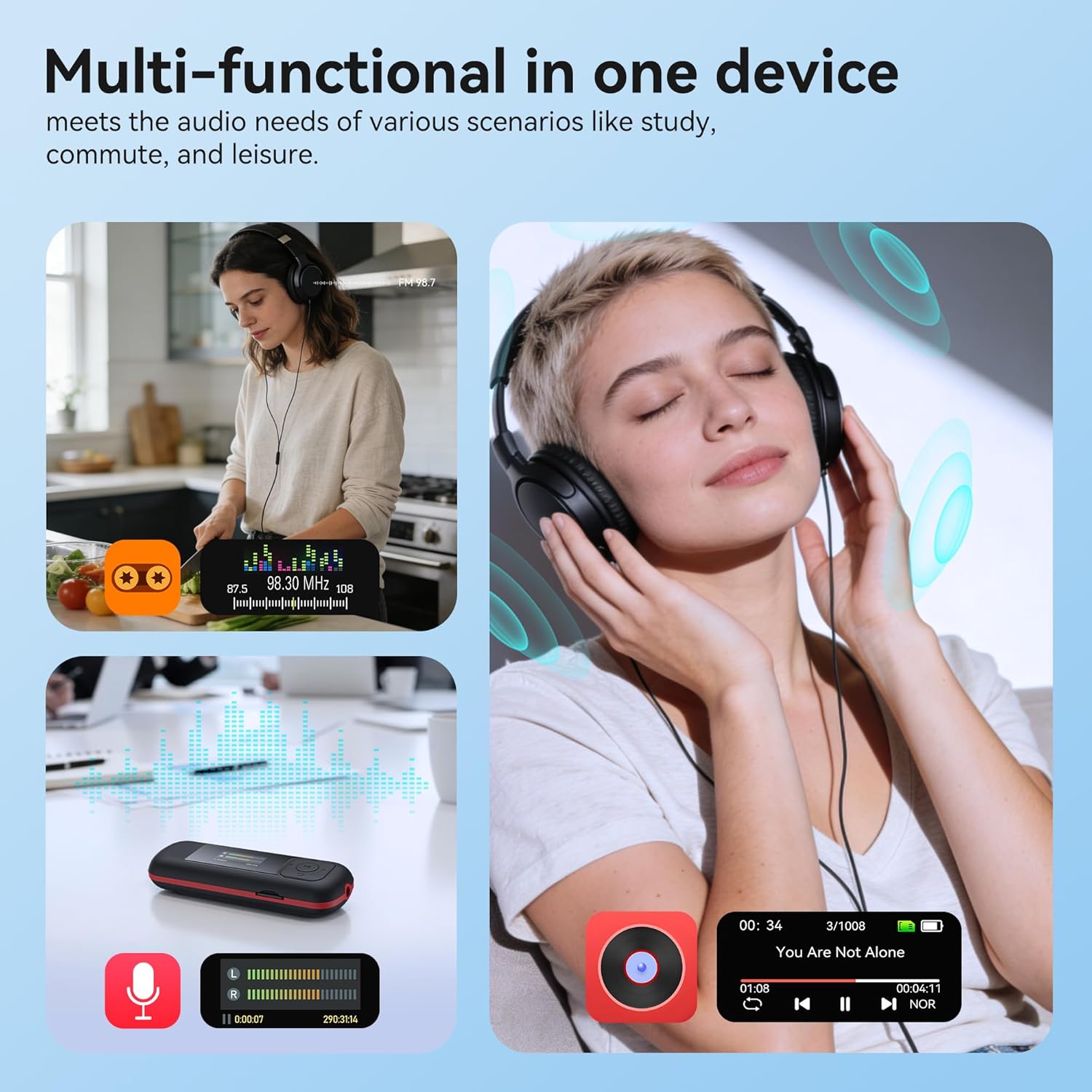
Image: The AGPTEK A55PL MP3 Player showcasing its multi-functional capabilities, including FM radio, voice recording, and music playback, suitable for various scenarios.
Поставување
1. Инсталација на батерија
The AGPTEK A55PL uses one AAA battery (not included). Ensure correct polarity when inserting the battery.
- Пронајдете го капакот на преградата за батерии на задната страна од уредот.
- Press the center of the cover and slide it forward to unlock and remove.
- Insert one AAA battery, matching the positive (+) and negative (-) terminals with the indicators inside the compartment.
- Лизгајте го капакот на своето место додека не кликне безбедно.

Image: Step-by-step guide for removing the USB cap and installing the AAA battery into the AGPTEK A55PL MP3 Player.
Забелешка: USB charging is not supported. The device relies solely on AAA battery power. The battery display on the screen is based on voltage changes at the battery terminal.
2. Initial Connection and File Трансфер
You can transfer music and other files to your MP3 player from a computer or a Type-C smartphone.
- За компјутери: Use the included Type-C to USB cable. Connect the Type-C end to the player and the USB-A end to your computer's USB port. The player will appear as a removable disk.
- For Type-C Phones: Plug the player's Type-C connector directly into your phone's Type-C port. The player will be recognized as external storage. (For iPhones, a Lightning-to-Type-C OTG adapter is needed, not included).

Image: Demonstrates connecting the AGPTEK A55PL MP3 Player to a computer via USB cable and directly to a Type-C smartphone for file трансфер.
Упатства за работа
Основни контроли
The player features a simple interface with dedicated buttons for easy navigation.
- Копче за вклучување: Притиснете и задржете за да се вклучи/исклучи.
- Копче за репродукција/пауза: Притиснете за да репродуцирате или паузирате музика.
- Копчиња за навигација (горе/долу/лево/десно): Се користи за навигација низ менијата и прилагодување на поставките.
- Копчиња за јачина на звук (+/-): Dedicated buttons on the side to adjust playback volume.
- Копче за мени (M): Accesses context-sensitive menus.
- Копче за враќање/назад: Се враќа на претходниот екран или мени.
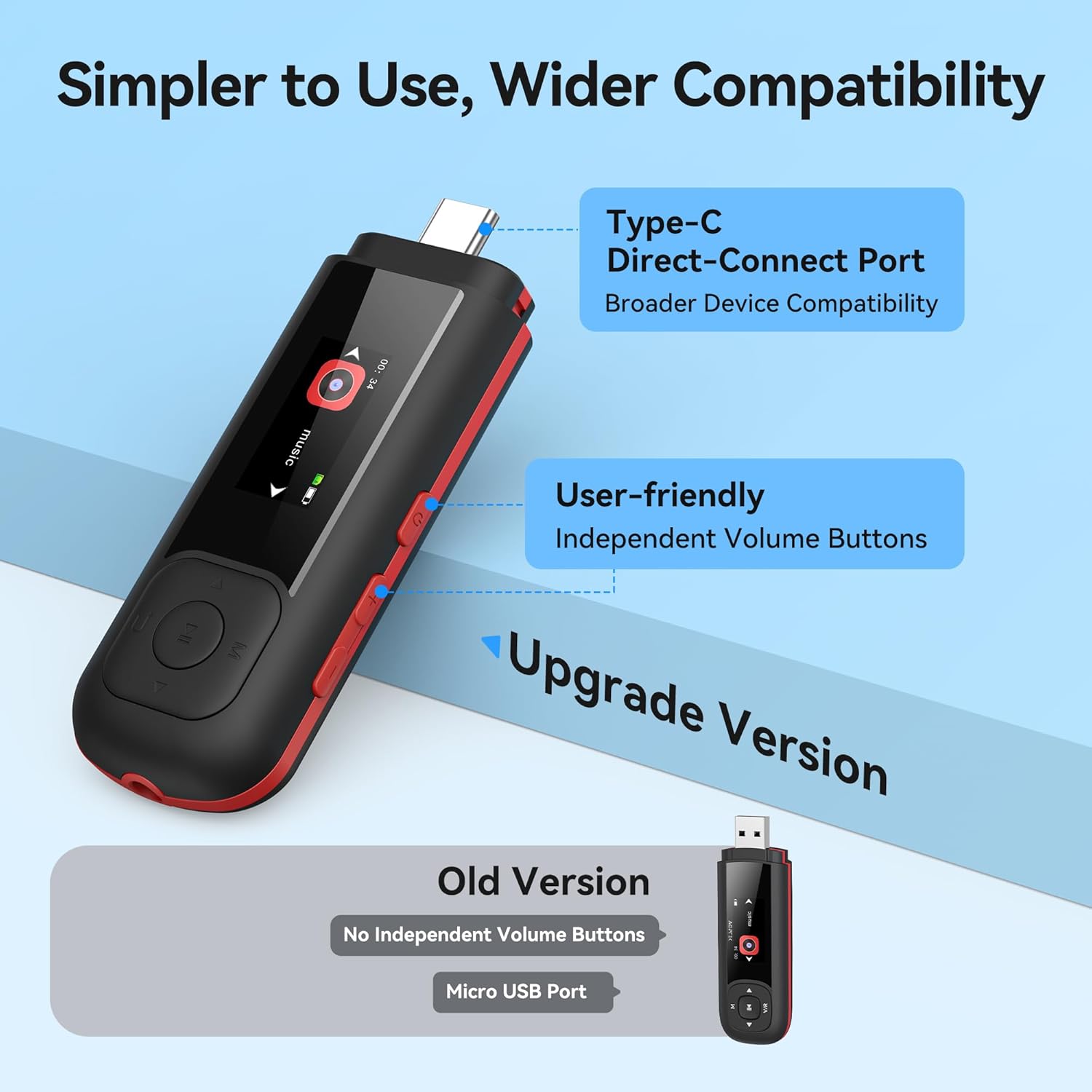
Image: Close-up of the AGPTEK A55PL MP3 Player, showing the Type-C direct-connect port and the independent volume buttons for user-friendly operation.
Репродукција на музика
The player supports various audio formats including MP3, WMA, APE, FLAC, and WAV.
- Connect wired headphones to the 3.5mm audio jack.
- Navigate to the "Music" option on the main menu.
- Browse through your music library by artist, album, or folder.
- Изберете песна за да започнете со репродукција.
- Use the Play/Pause button to control playback and the volume buttons to adjust sound levels.

Image: A person enjoying music through headphones, highlighting the AGPTEK A55PL MP3 Player's support for multi-format lossless audio quality.

Image: Illustrates the different playback modes available on the AGPTEK A55PL MP3 Player, including Folder Mode and Music Mode with options like repeat, shuffle, and play in order.
FM радио
To use the FM radio function, a wired headset must be connected as it acts as the antenna.
- Connect your wired headphones.
- Navigate to the "FM Radio" option from the main menu.
- Use the navigation buttons to scan for stations or manually tune to a frequency.

Image: A user enjoying FM radio on the AGPTEK A55PL MP3 Player, emphasizing that wired headphones are required to function as an antenna.
Снимач на глас
The built-in voice recorder allows you to capture audio on the go.
- Navigate to the "Recorder" option from the main menu.
- Select "Start Recording" to begin.
- Press the Play/Pause button to stop and save the recording.
- Recordings can be accessed and played back from the "Recordings" list.

Image: The AGPTEK A55PL MP3 Player showing its portable recorder function, ready for effortless on-the-go audio capture.
Custom Playlists
You can create and manage custom playlists by connecting the player to a computer.
- Connect the MP3 player to your computer using the Type-C to USB cable.
- Access the player's storage as a removable disk.
- Организирајте ја вашата музика files into folders or create M3U playlist files директно на уредот.
- The player supports up to 3 built-in customizable playlists.

Image: Demonstrates how to create and edit custom playlists by connecting the AGPTEK A55PL MP3 Player to a computer via USB.
Одржување
- Чистење: Користете мека, сува крпа за чистење на уредот. Избегнувајте течни средства за чистење или растворувачи.
- Складирање: Чувајте го плеерот на ладно и суво место, подалеку од директна сончева светлина и екстремни температури.
- Нега на батеријата: Remove the AAA battery if the device will not be used for an extended period to prevent leakage.
- Бекап на податоци: Редовно правете резервни копии од важност files from the player to a computer to prevent data loss.
Решавање проблеми
Уредот не се вклучува
- Ensure the AAA battery is inserted correctly with the correct polarity.
- Заменете ја AAA батеријата со нова.
- Притиснете и задржете го копчето за вклучување неколку секунди.
Не може да се префрли Files
- Verify the Type-C to USB cable is securely connected to both the player and the computer/phone.
- Обидете се со друга USB порта на вашиот компјутер.
- Ensure your computer's operating system recognizes external storage devices.
- For phones, ensure the phone supports OTG (On-The-Go) functionality for external storage.
Нема звук за време на репродукцијата
- Check if wired headphones are properly plugged into the 3.5mm audio jack.
- Осигурајте се дека јачината на звукот не е поставена на минимум или исклучена.
- Тестирајте со друг пар слушалки за да исклучите проблеми со слушалките.
- Проверете го аудиото files are not corrupted and are in a supported format (MP3, WMA, APE, FLAC, WAV).
FM радиото не работи
- Confirm that wired headphones are connected, as they serve as the antenna.
- Try scanning for stations again in an open area.
Спецификации
| Карактеристика | Детал |
|---|---|
| Име на моделот | A55PL |
| Бренд | АГПТЕК |
| Капацитет за складирање на меморија | 64 GB (via TF Card) |
| Технологија за поврзување | USB Type-C, Aux (3.5mm) |
| Посебни карактеристики | FM Radio, Voice Recorder, Replaceable AAA Battery |
| Боја | Црното |
| Големина на екранот | 0.96 Inches (LED) |
| Компатибилни уреди | Headphones, Computers, Type-C Smartphones |
| Тип на медиум | Micro SD |
| Тежина на ставката | 3.87 унци |
| Димензии на пакетот | 6.57 x 5.12 x 0.94 инчи |
Гаранција и поддршка
За информации за гаранцијата и техничка поддршка, ве молиме погледнете го официјалниот AGPTEK. webстраницата или контактирајте ја нивната служба за корисници. Чувајте ја сметката за купување како доказ за купување за какви било гаранциски побарувања.
Поддршка преку Интернет: Посетете го Продавница AGPTEK на Amazon за информации за производот и ресурси за поддршка.


