1. Вовед
The SMSL PL20 is a versatile HiFi CD player designed for high-fidelity audio reproduction, featuring advanced decoding capabilities, multiple input/output options, and convenient CD ripping functionality. This manual provides detailed instructions for setting up, operating, and maintaining your PL20 to ensure optimal performance and longevity.
Опис на видеото: Ова видео дава општ прегледview of the SMSL PL20 HiFi CD Player, showcasing its design and highlighting key features such as CD ripping and dual CS43131 chips.
Официјално видео за производот: SMSL PL20 HiFi CD Player CD Ripper display of products. This video offers a visual demonstration of the PL20's features and design.
2. Информации за безбедност
- Не го изложувајте уредот на дожд или влага.
- Не го расклопувајте уредот. За сите сервиси обратете се на квалификуван персонал.
- Избегнувајте поставување на уредот во близина на извори на топлина или на директна сончева светлина.
- Обезбедете соодветна вентилација за да спречите прегревање.
- Use only the specified power adapter (USB-C 5V/2A).
- Да се чува подалеку од дофат на деца.
3. Содржина на пакетот
Проверете дали сите артикли се присутни во пакувањето:
- 1x SMSL PL20 CD Player
- 1x далечински управувач
- 1x USB кабел од тип А до тип Ц
- 1x Упатство за употреба
- 1x SMSL Card
Опис на видеото: This video shows the unboxing process of the SMSL PL20 HiFi CD Player. It begins with the outer packaging, then reveals the inner box containing the device and accessories. The video highlights the SMSL card, instruction manual, USB cable, and remote control before showcasing the main unit.
Официјално видео за производот: SMSL PL20 HiFi CD Player Unboxing. This video demonstrates the unboxing experience of the SMSL PL20, showing all included components.
4. Производот завршиview
4.1 Контроли на предниот панел
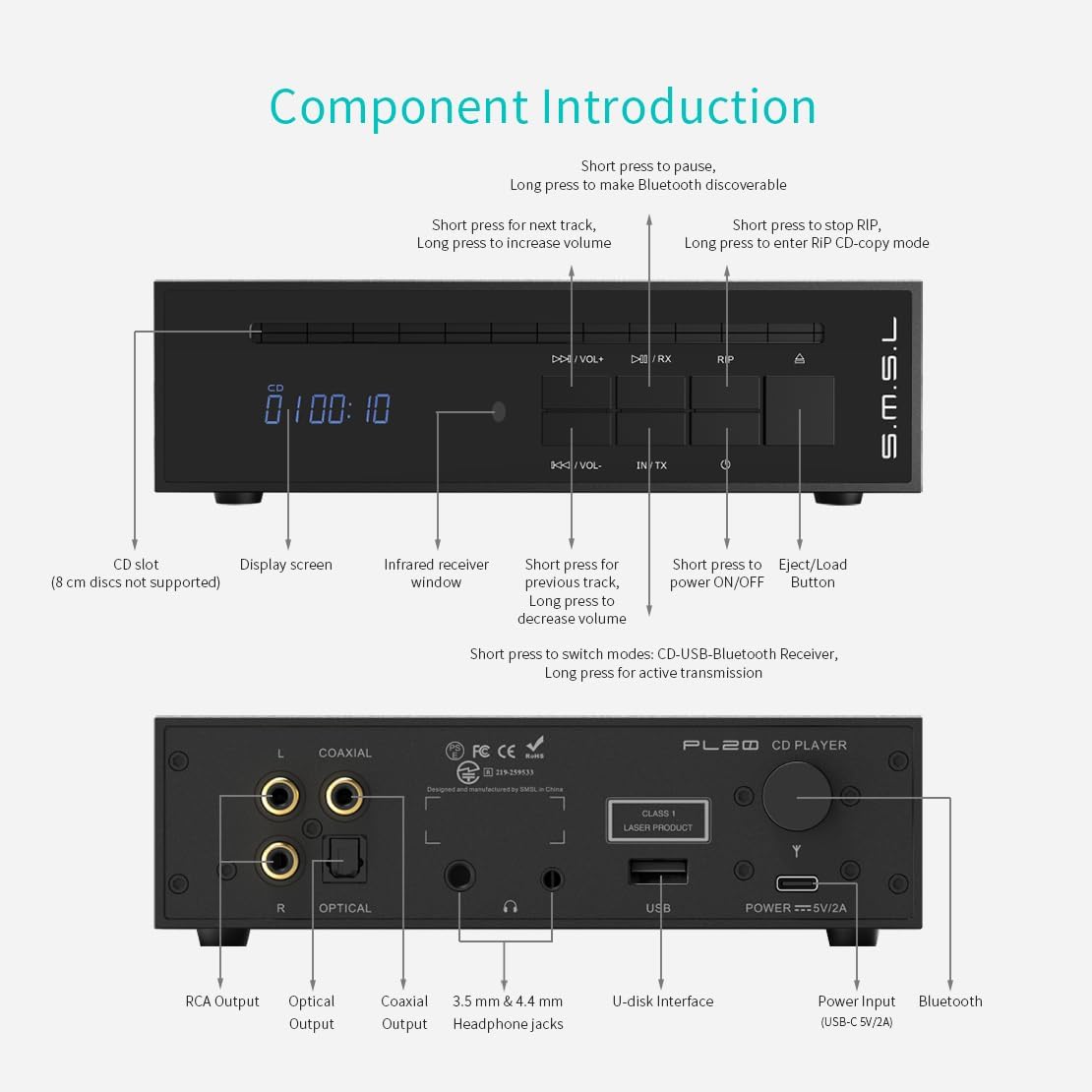
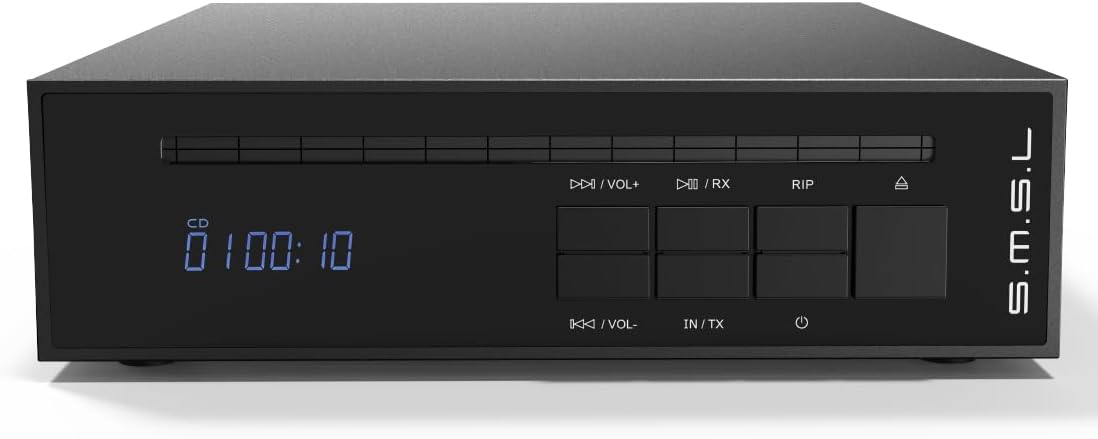
- Слот за ЦД: For inserting audio CDs (8 cm discs not supported).
- Екран за прикажување: Shows track information, volume, and current mode.
- Infrared Receiver Window: За сигнали од далечинско управување.
- Play/Pause (Short press) / Make Bluetooth discoverable (Long press): Controls playback and Bluetooth pairing.
- Next Track (Short press) / Increase Volume (Long press): Navigates tracks and adjusts volume.
- Previous Track (Short press) / Decrease Volume (Long press): Navigates tracks and adjusts volume.
- Stop RIP (Short press) / Enter RIP CD-copy mode (Long press): Controls CD ripping function.
- Eject/Load Button: Ejects or loads a CD.
- ВКЛУЧУВАЊЕ/ИСКЛУЧУВАЊЕ: Го вклучува или исклучува уредот.
- Switch Modes (Short press: CD-USB-Bluetooth Receiver) / Active Transmission (Long press): Cycles through input modes and activates Bluetooth transmission.
4.2 Приклучоци на задниот панел
- RCA излез (лево/десно): Аналоген аудио излез за поврзување со ampлајфикатори или звучници со напојување.
- Оптички излез: Дигитален аудио излез.
- Коаксијален излез: Дигитален аудио излез.
- 3.5 mm & 4.4 mm Headphone Jacks: For connecting headphones (standard and balanced).
- U-disk Interface (USB-A): For connecting USB flash drives for playback and CD ripping.
- Power Input (USB-C 5V/2A): Connect the provided USB cable for power.
- Антена за Bluetooth: За безжична Bluetooth конекција.
4.3 Функции на далечинскиот управувач

- ВКЛУЧУВАЊЕ/ИСКЛУЧУВАЊЕ: Го вклучува или исклучува уредот.
- Исфрли: Ejects the CD.
- Vol+ / Vol-: Ја прилагодува јачината на звукот нагоре или надолу.
- Previous Track / Next Track: Се движи помеѓу патеките.
- Пушти/Пауза: Ја започнува или паузира репродукцијата.
- Bluetooth Active Connection: Иницира спарување преку Bluetooth.
- Мешај: Го вклучува/исклучува режимот на репродукција со случаен избор.
- TX (пренос): Activates Bluetooth transmission mode.
- IN (Input): Циклично се менува низ режимите на внесување.
- RIP Mode: Enters CD ripping mode.
- RIP Stop: Stops the CD ripping process.
Опис на видеото: This video demonstrates the functions of the SMSL PL20 remote control. It shows how to power on/off, eject a CD, adjust volume, navigate tracks, play/pause, activate Bluetooth connection, shuffle, switch modes, and use the RIP functions.
Официјално видео за производот: SMSL PL20 HiFi Balanced CD Player with Remote Control. This video illustrates the various functions of the remote control for the PL20.
5. Водич за поставување
Follow these steps to set up your SMSL PL20 CD Player:
5.1 Поврзување за напојување
- Connect the provided USB Type-A to Type-C cable to the "POWER === 5V/2A" port on the rear panel of the PL20.
- Connect the other end of the USB cable to a compatible 5V/2A USB power adapter (not included) or a USB port that provides sufficient power.
- Press the power button on the front panel or remote control to turn on the unit.
5.2 Приклучоци за аудио излез
Choose the appropriate audio output method for your setup:
- Излез на RCA: Connect RCA cables from the "L" and "R" RCA output jacks on the PL20 to the corresponding analog input jacks on your ampзајакнувач или звучници со напојување.
- Оптички излез: Connect an optical cable from the "OPTICAL" output port on the PL20 to the optical input on your DAC or digital ampживописен.
- Коаксијален излез: Connect a coaxial cable from the "COAXIAL" output port on the PL20 to the coaxial input on your DAC or digital ampживописен.
- Излез за слушалки: Connect your headphones to either the 3.5mm or 4.4mm balanced headphone jack on the rear panel.
Опис на видеото: This video demonstrates how to connect the SMSL PL20 to various audio components. It shows connecting the power input, a USB drive, 3.5mm and 4.4mm headphones, optical output, coaxial output, and RCA output.
Официјално видео за производот: How to connect SMSL PL20 HiFi CD Player for Home. This video provides a visual guide for connecting the PL20 to your audio system.
6. Упатства за работа
6.1 Репродукција на ЦД
- Ensure the PL20 is powered on and connected to your audio system.
- Gently insert an audio CD into the CD slot on the front panel. The player will automatically draw in the disc.
- The display will show "Cd rEAd" and then begin playback automatically.
- Use the Play/Pause, Next Track, Previous Track, and Volume buttons on the front panel or remote control to manage playback.

6.2 Репродукција од USB уред
- Insert a USB flash drive into the U-disk interface on the rear panel.
- Press the "IN/TX" button on the front panel or the "IN" button on the remote to switch to USB input mode. The display will show "USB".
- The PL20 supports DSD64 (DFF/DSF), WAV, FLAC, APE, WMA, and MP3 formats.
- Use the playback controls to select and play music from the USB drive.

6.3 Bluetooth Operation (Receive & Transmit)
The PL20 features two-way Bluetooth 5.3 for both receiving and transmitting audio.
6.3.1 Bluetooth Reception (RX Mode)
- Press the "IN/TX" button on the front panel or the "IN" button on the remote to switch to Bluetooth Receiver mode. The display will show "BT RX".
- On your phone, tablet, or other Bluetooth device, search for "CD player" in the Bluetooth settings.
- Select "CD player" to connect. Once connected, audio from your device will play through the PL20.
6.3.2 Bluetooth Transmission (TX Mode)
- Long press the "IN/TX" button on the front panel or the "TX" button on the remote control.
- The PL20 will automatically search for the strongest Bluetooth signal nearby (e.g., Bluetooth headphones, speakers).
- Once connected, audio from the PL20 (CD or USB) will be transmitted to the paired Bluetooth device.

6.4 CD Ripping Function
The PL20 allows you to rip audio tracks from a CD directly to a USB flash drive in lossless WAV format.
- Insert an audio CD into the CD slot.
- Insert a USB flash drive (FAT32 or exFAT formatted; NTFS is not supported for ripping) into the U-disk interface.
- Long press the "RIP" button on the front panel or remote control to enter CD-copy mode.
- The PL20 will begin ripping the tracks from the CD to the USB drive.
- To stop ripping, short press the "RIP" button or the "RIP STOP" button on the remote.
- Once ripped, the WAV files can be played back from the USB drive on the PL20 or transferred to a computer.

7. Одржување
- Чистење: Користете мека, сува крпа за чистење на надворешноста на уредот. Не користете течни средства за чистење или аеросоли.
- Грижа за дискови: Handle CDs by the edges. Keep them clean and free of scratches to ensure optimal playback and ripping performance.
- Складирање: Кога не го користите уредот подолг период, чувајте го на ладно и суво место.
8 Смена на проблеми
| Проблем | Можна причина | Решение |
|---|---|---|
| Нема моќ | Power cable not connected or faulty power adapter. | Check power cable connection. Ensure power adapter is 5V/2A. |
| Нема излез на звук | Incorrect input/output selection, loose cables, or external ampисклучени звучници/осветлувачи. | Verify correct input mode on PL20 and external device. Check all audio cable connections. Ensure external audio equipment is powered on. |
| ЦД-то не се репродуцира/чита | Dirty or scratched CD, incorrect disc type, or disc inserted incorrectly. | Clean the CD. Try a different CD. Ensure the disc is inserted correctly. Note: 8cm discs are not supported. |
| USB-уредот не е препознаен | Incorrect USB format, unsupported file type, or faulty USB drive. | Ensure USB drive is FAT32 or exFAT. Check file formats. Try a different USB drive. |
| Неуспех во спарувањето со Bluetooth | Уредот е предалеку, не е во режим на спарување или има пречки. | Ensure both devices are in pairing mode and within range. Reduce interference. |
| CD ripping not working | USB drive formatted as NTFS, or insufficient space. | Use a USB drive formatted as FAT32 or exFAT. Ensure enough free space on the USB drive. |
9. Спецификации
| Карактеристика | Детал |
|---|---|
| Влез | CD, USB Drive, Bluetooth |
| Излез | 4.4mm Headphone, 3.5mm Headphone, Optical, Coaxial, RCA, Bluetooth |
| U-disk Formats | FAT32, exFAT, NTFS (read-only) |
| Тип на ЦД | CD-DA/CD-ROM/CD-R/CD-RW/CD-DSD/MP3 |
| Headphone Output Power (32Ω) | 4.4mm: 160mW, 3.5mm: 40mW |
| THD+N | 0.0012% |
| SNR | 98 dB |
| Потрошувачка на енергија | <3.5 W |
| Standby Power | <0.1 W |
| Големина (ШxВxД) | 166.3 x 49.5 x 209.3 mm |
| Тежина | 1.39 кг / 3.06 фунти |
Дополнителни карактеристики:
- Dual CS43131 DAC chips for enhanced audio performance.
- High-quality CNC all-aluminum shell with gold-plated connectors.
- Automatic disc magnetization for smooth loading.
10. Гаранција и поддршка
The SMSL PL20 comes with a standard manufacturer's warranty. Please refer to the included SMSL Card or contact your retailer for specific warranty terms and conditions.
For technical support or further assistance, please visit the official SMSL webсајт или контактирајте со нивниот оддел за услуги на клиентите.


